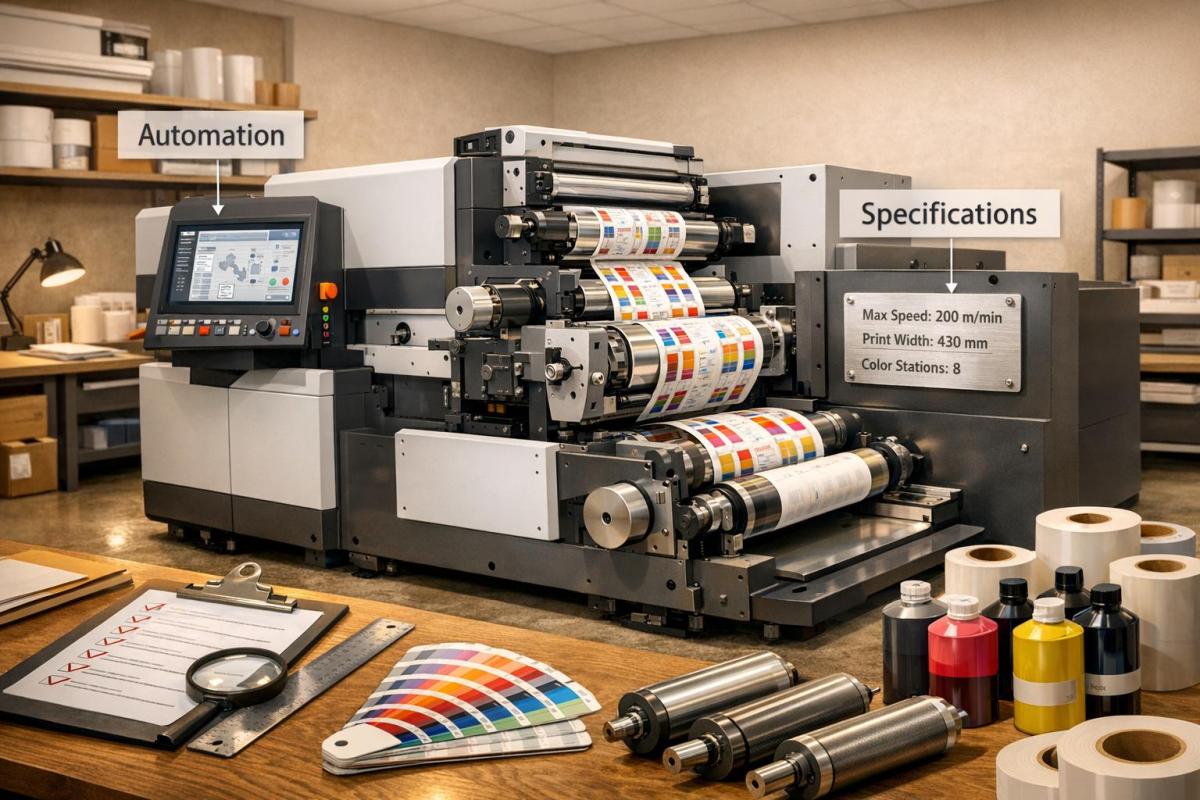
When purchasing flexographic printing equipment, you need to make informed decisions to avoid costly mistakes. Here’s a quick guide to help you choose the right machine for your business:
- Define Your Needs: Assess production volume, materials (e.g., film, foil, paper), and design complexity. Plan for future growth.
- Technical Specifications: Look for speed, accuracy, drying systems compatible with your ink types, and automation features like AI-driven registration.
- Manufacturer Reliability: Check machine construction, warranties, service support, and availability of spare parts.
- Total Ownership Costs: Consider upfront costs, maintenance, labor, energy consumption, and consumables. Compare new vs. used equipment.
- Facility and Training: Prepare your site for installation and ensure your team receives proper training for smooth operations.
Pro Tip: Choose a machine that fits your current needs but allows for upgrades as your business expands. Always calculate the total cost of ownership to ensure long-term profitability.
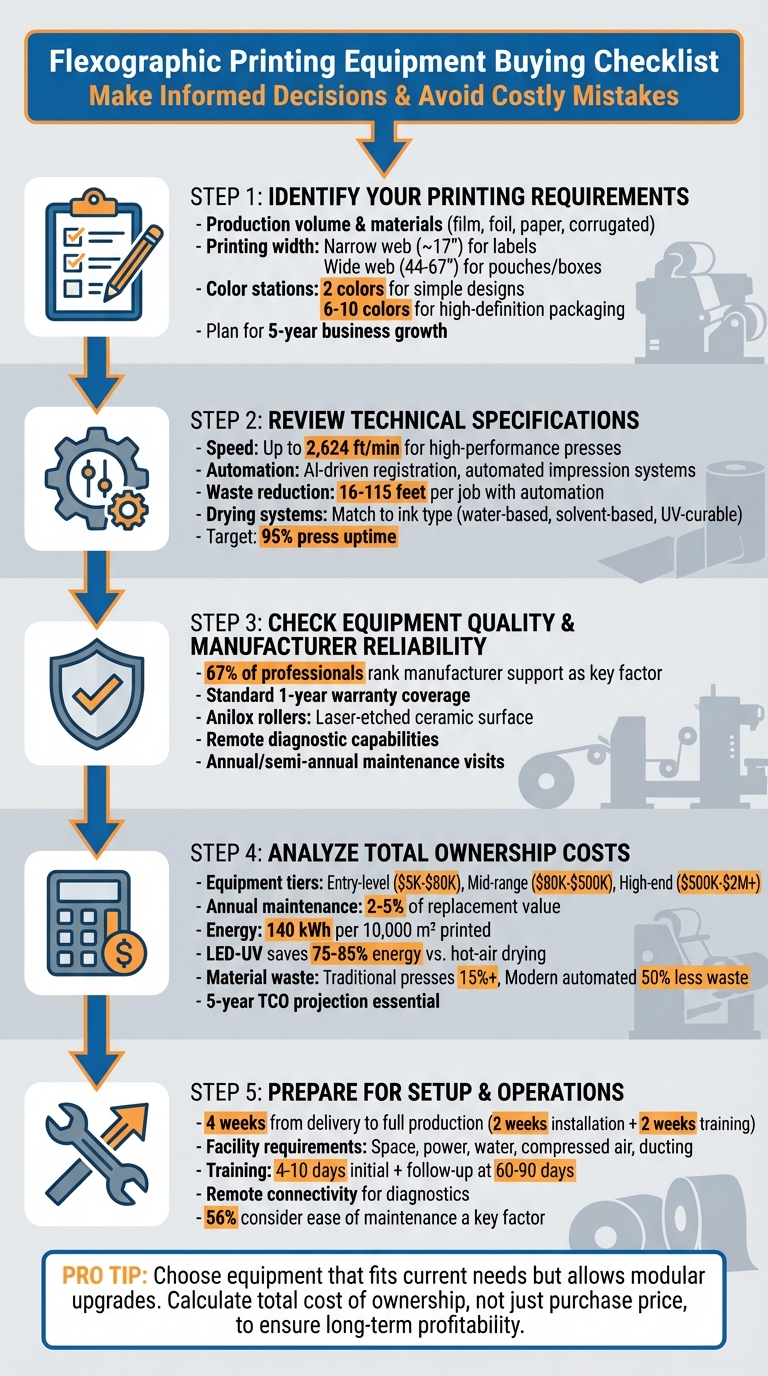
5-Step Flexographic Printing Equipment Buying Checklist
Spande S7 Series – Flexo Printing Machine for Labels
1. Identify Your Printing Requirements
Start by defining your printing needs. Think about your production volume, the types of materials you’ll be printing on, and the complexity of your designs. But don’t just focus on your current operations – consider where your business might be heading in the next five years. At Miro Printing & Graphics Inc. (https://bergencountyprinters.com), we understand that a clear grasp of your requirements is key to choosing the right equipment. From production volume to material behavior and color station needs, every detail matters.
1.1 Determine Production Volume and Materials
Take stock of the materials you use now and those you might need in the future. Flexographic equipment is versatile, working with substrates like foil, polyethylene film, opaque films, tissue, corrugated board, paper, folding cartons, and blister packaging. Each material has unique characteristics – film stretches, paper dries quickly, and foil can tear easily. If your business involves food, pet food, or nutraceutical packaging, you may need advanced options like high-barrier laminations, stand-up pouches, or surface and reverse printing capabilities.
For example, in May 2016, Poly Print Inc. in Tucson, Arizona, installed a 10-color, 44-inch Uteco Onyx press to meet the demands of food, beverage, and pet food packaging. Their choice included features like an automatic wash-up system, auto-registration, and re-insertion capabilities for double-sided printing on premium snack and pet food packaging.
1.2 Select Printing Width and Number of Color Stations
Flexographic presses typically offer between 1 and 12 color stations, so it’s important to match the press to your design needs. A 2-color press might work for simple branding or dual-tone designs, but for high-definition, intricate packaging, a press with 6 to 10 color stations is a better fit. Similarly, printing widths vary: narrow web presses (around 17 inches) are ideal for labels, while wide web presses (44 to 67 inches) are suited for larger products like food pouches or corrugated boxes.
Mike Reinhardt, Sales Manager at Windmoeller & Hoelscher Corp., emphasizes:
"Size the press for the business being done. A smaller press is faster and easier to change over than a larger machine."
Choose equipment that meets your current needs but leaves room for growth. For instance, if only 20% of your jobs require finishing processes like lamination, an offline solution might be more efficient than an inline system, which could slow down your primary press.
1.3 Account for Business Growth
Think ahead about the materials and features your business might need in the future. Don’t just focus on what you’re printing today – consider the substrates and capabilities you may require in the next five years. Perry Lichon, President of Retroflex Inc., explains:
"The press can be designed to accommodate certain features at a later date, if designed accordingly."
Modular press designs are a smart choice because they allow you to add components like extra color stations, drying systems, or finishing units later on without needing to replace the entire machine. This approach is especially useful if you’re planning to expand into new packaging categories or adopt techniques like expanded gamut printing. Make sure your facility can handle future upgrades, such as additional color decks or drying tunnels, to support your long-term goals.
2. Review Technical Specifications
When choosing a flexo press, it’s crucial to dive into the technical details to ensure it meets your production goals, quality standards, and operational needs. Let’s break it down.
2.1 Check Printing Speed and Accuracy
Printing speed isn’t just about hitting high numbers – it’s about efficiency and quality. Take high-performance direct drive flexo presses like the VISTAFLEX CL, which can reach speeds of up to 2,624 feet per minute. But speed alone isn’t enough. Pairing it with advanced automation is what ensures smooth, waste-free operation. Modern flexo presses now rival gravure, litho, and offset printing in quality, offering high linescreen printing.
Automation plays a big role in maintaining precision at these speeds. Features like automated registration, impression, and inspection systems help achieve production speeds quickly while minimizing waste. For instance, automated impression systems can cut waste during setup to as little as 16 to 115 feet per job.
Color consistency is another key factor. Expanded Gamut (EG) 7-color printing has become a go-to method for achieving consistent color matching across various job lengths. This is especially important for brands that demand uniformity in packaging across global markets.
Finally, make sure your drying system is compatible with your ink types to maintain both speed and quality.
2.2 Examine Drying Systems and Ink Types
The drying system you choose must align with the type of ink you’re using – whether it’s water-based, solvent-based, or UV-curable. Each ink type has unique drying requirements:
- Water-based inks: These rely on hot air or infrared (IR) drying to remove moisture.
- Solvent-based inks: These dry quickly with hot air and ventilation but need regular cleaning to avoid clogs.
- UV-curable inks: These cure through polymerization using UV lamps or LED systems.
Drying too fast can cause problems like "feathering" (ink drying on the plate) or "pinholing" (ink lifting off the substrate). Adjust drying temperatures carefully to suit the material you’re printing on. As Poly Print Inc. puts it:
"They say presses come down to two major things: tension and ink."
If you’re working with fast-drying UV or solvent-based inks, look for presses with automatic wash-up systems. These systems clean internal components during changeovers, preventing dried ink buildup and ensuring smooth operation.
2.3 Look for Automation Features
Automation isn’t just a luxury – it’s a necessity for modern flexo presses. In fact, 100% of major original equipment manufacturers (OEMs) emphasize the importance of automation in today’s machines. Todd Blumsack, Vice President at Bobst North America Inc., highlights its significance:
"Automation not only means efficiency, but also consistency. It was the missing link in the flexo world for years, due to the inherent lack of standardization."
Key automation features to look for include servo motor-driven systems and camera-based technology for automatic impression and registration adjustments. These systems minimize manual intervention, reduce waste, and ensure consistent results. Digital automation programs with job memory and recall capabilities make repeat orders seamless, cutting down setup times significantly.
For example, Clondalkin’s Flexoplast factory in Holland implemented the Comexi Cingular Real2 automation system in 2015. This upgrade saved about two minutes and 492 feet of material for each of their 10 to 15 daily setups.
Advanced automation can also boost press uptime to as high as 95%. Features like toolless doctor blade systems, shaftless turrets for quicker roll changes, and automatic wash-up systems that clean ink units in minutes are game-changers for reducing downtime. Some newer machines even integrate AI to handle tasks like anti-bounce adjustments and real-time corrections for print inaccuracies. Rodney Pennings, Director of Sales at PCMC, explains:
"AI technology, such as camera-based automatic impression and register systems, takes operator error and guesswork out of the equation as presses adjust to address print inaccuracies without human intervention."
When evaluating automation, test the systems with your typical jobs to see how they perform under real-world conditions. Consider optional modules based on your production needs and budget.
3. Check Equipment Quality and Manufacturer Reliability
When choosing equipment, it’s not just about technical specifications. The quality of the machinery and the reliability of the manufacturer are just as important for ensuring smooth, long-term operations. A well-built machine paired with dependable support can make all the difference in maintaining consistent performance over time.
3.1 Examine Construction and Key Components
Start by evaluating the anilox rollers, which are essential for transferring ink consistently. The best rollers feature a steel or aluminum core with a laser-etched ceramic surface for precision ink transfer. For air mandrels, prioritize those with a hardened chrome finish, as this resists scratches and wear during regular use.
Modern anilox sleeves are built with multiple layers: a fiberglass or carbon fiber inner core, a compressible layer, and an outer shell of steel or aluminum that’s coated with ceramic. Inspect mandrels carefully for any nicks or damage, as these can harm sleeves and blades. Balanced components, especially air mandrels, are critical to avoid vibrations that can lead to premature wear.
Doctor blade systems also deserve attention. Opt for toolless designs that allow for quick blade and seal changes, minimizing downtime. Shaftless turrets at unwind and rewind stations can improve both safety and efficiency. If the equipment includes pressurized integral rolls or air mandrels, ask for pressure test certificates and ensure the construction is welded with sufficient wall thickness for durability.
Finally, test the machine under typical operating conditions. This will give you a clear picture of its performance, including dot quality and overall reliability.
3.2 Review Warranties and Service Support
A high-quality machine should come with strong warranty coverage and reliable service support. Get all warranty details in writing, including specifics on price, delivery timelines, payment terms, after-sales service, and exactly what the warranty covers. Most new equipment comes with a standard one-year "bumper-to-bumper" warranty, but confirm the fine print on what is and isn’t included.
Service is a huge factor – 67% of industry professionals rank manufacturer support as a key consideration when buying a press. Check if local technicians are available for on-site support. Many modern machines now offer remote diagnostic capabilities, enabling manufacturers to troubleshoot issues online and reduce downtime.
Preventative maintenance is another crucial aspect. Schedule annual or semi-annual maintenance visits to avoid costly production delays. Also, clarify the costs of service contracts that kick in after the initial warranty expires, as they directly affect your total ownership costs. Before signing any agreements, reach out to current customers of the manufacturer to understand their experiences with service quality and parts availability.
Training is equally important. Plan for two training sessions – one at startup and another a few weeks or months later to address questions that arise after operators gain hands-on experience. Assign a specific employee to take ownership of the equipment and act as the primary contact for the manufacturer. Recording training sessions can also be a smart move, creating a resource for both current and future operators.
Pavla Kusa, Commercial Director at SOMA, offers a valuable perspective:
"The best price at the beginning might not ultimately be the best when considering long-term performance and service/maintenance over the next five years."
Think of the manufacturer as a long-term partner – someone you’ll rely on for at least five years – not just a one-time supplier.
sbb-itb-ce53437
4. Analyze Total Ownership Costs
After evaluating performance and reliability, it’s essential to take a closer look at the full ownership costs to ensure long-term profitability. This involves analyzing the Total Cost of Ownership (TCO), which accounts for all expenses from installation to daily operations. Mickey Yu from HENGHAO Machinery highlights this point:
"The purchase price of a new flexo press goes far beyond the initial price tag. A smart investment requires a deep understanding of the Total Cost of Ownership (TCO) and Return on Investment (ROI)."
4.1 Weigh New Equipment Against Used Options
When considering new equipment, prices typically fall into three categories: entry-level ($5K–$80K), mid-range ($80K–$500K), and high-end automated platforms ($500K–$2M+). On the other hand, used mid-range presses from trusted brands like Mark Andy or Nilpeter generally range between €35,000 and $75,000.
While used equipment often comes with a lower upfront cost, it may require more frequent maintenance, rely on outdated technology, and have limited availability of spare parts. To make an informed decision, observe a used press in action on a typical job, review its maintenance history, and conduct a detailed inspection before purchasing.
4.2 Include Maintenance and Operating Expenses
Initial purchase costs are just the beginning – ongoing expenses can significantly impact the overall value of your investment. Maintenance alone can range from 2% to 5% of the equipment’s replacement value annually. For example, maintaining a $500,000 press could cost between $10,000 and $25,000 per year. Labor is another major factor, with U.S. printing industry workers earning an average of $24.42 per hour as of March 2025.
Energy consumption is also a key consideration. A typical flexo press consumes about 140 kWh per 10,000 m² printed, with electricity costs averaging $0.0827 per kWh in North America. Upgrading from traditional hot-air drying systems to LED-UV curing can cut energy use by 75% to 85%.
Consumables add another layer of expense. Costs for materials like water-based ink range from $1.30 to $4.50 per kg, UV ink from $8.80 to $22.00 per kg, solvent-based ink from $42.50 to $48.50 per kg, and flexographic plates from $29 to $69 per m².
Material waste during setup is another area to examine. Traditional flexographic presses can lead to material losses of 15% or more during setup, while modern automated presses can cut substrate waste by over 50%, offering potential savings, particularly for short-run jobs.
4.3 Create a Cost Comparison Chart
To make informed decisions, create a detailed cost comparison chart projecting expenses over five years. Include the purchase price, shipping, import duties, installation, operator training, and any additional prepress equipment like inspection systems or workflow software.
Don’t overlook ongoing costs such as labor (including wages and benefits), energy consumption based on production volume, consumables like ink and plates, and the annual maintenance budget of 2%–5%. Additionally, consider how automation features – like auto-register, auto-washup, and AI-driven impression control – can lower waste and setup time, ultimately improving ROI and shortening the payback period.
When comparing options, request standardized specification sheets with details like print width, maximum speed, and component brands (e.g., Siemens or Mitsubishi). Test equipment using typical daily jobs rather than stress-test scenarios to get a realistic picture of performance and waste levels.
| TCO Category | Key Factors to Include |
|---|---|
| Initial Capital (CapEx) | Purchase price, prepress systems, shipping/duties, installation, and initial training |
| Operating Costs (OpEx) | Labor (wages/benefits), electricity, ink, plates, and substrate waste |
| Maintenance | Spare parts (2–5% of asset value), service contracts, and annual wellness visits |
| Productivity Gains | Increases in speed, reduced setup time, and decreases in waste percentage |
| Financial Metrics | ROI, payback period (in years), and a five-year TCO projection |
5. Prepare for Setup and Ongoing Operations
After committing to your flexographic press purchase, preparation becomes key to ensuring a smooth setup and operation. Expect about four weeks from delivery to full production – two weeks for installation and another two for startup and training. By planning ahead, you can avoid unnecessary delays and make the most of your investment from day one.
5.1 Ready Your Facility for Equipment Installation
Before your new press arrives, your facility must meet the manufacturer’s requirements. Rodney Pennings, Director of Sales at Paper Converting Machine Co (PCMC), emphasizes the importance of preparation:
"Prior to the equipment’s arrival, the converter needs to have the space ready for the press. This includes adequate space per the floor plan requirements, as well as power, water and compressed air supplies, and the necessary ducting completed."
Start by assessing the installation site. Make sure there’s enough space, proper overhead clearance, and accessible truck routes. The flooring should support the press’s weight and prevent vibrations during high-speed operations. You’ll also need to arrange for specialized work like electrical wiring, plumbing for water and drainage, compressed air installations, and ducting, all according to the manufacturer’s specifications.
Plan your layout so operators can easily monitor both the unwind and rewind turrets from the control station, ensuring smooth roll changes and material flow. Reliable internet connectivity is also essential for remote diagnostics and troubleshooting. Apply for any required state and local permits well in advance to avoid delays. To streamline the process, assign a primary contact who will handle all installation-related communication and resolve any issues quickly.
Once the facility is ready, the next step is equipping your team with the right training.
5.2 Arrange Operator Training and Documentation
Proper training is crucial for optimizing equipment performance and maintaining safety. Designate a lead trainee to act as the main point of contact with the manufacturer. Initial training typically involves up to three people over a period of 4 to 10 days, with in-house training groups limited to four participants per shift to ensure effective hands-on learning.
Schedule a follow-up training session 60–90 days after installation to address practical production challenges. During these sessions, focus on running jobs that mirror your typical daily operations rather than complex or unusual tasks. Recording the training sessions can provide a valuable reference for future operators.
Create written Standard Operating Procedures (SOPs) to document key press setup details like ink pH, viscosity, and serialized anilox sleeves, ensuring consistent performance. Additionally, train your team on proper lifting techniques and ergonomic workstation adjustments to reduce the risk of repetitive strain injuries. Familiarize operators with advanced automation tools such as 100% web inspection systems, AI-driven registration, and remote diagnostic features.
Thorough training lays the groundwork for efficient daily operations and sets your team up for success.
5.3 Confirm Parts Availability and Technical Support
As discussed earlier, the reliability of your manufacturer plays a critical role in long-term performance. Ensure that aftersales support, maintenance agreements, and warranty terms are clearly outlined in your purchase contract. Verify that the press supports remote connectivity, enabling manufacturers to diagnose and resolve issues quickly without needing on-site visits.
According to industry data, 67% of flexographic printers and converters rate service and support as a top priority when choosing a press, and 56% consider "ease of maintenance" a key factor. Pavla Kusa, Commercial Director at SOMA, highlights the importance of looking beyond the initial price:
"The best price at the beginning might not ultimately be the best when considering long-term performance and service/maintenance over the next five years."
To avoid unexpected production delays, secure annual or semi-annual maintenance contracts. For hybrid systems, clarify which vendor is responsible for servicing specific components. During installation and initial trials, ensure the manufacturer provides at least one mechanical and one electrical technician to properly calibrate the press. Finally, request a detailed timeline that covers construction, delivery, training, and technical sign-off.
Conclusion
Purchasing flexographic equipment is a big decision, and having a clear checklist can help you reduce risks and make a smart investment. This checklist covers everything from production needs to ongoing support. As Kregg Albrecht, Sales Manager at Matik Inc., explains:
"It’s not about the press itself that makes it best; it’s more about investing in the right press technology that’s the right fit for your business and your customers."
Take a close look at your production volume, the substrates you plan to use, and the technical features required to meet market demands. Don’t overlook the importance of manufacturer reliability and support – 67% of industry professionals rank service, support, and training programs as top priorities when choosing equipment.
Make sure to calculate the total cost of ownership rather than focusing solely on the upfront price. Earlier sections of this guide provide detailed comparisons to help with this. KYMC Marketing emphasizes that cutting functionality to save money upfront can lead to costly downtime and repairs that outweigh the initial savings. Before the press arrives, ensure your facility is ready, arrange for thorough operator training, and confirm that replacement parts will be easily accessible.
FAQs
What should I consider when buying flexographic printing equipment for my business?
When selecting flexographic printing equipment, the first step is to assess the materials you plan to print on. Whether it’s film, foil, corrugated board, or tissue, ensure the press can handle your current substrates and has the capability to accommodate new materials as your business evolves.
Next, think about the size and setup of the equipment. Does it fit within your available space? Can your team operate it, or will they need additional training? Also, make sure it integrates smoothly with your existing workflow to avoid disruptions.
Consider the performance metrics that matter most to your business. Features like quick-change decks, automated controls, and advanced color management tools can boost efficiency and maintain consistent print quality. However, weigh these benefits against the upfront investment and ongoing costs, such as energy consumption and maintenance. Factors like setup waste and changeover time are especially critical for small- and medium-run jobs, as they can significantly affect your bottom line.
Lastly, take a close look at the total cost of ownership. This includes not just the purchase price but also maintenance, spare parts, and operational expenses. A thorough evaluation of these factors will help you choose a flexographic press that fits your budget, meets your printing needs, and aligns with your long-term business goals. Miro Printing & Graphics Inc. is available to help you find a solution tailored to your specific requirements.
How do automation features in flexographic printing presses enhance efficiency and minimize waste?
Automation in flexographic presses simplifies operations and helps reduce errors, leading to a smoother and more efficient printing process. Features such as automatic impression and register control, quick-change systems, and automated wash-up modules ensure consistent ink application, shorten setup times, and cut down on material waste.
Additionally, these systems deliver real-time performance data, which boosts uptime and productivity while minimizing unnecessary scrap. Embracing automation allows businesses to save time, lower costs, and produce higher-quality results with less hassle.
What factors should I consider when calculating the total cost of owning flexographic printing equipment?
When looking at the overall cost of owning flexographic printing equipment, there’s more to consider than just the upfront price tag. You’ll need to factor in ongoing labor costs, materials and consumables, energy consumption, and maintenance or repair expenses. On top of that, don’t forget about insurance, storage needs, and any compliance costs tied to regulations or environmental standards.
Taking these elements into account will help you make a smarter decision, ensuring the equipment aligns with your financial plan and day-to-day operations in the long run.
Related Blog Posts
- Post-Press Quality Control Checklist
- Substrate Selection for Digital Printing
- Checklist for Choosing Recycled Paper for Printing
- Common Post-Press Quality Issues and Fixes
https://app.seobotai.com/banner/banner.js?id=694898f112e0ddc125e68334
 BergenCountyPrintersBlogs