Checklist for In-Process Print Inspections

Early, structured in-process inspections are the most cost-effective way to prevent print defects, color drift, and costly rework.

In-process print inspections help catch errors early, reducing defects and saving costs. Here’s what you need to know:

  • Why It Matters: Quality issues can cost up to 20% of sales revenue. A $50M business could lose $10M due to defects.
  • Key Focus Areas:
    • Visual Checks: Ensure color accuracy, alignment, and surface quality.
    • Dimensional Checks: Verify trim size, margins, and registration for precise output.
    • Substrate Inspection: Assess materials for defects before and during production.
    • Color Consistency: Monitor for shifts in hues and ensure ink adhesion.
    • Final Inspection: Catch surface defects before shipping.

Pro Tip: Use digital tools for real-time tracking, photo documentation, and streamlined reporting. Early detection saves time and money while maintaining high-quality standards.

5-Stage In-Process Print Inspection Checklist with Key Metrics

5-Stage In-Process Print Inspection Checklist with Key Metrics

How Camera Inspection in Printing Works

Visual Quality Checks

Visual inspections play a crucial role in identifying defects early by ensuring that prints align with design specifications and meet customer expectations. As Unitek Technical Services explains:

"Our visual inspection checks for defects, marks, missing objects and foreign object damage to ensure the product is conformal before it leaves production".

Color Accuracy and Consistency

Ensuring accurate and consistent color requires adherence to Acceptable Quality Level (AQL) standards and pre-established color benchmarks. Operators should rely on calibrated tools to compare prints against reference samples throughout production. Techniques like shade segregation help manage color variations between batches, ensuring consistent hues and saturation levels.

Digital checklists, accessible via mobile devices, allow inspectors to take real-time photos of prints, creating a traceable record for comparing approved samples with current outputs. Routine random sampling can catch early signs of color drift, minimizing rework costs. After verifying color, it’s essential to confirm alignment using registration marks.

Registration Alignment

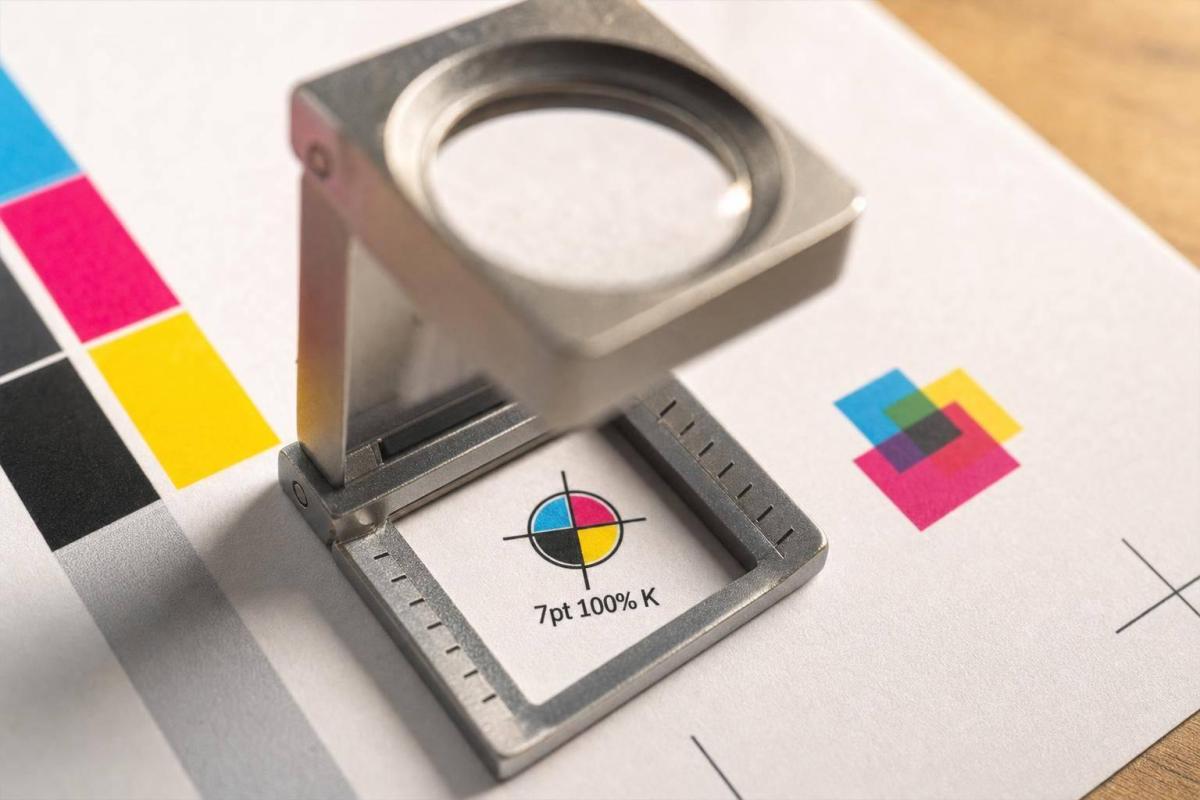
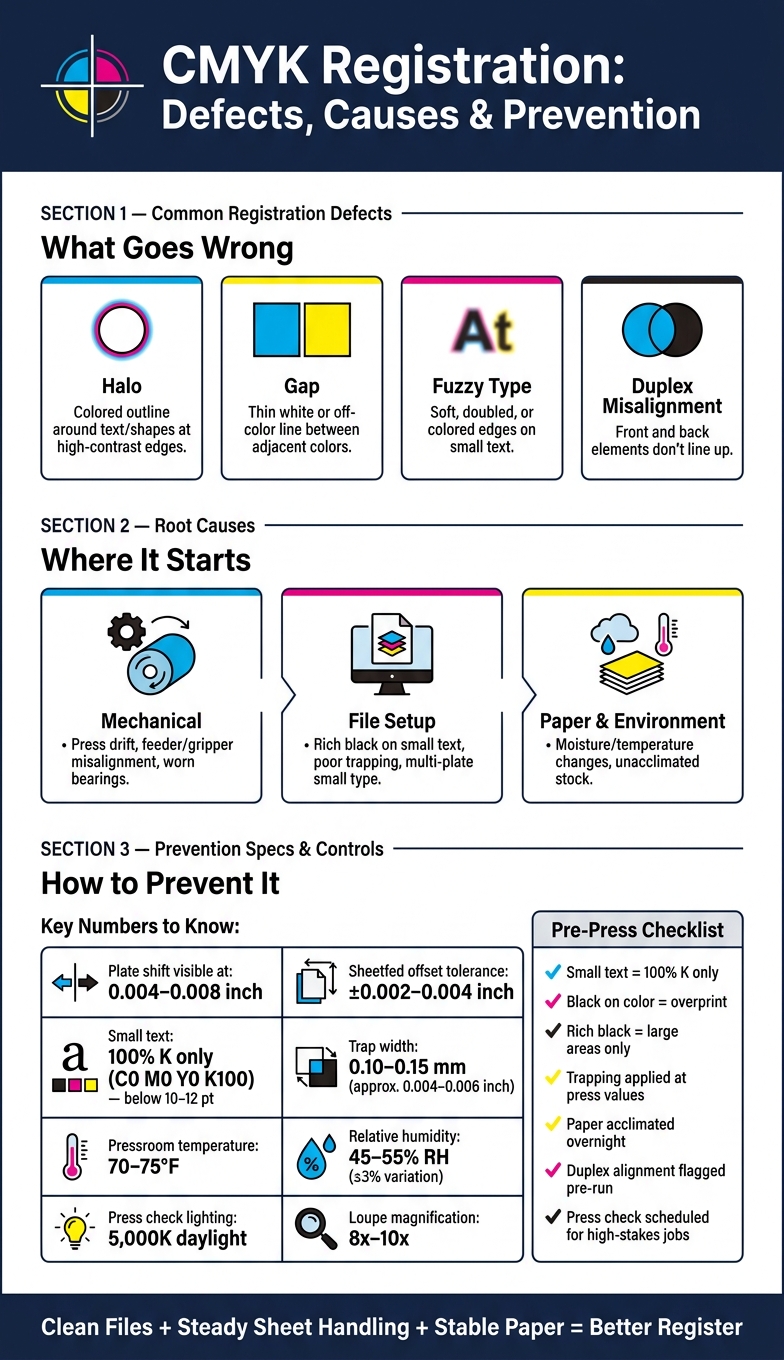
After confirming color accuracy, inspectors should check registration marks to ensure proper alignment. These marks – small crosshairs or grids printed in trim areas – are designed to reveal alignment issues instantly. Since registration marks use 100% of all ink colors, they should appear as a single, sharp black shape when aligned correctly. Misalignment is evident when cyan, magenta, or yellow fringes appear around the mark. As Color Vision Printing puts it:

"Precise registration is a prerequisite for high-quality printing".

Inspectors should also look for signs like fuzzy or blurred text, halo effects around objects, or unprinted gaps where color is expected. Registration checks should extend beyond ink alignment to include finishing details such as foil stamping, embossing, die-cuts, and spot UV coatings. For carbonless forms, ensure that printed fields on the top ply align perfectly with fields on subsequent plies to guarantee accurate data transfer. These checks help maintain the integrity of finishing features and overall print quality.

Surface Defects and Ink Coverage

Surface inspections are key to spotting marks, missing elements, or foreign object damage that could compromise print quality. Detecting issues like smudging, streaking, or uneven ink coverage early prevents hidden defects from escalating. Digital tools can document any surface damage, facilitating clear communication with management. As Operations1 highlights:

"Digital checklists shed light on the black box of incoming goods… [and] ensure that everything is documented in a legally compliant and error-free manner".

Focusing on high-risk areas during surface inspections can significantly reduce the need for rework.

Dimensional and Registration Checks

Precision goes beyond just visual inspections – it requires exact dimensional and registration measurements to meet customer expectations. Dimensional checks ensure that products align with specifications by using calibrated tools. As Unitek Technical Services explains:

"Our in-process inspection goal is to measure and confirm a component’s critical characteristics to ensure a seamless production process and to eliminate potentials for rework."

Identifying issues early can significantly reduce rework costs. Operators should combine visual and dimensional inspections to catch surface flaws and measurement discrepancies simultaneously. This dual approach ensures consistent print quality.

Trim Size and Margins

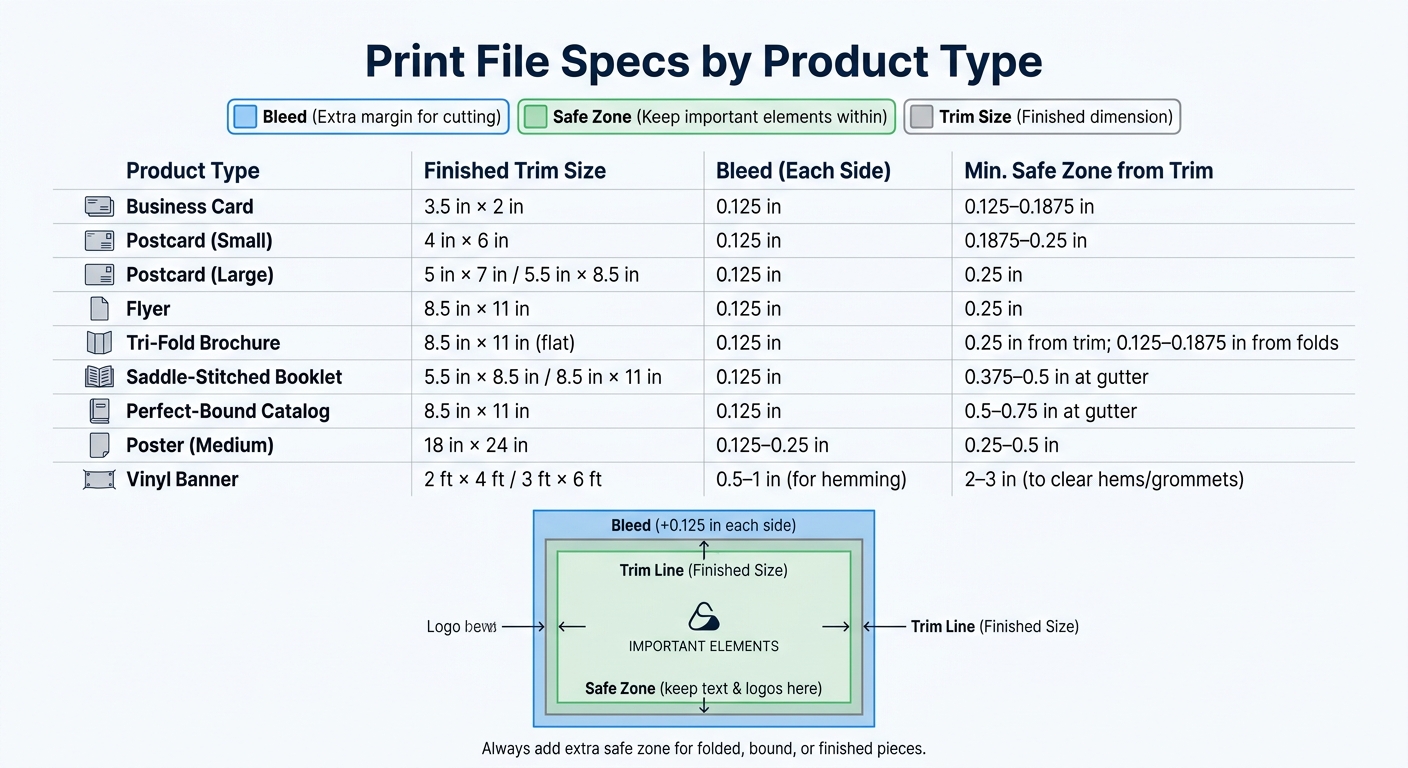
Accurate trim size and margin measurements are crucial. Calibrated rulers or digital calipers are often used to confirm that prints are within job specifications. For MICR check printing, margins typically measure 0.25 inches on portrait orientation, allowing for an 8-inch printable width. If these standard margins limit the print area, they can be adjusted to 0.2 inches (5 mm) in the print setup software.

Test print validation is a practical method for ensuring dimensions are correct. For example, Cast and Crew employs test printing for MICR checks on 8.5″ × 11″ blank check stock. Their process involves printing a sample check and submitting it to the bank for approval. Production only begins once the bank confirms the test check’s dimensions and alignment. For layouts requiring precise positioning – such as checks where the negotiable portion must sit in the lower third of the page – operators should compare placement against physical templates both during setup and periodically throughout production.

Multi-Color Registration

Ensuring accurate multi-color alignment is just as critical as verifying dimensions. Misaligned colors can lead to visible fringing or gaps between ink layers. For offset printing, the standard registration tolerance is ±0.12 mm, while high-resolution lithography demands tighter tolerances, often around ±0.06 mm. Since registration errors are often non-linear, inspectors should examine all four corners and the center of each sheet.

To prevent substrate shifting during multi-pass runs, maintaining consistent web tension and using sheet-alignment systems is essential. Plates should be mounted with alignment pins and calibrated gauges for precise repeatability. Many modern presses now feature Automatic Register Control (ARC) systems, which use optical sensors to make micro-adjustments during production.

For added accuracy, test a 1–2 inch strip with registration marks under magnification. Ensure the RIP is set to 1:1 scaling with the "register check" feature enabled. Climate-controlled environments are also critical for maintaining registration stability during production.

Substrate and Material Inspection

The quality of your printed output starts with the condition of your substrate – long before it reaches the press. Beyond dimensional and visual checks, the substrate’s condition plays a key role in ensuring consistent print quality. Inspecting materials as soon as they arrive not only keeps your production schedule on track but also protects your rights under supplier warranties. In fact, some commercial codes state that failing to inspect materials promptly could forfeit your ability to claim damages for defective goods. As Operations1 explains:

"The incoming goods inspection is important for determining whether a delivery corresponds to the initial order placed in terms of quantity and quality."

Pre-Production Substrate Checks

Before production begins, confirm that your substrate meets all order specifications, such as quantity, weight, count, trim size, and thickness. Use calibrated tools and visual inspections to identify any surface defects, dust, foreign object damage, or moisture that might affect ink adhesion.

If any defects are found, work with suppliers to document them for potential warranty claims. For specialized materials like fabric, additional steps such as shrinkage testing and shade segregation can help prevent issues like color inconsistencies.

Also, double-check shipping documents and packing lists for accuracy. Implement FIFO (First In, First Out) protocols to ensure materials are used before they degrade. Once these checks are complete, safeguarding the substrate throughout production becomes the next priority.

Material Handling During Production

Proper material handling during production builds on pre-production checks to maintain substrate quality throughout the printing process. Continuously monitor for issues such as wrinkles, tears, or environmental damage that could compromise the substrate. Use 5S methodology in storage areas to minimize contamination risks, especially for sensitive materials.

Be aware of "hidden defects" that might only emerge during printing, such as internal inconsistencies or moisture problems that disrupt ink performance. Real-time reporting systems can help you detect and address these issues immediately, reducing waste and avoiding costly rework. Additionally, integrating sensors with digital systems to automatically track substrate values can improve traceability and reduce manual errors. This kind of proactive monitoring ensures that errors don’t snowball into larger problems, preserving the quality of your final output.

Color Consistency and Ink Performance

At Miro Printing & Graphics Inc., keeping colors consistent throughout a print run is a key focus. Even with careful preparation, colors can shift during production, and ink performance issues can pop up unexpectedly. By monitoring these factors in real time, you can avoid waste and ensure every piece meets the approved quality standards.

Color Drift Monitoring

Color drift happens when hues gradually change during production. This can be caused by things like variations in ink flow, temperature changes, or differences in the substrate between batches. To catch these shifts early, conduct visual inspections throughout the run, comparing against established color standards and Acceptable Quality Levels (AQL) [1, 2]. As Millcraft points out, "Colors often appear differently depending on the medium, lighting, and viewing conditions". For accurate inspections, always use lighting conditions that match how the final product will be viewed.

Using shade segregation is another way to track variations, especially during long runs. If you notice drift, record it immediately using digital checklists with real-time updates. This approach helps you address the issue before hundreds of sheets are affected [2, 6]. Integrating sensors and scanners with your quality management system can also provide objective color measurements, reducing the chance of human error. Once you identify a drift, implement corrective and preventive actions (CAPA) to adjust press settings and bring the output back to spec.

To document issues thoroughly, take photos of any color variations and attach them to inspection reports. This creates a clear record for addressing problems and improves communication between inspection points and the production floor, helping to minimize the amount of off-color material.

Ink Adhesion and Drying Time

Good ink adhesion is critical to avoid problems like peeling, blistering, or smudging. Ink bonds to substrates in different ways: through absorption in porous materials, chemical bonding when solvents soften the surface, or mechanical interlocking via surface wetting. Testing adhesion during production ensures the bond will hold once the job is complete.

A simple way to check adhesion is the Thumbnail Test – scratch the cured ink surface with your thumbnail. According to Jim Hingst of Nekoosa, "A properly cured ink will resist scratching". Another option is the Thumb Twist Test: press your thumb into the ink and twist it. Hingst explains, "If the ink is not thoroughly cured, a hardened layer of ink can slip over an uncured layer. A properly cured coating also should not feel tacky".

For more precise results, use the Cross Hatch Test. This involves scoring 11 parallel lines and 11 perpendicular lines into the ink to create a grid with 1/8-inch spacing. Apply aggressive tape (like 3M Brand #600), press it down with a squeegee, and pull it off quickly at a 180° angle. If any ink comes off, adhesion is insufficient. While professional cross hatch testers can cost $500–$600, a simple knife and tape are often enough for routine checks.

Always perform these tests using the same curing methods planned for full production to get accurate results. Keep detailed records of the variables and materials used for each job to ensure consistency for future reorders. As Hingst notes, "The importance of adhesion testing is to determine the strength of the bond before the job leaves your shop. That way you avoid the embarrassment when a job fails".

Final Print Defect Detection

The final inspection is the last opportunity to identify defects before products are finished or shipped. This step is critical for catching surface issues that could lead to costly returns or warranty claims. It builds on earlier inspections to ensure no problems slip through before the product moves forward.

Surface Quality Inspection

Surface quality inspection requires a detailed visual review to catch scratches, ink transfers, marks, or any foreign object damage. This is the last chance to confirm the product meets standards before leaving production. Inspect for more subtle issues as well, such as wear, corrosion, or incomplete ink coverage that may have gone unnoticed during earlier checks.

Proper lighting plays a key role in spotting these issues. Ensure the inspection area is well-lit to reveal faint scratches or slight color variations. Digital inspection tools can be incredibly effective, with some systems reporting a 97% success rate in identifying manufacturing defects.

Additionally, maintain a clean and organized workspace to avoid contamination of finished prints. Be attentive to any unusual odors or leaks, as these could point to chemical contamination or ink drying problems.

Once surface issues are resolved, confirm that all prints are ready for shipment.

Packaging Readiness Check

Before packaging, ensure that prints meet both quality and quantity standards. Cross-check the finished prints against packing lists and delivery bills to verify they match the order. Confirm that all labels and warning signs are clear and correctly applied. Any product that fails to meet standards should be quarantined immediately to prevent accidental shipping.

When defects are found, document them promptly with photographs. This visual record supports corrective actions and can serve as evidence if supplier complaints or customer concerns arise. Use digital checklists to log findings whenever possible. As Operations1 explains:

"Digital checklists shed light on the black box of incoming goods… ensuring that everything is documented in a legally compliant and error-free manner".

For added accountability, use scanner- or log-in-based signatures to track who performed the final inspection and when, creating a reliable and legally binding record.

Documentation and Quality Records

Accurate record-keeping transforms inspection data into actionable insights, driving improvements in processes. Below, we’ll dive into how to effectively document findings and monitor quality trends.

Recording Inspection Findings

Keeping detailed records is essential for building a reliable audit trail. Start by logging the job number, operator and supervisor initials, timestamps, and the specific production stage. This ensures both accountability and traceability for every print run.

Go beyond basic pass/fail results by recording exact measurements like color density, registration alignment, and ink viscosity. For instance:

  • Color density values should be precise.
  • Registration alignment is typically maintained within ±0.2 mm for high-quality output.
  • Ink viscosity should fall within the target range of 35–45 cPs for most processes.

When defects occur, document everything: the defect type (e.g., smudging, pinholes, ghosting, or ink bleed), its location, photographic evidence, corrective actions taken, the person responsible, and the time verification was completed. As SafetyCulture notes:

"IPQC helps detect quality lapses or abnormalities early in manufacturing, minimizing human errors and preventing defective products from progressing further or reaching the market".

Keep all inspection records consolidated in a single audit log that accompanies the job through every stage. This "passport" approach, as Stijloor from Elsmar Quality Forum describes, ensures:

"The benefit of this passport is that it eliminates different and loose forms, it travels with the job and can be reviewed at any time".

These detailed logs play a critical role in feeding data back into your quality assurance system, supporting continuous process improvement.

Tracking Quality Metrics

Beyond individual inspection results, tracking quality metrics over time is essential for identifying trends and enhancing processes. Focus on three primary metrics:

  • Pass rate: The percentage of pieces without defects.
  • Rework rate: The percentage of items requiring touch-ups.
  • Defect frequency by type: Categorizing and quantifying recurring issues.

Analyzing these metrics reveals whether your processes are improving or declining. Discuss defect logs in weekly team meetings and apply the "5 Whys" technique to uncover the root causes of recurring problems. When patterns emerge, update your Standard Operating Procedures to address them. For example, digital systems can flag critical measurements – like color variance (ΔE) exceeding a threshold of 2 – and notify quality managers immediately.

Using quality tiers can provide a quick visual snapshot of performance:

  • Excellent: <1% defect rate
  • Good: 1–3%
  • Acceptable: 3–5%
  • Marginal: 5–7%
  • Unacceptable: >7%

Tracking these rates across operators, shifts, or materials helps identify where adjustments or training are most needed. For instance, Nissin Foods achieved over 96% completion rates for GMP audits by adopting digital inspection tools that kept quality data easily accessible.

Conclusion

A well-structured inspection checklist is a powerful tool to catch issues early and avoid expensive mistakes later. Identifying problems during production is far more cost-effective than dealing with post-production fixes, which often lead to time-consuming and disruptive rework.

Studies reveal that professional inspection checklists can capture up to 97% of issues. Additionally, digital inspection tools streamline the process, cutting quality check times down to just 10–15 minutes per batch or hour. Beyond saving costs, these tools improve regulatory compliance and enhance supply chain performance. For example, integrated systems allow for 100% inspection rates at full line speed while avoiding bottlenecks. This ensures every item meets both visual quality standards and the machine-readable requirements essential for smooth distribution.

Digital inspection logs further improve efficiency by eliminating manual errors, enabling real-time data collection, and ensuring traceability for compliance documentation. As one Quality Engineering Manager from a global manufacturer shared:

"I want to express our appreciation for accomplishing these tasks so promptly and with such a professional staff. We both give your team very high marks for their knowledge and professionalism".

FAQs

How often should I sample sheets during a print run?

To keep quality on track, take sample sheets at regular intervals during a print run. Many printers check every 100–200 sheets or use specific time intervals, depending on their workflow and quality benchmarks. The goal is to strike a balance between production volume, cost, and the risk of defects. While inspecting every single sheet isn’t practical, interval-based sampling catches problems early without slowing things down.

What tools do I need to check color and registration accurately?

To keep color and registration accurate during in-process print inspections, having the right tools is crucial. A handheld spectrophotometer is one such tool that can make a big difference. Take the X-Rite eXact 2, for instance – this device is built for quick and precise color measurements, making inspections more efficient and ensuring consistent quality throughout the printing process.

What should I do first if I find a defect mid-run?

If a defect is discovered during production, halt the process right away to avoid further quality issues. Make sure to document the defect thoroughly and inform the relevant team or personnel immediately. Acting quickly allows for corrective measures to be implemented, helping to maintain product quality while reducing waste and minimizing the need for rework.

Related Blog Posts

https://app.seobotai.com/banner/banner.js?id=69e17c9809e6c77f4f7b3f7a

Matte Paper vs Glossy: Key Differences

Compare matte vs glossy paper: color, glare, durability, writability, best uses and production differences for printing.

Matte and glossy paper differ in their finish, appearance, and usability. Matte paper has a non-reflective surface that absorbs ink, offering muted colors and excellent readability. It’s ideal for text-heavy materials, frequent handling, and writing. Glossy paper, with its shiny, reflective coating, enhances color vibrancy and detail, making it perfect for photos, marketing materials, and visual projects.

Key Points:

  • Matte Paper: Low glare, easy to read, resists fingerprints, writable, but less vibrant colors.
  • Glossy Paper: High shine, vibrant colors, great for visuals, but shows fingerprints and is harder to write on.

Quick Comparison:

Feature Matte Paper Glossy Paper
Sheen Minimal, non-reflective High, reflective
Color Intensity Soft, muted Bold, vibrant
Readability Excellent Challenging under bright light
Fingerprint Visibility Low High
Writability Easy for pens/pencils Poor, prone to smudging
Best Uses Text-heavy projects, writing Photos, marketing visuals

Choose matte for readability and frequent handling, and glossy for vibrant visuals and moisture resistance.

Matte vs Glossy Paper Comparison Chart

Matte vs Glossy Paper Comparison Chart

Matte vs Glossy Paper: Which is Best for You?

Visual Appearance Comparison

Matte finishes diffuse light, creating a flat, glare-free appearance, while glossy finishes reflect light, offering a sharp, high-shine effect that enhances color vibrancy.

This difference in light interaction directly impacts how colors appear and how readable the content is. Glossy finishes, with their heavy coating, keep ink on the surface, resulting in deeper color saturation and sharper details. In contrast, matte finishes, with their lighter coating and slightly textured surface, absorb more ink, producing softer, muted colors with an understated elegance.

The surface texture also plays a role in the overall look and feel. Matte paper retains some of the natural fiber texture, giving it a smooth yet velvety touch. Glossy paper, however, has a slick, polished surface due to its heavier coating. As Scott, a graphic designer, points out:

"Colors will be perceived as slightly more vibrant on gloss stock because ink isn’t absorbed as much into the substrate".

Feature Matte Finish Glossy Finish
Sheen Minimal shine; flat/muted High shine; reflective
Color Intensity Subdued, soft, and refined Vibrant, bold, and high-contrast
Glare Low to none; reduces eye strain High; can cause distracting reflections
Surface Texture Smooth but slightly textured/velvety Slick, smooth, and polished
Readability Excellent (ideal for text) Challenging under bright light

Matte: Non-Reflective and Subtle

Matte finishes are perfect for projects where reducing glare and ensuring readability are essential. Their non-reflective surface makes text easy to read from any angle, even under bright or direct lighting. This makes matte paper a go-to choice for text-heavy materials like reports, menus, and brochures, where distractions like reflections must be avoided. Its soft color tones also work beautifully for fine art prints and portraits, emphasizing subtle shading and natural hues. As VistaPrint explains:

"A matte finish offers a sophisticated, understated appearance that exudes professionalism, perfect for business cards, brochures and formal invitations".

Glossy: Reflective and Eye-Catching

Glossy finishes are ideal for creating a striking visual impact. Their reflective, high-shine surface brings out the best in high-resolution photos, product catalogs, and promotional materials meant to grab attention. However, the same reflectivity that enhances visuals can also cause glare, making content harder to view under strong lighting. Up next, we’ll explore how these visual traits affect handling and durability.

Durability and Handling Comparison

When selecting the right paper finish, it’s not just about how it looks – how it holds up to handling is just as important. Matte and glossy papers react differently to touch, writing, and environmental factors, which can influence their suitability for various uses.

One of the most noticeable contrasts lies in how they handle fingerprints. Glossy paper, with its shiny, reflective coating, tends to highlight fingerprints, making them highly visible. In comparison, matte paper’s textured surface resists fingerprints, making it ideal for items that are frequently touched, like books, brochures, or directories.

Writing performance is another area where these finishes differ significantly. Matte paper is easy to write on because its surface absorbs ink cleanly, making it perfect for pens or pencils. Glossy paper, however, struggles in this area. Its slick coating prevents proper ink absorption, often leading to smudges and incomplete writing. As Color Vision Printing explains:

"Being writable is a clear advantage over gloss paper as attempts to write on a gloss-coated stock will usually result in an incomplete transfer of the writing medium or an unsightly smear".

Handling also affects how these papers resist moisture and dirt. While glossy paper is prone to showing smudges, its coating creates a barrier that repels dirt and moisture, offering better protection against stains and environmental wear. Matte paper, on the other hand, absorbs moisture more easily due to its porous surface, making it less resistant to long-term exposure to damp conditions.

Here’s a quick breakdown of these differences:

Feature Matte Paper Glossy Paper
Fingerprint Visibility Low (Resists fingerprints) High (Shows easily)
Smudge Resistance High Low
Writability Excellent for pens and pencils Poor, prone to smearing
Handling Suitability Great for frequent handling Best for minimal contact
Surface Feel Textured and slightly grippy Slick and smooth
Moisture/Dirt Resistance Moderate High

Matte: Smudge-Resistant and Writable

Matte paper is a go-to choice for materials that require interaction, like filling out forms, annotating study guides, or flipping through workbooks. Its textured surface not only makes writing easier but also provides a slight grip, which is helpful for handling. Ink transfers cleanly and dries quickly on matte paper, avoiding smudging or bleeding.

However, matte paper’s porous nature means it absorbs moisture more easily, so it’s best stored in dry conditions to maintain its quality over time. This makes it ideal for calendars, greeting cards, and other items meant for frequent use but minimal exposure to damp environments.

Glossy: Durable but Shows Fingerprints

Glossy paper shines – literally – when it comes to protecting against environmental factors like dirt and fading. Its thick coating locks in vibrant colors and creates a surface that resists moisture and stains. That said, it’s not without drawbacks. The reflective finish shows fingerprints easily, and the smooth coating makes writing difficult, if not impossible.

Glossy finishes work best for materials that are meant to be admired rather than handled, such as posters, photo books, or high-end marketing materials. If handling is required, it’s a good idea to hold glossy items by the edges to keep them looking clean and polished.

When to Use Matte Paper

Matte paper shines in scenarios where readability and frequent interaction are top priorities. Its non-reflective surface makes it perfect for text-heavy materials like reports, manuals, and booklets. This enhanced readability and ease of handling make matte paper a practical choice in several key situations.

For business cards, matte paper is a standout option. Its surface allows for easy handwritten notes, which is especially useful during networking events. Plus, QR codes printed on matte finishes scan effortlessly since the lack of glare prevents interference with camera sensors.

Matte paper also works beautifully for planners, calendars, and workbooks. Its textured surface ensures smooth writing without ink smudging or bleeding, making it a favorite for daily-use items.

In addition to its functional benefits, matte paper offers a polished and professional appearance, making it a great fit for branding materials, fine art prints, and formal invitations. As VistaPrint notes:

"A matte finish offers a sophisticated, understated appearance that exudes professionalism, perfect for business cards, brochures and formal invitations".

Another ideal use is for framed prints and posters displayed behind glass. Matte paper prevents distracting double reflections caused by the combination of glass and glossy surfaces. This ensures images remain clear and easy to view from any angle, making it the go-to choice for gallery-quality art, black-and-white photography, and informational posters in bright spaces.

When to Use Glossy Paper

Glossy paper is the go-to choice when your project needs to make an instant visual impact with vibrant colors and sharp details. Thanks to its heavy coating, ink stays on the surface rather than soaking into the fibers, resulting in rich, saturated colors and crisp imagery.

Ideal Uses for Glossy Paper

Photo Prints:
Glossy paper is perfect for photos, enhancing their depth and making colors pop. Its reflective surface amplifies brightness and sharpness, giving images a polished, professional appearance. As Color Vision Printing notes:

"The reflective quality of gloss paper adds a sense of depth to printed images, helping them stand out and grab the viewer’s attention".

Marketing Materials:
Flyers, brochures, and catalogs benefit significantly from glossy finishes, which create a sleek, eye-catching look. Similarly, postcards, book covers, and product packaging shine – literally – when printed on glossy paper, as the vibrant color reproduction ensures your materials leave a lasting impression. However, keep in mind that glossy paper is better for items that won’t be handled excessively.

Menus and Food Photography:
Menus and food-related imagery also thrive on glossy paper. The shiny surface enhances the appeal of dishes, making them look more appetizing and visually engaging. Plus, glossy finishes are practical: they resist moisture, dirt, and stains, making them easier to clean and ideal for high-traffic uses.

Things to Consider

While glossy paper excels in making visuals pop, it does have some drawbacks. Fingerprints can be more noticeable on its surface, and glare from bright lighting might affect readability. This makes it better suited for items meant to be viewed rather than heavily handled.

Production and Cost Differences

Production processes play a key role in shaping the distinct characteristics of matte and glossy finishes.

Both finishes start with cellulose fibers, which naturally have a rough texture. The difference lies in the amount of coating applied. While both use similar blends of polymers, pigments, and clay to smooth the surface, glossy paper receives a thicker coating. This extra layer fills in most of the fiber texture, creating a smooth and reflective surface. In contrast, matte paper retains more of its natural roughness, which helps diffuse light .

This difference in production also affects how ink behaves. Matte paper’s porous surface takes longer to dry and is more prone to smudging. On the other hand, glossy paper keeps ink on the surface, resulting in sharper, more vibrant prints . Even when both finishes have the same gsm (grams per square meter), glossy paper feels denser and thinner due to the compressed fibers caused by its heavier coating.

Both finishes are compatible with professional printing methods and are available in various weights, such as text, cover, and cardstock. If you’re using matte paper, keep in mind its high ink absorption and longer drying times to avoid smudges. Additionally, secondary top coats – like varnishes, aqueous coatings, UV coatings, or laminates – can be applied after printing to enhance the final look.

When it comes to cost, the choice depends on your project. Glossy paper is typically less expensive than matte, though pricing varies based on paper quality and the printing service. For example, on platforms like Amazon’s KDP, there’s no price difference between matte and glossy finishes for paperback covers – the cost is calculated as $0.85 plus $0.012 per page. In commercial printing, matte paper is often considered a budget-friendly option for high-volume projects like brochures and flyers. However, specialized matte finishes can come at a higher price. Understanding these production and cost factors can help you decide which finish best suits your budget and project goals.

Conclusion

Choosing between matte and glossy finishes comes down to your project’s specific needs, both in terms of function and appearance.

Glossy paper, with its protective coating, excels at enhancing visual appeal and resisting moisture. It’s a great fit for photography, product catalogs, and promotional materials. However, it’s worth noting that glossy finishes can show fingerprints and create glare under bright lighting.

On the other hand, matte paper offers a sleek, non-reflective surface that reduces glare and resists smudging. This makes it ideal for text-heavy documents, business cards with QR codes, or materials that will be handled frequently or used in well-lit spaces. Plus, matte surfaces are pen- and pencil-friendly, allowing for easy writing without smearing.

Think about where and how your printed materials will be used. If they’ll be in bright environments or need to accommodate writing or scanning, matte is likely the better option. But if your project demands vibrant imagery or a striking, glossy finish – especially for outdoor use or in damp conditions – then glossy paper could be the way to go.

Cost is another factor. Glossy finishes are typically more budget-friendly for large print runs, while matte finishes may come with a slightly higher price tag. If you’re unsure which finish will work best, consider ordering sample prints to see how your design translates onto each surface before committing to a full production run.

Ultimately, the right finish ensures your materials not only look great but also function as intended – whether that means standing out visually, maintaining readability, or holding up under frequent use. For expert advice and top-notch printing services tailored to your needs, reach out to Miro Printing & Graphics Inc., your trusted print partner in Hackensack, NJ.

FAQs

Which finish is better for QR codes and scanning?

A matte finish is often the preferred choice for QR codes and scanning. This type of paper absorbs ink evenly, minimizes reflections, and provides sharp, well-defined edges for the code’s modules, ensuring scanners can read them without issues. In contrast, glossy paper may reflect light and produce glare under certain conditions, which can disrupt scanning. For reliable and consistent QR code readability, matte finishes are usually the better option.

Can I write on glossy paper without smearing?

Yes, you can write on glossy paper with a permanent marker or a CD/DVD pen. To prevent smudging, allow the ink to dry completely for a few minutes before touching or handling the surface.

How do I choose matte vs glossy for a brochure or menu?

When choosing between matte and glossy finishes for a brochure or menu, think about both appearance and functionality. A matte finish gives a smooth, glare-free surface that improves readability and hides fingerprints, making it ideal for items that will be handled often. On the other hand, a glossy finish delivers a shiny, eye-catching look that enhances color vibrancy and offers better protection against moisture. Go with matte for a refined, understated style or glossy if you want bold visuals and durability in damp environments.

Related Blog Posts

https://app.seobotai.com/banner/banner.js?id=69e02bbe09e6c77f4f7b1e79

Cardstock Weights for Greeting Cards Explained

Compare LB, GSM and PT to pick the right cardstock for greeting cards—balancing foldability, durability, and print compatibility.

When choosing cardstock for greeting cards, the weight and thickness directly impact durability, appearance, and functionality. Here’s what you need to know:

  • Lightweight (65-80 lb / 176-216 GSM): Flexible and easy to fold, ideal for standard cards or layered designs. Works with most home printers.
  • Medium (80-100 lb / 216-270 GSM): Balanced sturdiness and foldability, perfect for everyday cards and DIY invitations. Scoring may be needed for clean folds.
  • Heavyweight (100-130 lb / 270-350 GSM): Rigid and durable, great for premium cards like wedding invitations. Often requires professional printing.

Cardstock is measured in GSM (density), LB (weight), and PT (thickness). GSM is the most consistent globally, while PT measures thickness in thousandths of an inch. For best results, heavier cardstock often needs scoring to fold cleanly and may require professional printing for a polished finish.

Key takeaway: Match cardstock weight to your project’s needs – lighter for casual designs, heavier for formal or durable cards.

Cardstock Weight Guide for Greeting Cards: LB, GSM, and PT Comparison Chart

Cardstock Weight Guide for Greeting Cards: LB, GSM, and PT Comparison Chart

Confused by Cardstock Weight: GSM vs. LBS Explained!

Cardstock Measurement Systems Explained

When you’re picking cardstock, you’ll come across three main measurement systems: GSM, LB, and PT. Each one highlights a different aspect of the paper, and knowing how they work can help you make the best choice for your greeting cards.

GSM (Grams per Square Meter) is the global standard for measuring paper density. It tells you the weight of a one-square-meter sheet of paper. The great thing about GSM is its consistency – a 300 GSM sheet is always 300 GSM, no matter the type of paper. For reference, standard office copy paper usually ranges between 80–90 GSM, while greeting cards often use cardstock in the 250–300 GSM range. If you’re looking for something more premium, like wedding invitations or high-end cards, you’ll want cardstock that’s 300 GSM or higher. This measurement is key when balancing sturdiness with a polished look.

LB (Pounds) is the traditional US system, which measures the weight of 500 sheets of paper at a specific "basic size" before cutting. The catch? The basic size changes depending on the paper grade. For cardstock, also called "Cover" grade, the basic size is 20" × 26". This means that 80 lb cover paper is not the same as 80 lb text paper – they differ in thickness even though the weight number is identical. To convert Cover weight to GSM, multiply the pound value by 2.708 (e.g., 80 lb cover × 2.708 = 216.64 GSM).

PT (Points) measures the actual thickness of the paper in thousandths of an inch. Each point equals 0.001 inches. Unlike GSM and LB, which focus on weight and density, PT gives you a direct measurement of how thick the paper is. For greeting cards, 15pt is a popular choice – it strikes a nice balance between being sturdy yet foldable. Thicker paper with higher PT values feels more substantial, stands upright better, and resists bending during mailing or handling.

Although these systems measure different properties, they often align. Heavier paper (higher GSM or LB) generally means thicker paper (higher PT), although the material’s composition can influence this relationship. If you’re working with international printing services, GSM is the most precise and avoids confusion caused by the varying basis sizes in the US pound system. Understanding these systems will help you pick the perfect cardstock weight for your greeting cards.

How to Choose Cardstock Weight for Greeting Cards

Picking the right cardstock weight depends on the type of card you’re making and how it will be used. This decision ties directly to how cardstock density affects both the durability and the overall presentation of your card. The weight determines how well the card folds, its sturdiness, and even its tactile appeal. For example, consider whether the cardstock will be the main structure of the card or just a decorative layer. Also, think about how the card will be delivered – cards in envelopes are protected during mailing, but standalone mailers like postcards need to be tougher to survive transit. Here’s a breakdown of how different cardstock weights can impact your project.

Lightweight Cardstock (65-80 lb / 176-216 GSM)

Lightweight cardstock is flexible and easy to fold by hand, making it a great choice for standard greeting cards, detailed die-cut designs, or layered projects where smooth bending is key. Its pliability also reduces the risk of cracking in layered designs. If you’re working on bulk projects like holiday inserts or promotional flyers, lightweight cardstock is a budget-friendly option. Plus, most consumer-grade printers can handle this weight, typically up to 80 lb or sometimes 100 lb.

Medium Cardstock (80-100 lb / 216-270 GSM)

Medium cardstock is often considered the go-to choice for greeting cards. It strikes a balance between sturdiness and ease of use, offering a solid feel without being too difficult to fold. For cardstock that’s 80 lb or heavier, using a scoring tool ensures clean, precise creases. This weight range is perfect for everyday greeting cards, DIY invitations, and brochures. Just be sure to double-check your printer’s specifications to confirm compatibility with this weight.

Heavyweight Cardstock (100-130 lb / 270-350 GSM)

If you’re aiming for a premium, high-end look, heavyweight cardstock is the way to go. Its rigidity and durability make it ideal for wedding invitations, business cards, certificates, and even designs with structural elements like pop-ups. For formal invitations, 100 lb cardstock offers an elegant feel, but keep in mind that most home printers can’t handle weights above 80–100 lb. In these cases, a professional printing service is usually your best bet.

When mailing cards without envelopes, choosing cover paper between 60 lb and 120 lb ensures the card meets U.S. Postal Service thickness standards and holds up during transit. This ties back to the earlier discussion on how cardstock weight affects mailing durability.

For heavyweight projects, consider working with professionals like Miro Printing & Graphics Inc. in Hackensack, NJ, to achieve the best results. Upgrading your cardstock weight can make a big difference in how your cards are perceived, paving the way for discussions on how quality impacts the final product.

How Cardstock Weight Affects Greeting Card Quality

Cardstock weight plays a crucial role in determining the foldability, opacity, durability, and print performance of your greeting cards.

Foldability
The heavier the cardstock, the trickier it is to fold cleanly. Lightweight cardstock (around 60–70 lb) can be folded by hand with little effort. However, once you move to 80 lb or heavier cardstock, scoring the fold line becomes essential to avoid cracking and achieve a smooth crease. This is especially important for creating professional-looking cards.

Opacity and Show-Through
Heavier cardstock offers better opacity, which means it’s less likely to let images or text on the reverse side show through. For double-sided greeting cards, cardstock weighing 100 lb or more is ideal, as it resists warping and prevents ink from bleeding. On the other hand, lighter cardstock can sometimes allow unwanted transparency, which might affect the overall design quality.

Print Quality Considerations
While cardstock weight doesn’t directly control print quality, it does influence how well your printer handles the material. Most consumer-grade printers can handle up to 80–100 lb cardstock, but anything heavier could lead to paper jams or uneven ink application. The finish – whether glossy or matte – also plays a big role in how colors appear and how ink is absorbed. Heavier cardstock gives your design a solid foundation, but the right finish ensures the best visual results.

Durability
For cards that need to endure handling or transit, heavier cardstock is the better choice. For example, postcards sent without envelopes must meet the U.S. Postal Service’s minimum thickness requirement of 0.007 inches, which corresponds to cardstock in the 60–120 lb range. If your goal is to create a keepsake or a card that can withstand frequent handling, opting for a higher weight is a practical decision.

These considerations, combined with earlier guidelines on cardstock measurement systems, can help you select the perfect weight for your greeting cards.

Cardstock Weight Comparison Table

Cardstock Category Weight (LB / GSM) Foldability Opacity Durability Best For Trade-offs
Lightweight 60–70 lb / 100–140 GSM Easy to fold by hand; no scoring required Low; prone to show-through Low; bends easily Flyers, card inserts, DIY projects Feels less sturdy; can appear translucent
Medium 80–90 lb / 216–243 GSM Easy to fold with scoring (for 80 lb and above) Moderate Sturdy enough for mailing Standard greeting cards, brochures Requires scoring for a polished fold
Heavyweight 100–130 lb / 270–350 GSM Scoring is a must; manual folding risks cracking High; excellent opacity Highly durable and rigid Premium invitations, business cards May jam home printers; professional equipment often needed

Tips for Printing Greeting Cards on Cardstock

Preparing Cardstock Before Printing

If you’re working with cardstock over 80 lb, scoring is a must to avoid cracking or warping when folding. Scoring creates a ridge that allows the cardstock to bend smoothly without damaging the surface. For lighter cardstock (around 60–70 lb), you can often fold it by hand without any issues. But once you move into the heavier weights, a scoring tool becomes essential.

"Heavier (i.e. thicker) cardstock can fold, but it may require scoring for the fold to look attractive." – InvestGuiding

Keep in mind that glossy coatings make cardstock stiffer. For instance, an 80 lb glossy sheet will be harder to fold compared to an uncoated one. If you’re aiming for a polished look, professional scoring equipment can make a big difference. Once your cardstock is prepped, double-check that your printer can handle the weight you’ve chosen.

Testing Printer Compatibility

After scoring and preparing your cardstock, it’s time to test your printer. Start by reviewing your printer’s specifications – most home printers struggle with cardstock over 110 lb (300 GSM). If your printer allows it, switch to "Cardstock" or "Heavy Paper" mode and run a single test sheet to spot any potential issues like jams or alignment problems.

Printers with a straight-through paper path or a rear-feed tray are better suited for thicker cardstock because they don’t require the paper to bend as sharply. This feature can save you a lot of headaches when working with heavier materials.

Working with Professional Printing Services

For cardstock that exceeds 110 lb or has special finishes, professional printing services are the way to go. Home printers aren’t built to handle ultra-thick materials like 16pt or 18pt cardstock, and forcing them can result in mechanical damage or poor-quality prints.

A great example is Miro Printing & Graphics Inc. in Hackensack, NJ. They offer both digital and offset printing for greeting cards and provide in-house services like die-cutting, creasing, and folding. This means you can get precise, clean folds on heavyweight cardstock without worrying about cracking or uneven edges. They also offer custom finishes and premium options that most home setups can’t achieve. By using professional services like Miro Printing & Graphics Inc., you can ensure your greeting cards look polished and professional, regardless of the cardstock weight.

Conclusion

Choosing the right cardstock weight is about more than just numbers – it’s about ensuring your greeting cards strike the perfect balance between durability and elegance. As Investguiding.com puts it, "Generally speaking, heavier cardstock is good for two things: durability and elegance". The weight you select directly impacts how sturdy your card feels, how easily it folds, and the impression it leaves on the recipient.

For everyday cards, lighter cardstock (65–80 lb) is a practical choice, as it folds easily and works well with home printers. However, for premium or high-end designs, heavier cardstock (100 lb+) is ideal. Keep in mind, though, that thicker paper often requires scoring and professional printing, as most home printers can only handle up to 80–100 lb.

If you’re aiming for a polished, professional finish, services like Miro Printing & Graphics Inc. in Hackensack, NJ, offer advanced options like in-house creasing, die-cutting, and finishing. These services are perfect for projects that demand precision and a refined look.

Ultimately, selecting the appropriate cardstock weight ensures your greeting cards not only look great but also make the lasting impression you’re aiming for.

FAQs

What cardstock weight is best for my home printer?

For most home printers, cardstock in the range of 20 lb (75 GSM) to 24 lb (90 GSM) strikes a good balance between sturdiness and printer compatibility. If you’re aiming for thicker, more durable greeting cards, you can opt for 65 lb (176 GSM) or heavier cardstock. However, make sure to check your printer’s specifications to confirm it can handle the extra weight. For most home-printed greeting cards, sticking with 20-24 lb cardstock is typically the most reliable option.

How do I convert lb cover to GSM or pt?

To convert lb cover to GSM or points (pt), here’s a helpful reference: 80 lb cover paper is approximately 216 GSM or 16 pt in thickness.

For a quick calculation, you can multiply the lb cover value by 2.7 to estimate GSM. For example, 80 lb cover paper:
80 × 2.7 ≈ 216 GSM.

Thickness in points can also be estimated, with 80 lb cover being close to 16 pt.

Do I need to score cardstock before folding cards?

Scoring cardstock before folding isn’t always required, but it can make a big difference when working with thicker or heavier cardstock. It ensures a clean, crisp fold and helps prevent cracking along the crease. While this article focuses on how cardstock weights affect greeting cards, it’s worth noting that scoring is a good practice for achieving a professional-looking finish with heavier materials.

Related Blog Posts

https://app.seobotai.com/banner/banner.js?id=69def71209e6c77f4f7b0cb5

How to Choose Fabrics for Large-Format Printing

Compare cotton, blends, and canvas; match fabrics to printing methods and test samples for color, durability, and cost.

Choosing the right fabric for large-format printing affects your project’s quality, durability, and overall appearance. Here’s what you need to know:

  • Cotton: Absorbs ink well for vibrant colors. Great for art prints and tote bags. Costs $25.08–$28.90 per meter.
  • Cotton-Polyester Blends: Combines cotton’s print quality with polyester’s durability. Ideal for banners and outdoor displays.
  • Canvas: Heavy-duty fabric for professional prints like gallery wraps and signage. Prices start at $26.35 per meter.

Key Factors to Consider:

  • Printing Method: Match fabric to techniques like screen printing, DTG, or dye-sublimation.
  • Durability: Choose thicker fabrics for outdoor or high-traffic use.
  • Budget: Fabric printing costs around $4.00 per square foot.

Always test fabric samples to ensure compatibility with your printing method and confirm color accuracy, ink retention, and durability before scaling up production.

Fabric Print on Large Format Printer with ECO-Solvent Ink Test Print

Common Fabric Types for Large-Format Printing

Fabric Comparison Guide for Large-Format Printing: Cotton vs Blends vs Canvas

Fabric Comparison Guide for Large-Format Printing: Cotton vs Blends vs Canvas

Cotton: Properties and Advantages

Cotton is a standout choice for large-format printing, thanks to its ability to absorb ink deeply. This property results in vibrant colors and a textured, artistic finish that many artists and designers love. High-quality cotton canvas, especially museum-grade, can last over a century with proper care, retaining both its visual appeal and structural strength. Its acid-free composition and breathable, porous structure help wick away moisture and regulate heat, reducing the risk of mold. Over time, cotton also softens with washing while maintaining durability, making it ideal for items like tote bags and upholstery.

When planning a project on a budget, expect cotton fabric prices to range between $25.08 and $28.90 per meter, depending on the specific type. Premium canvas, often weighing 12–16+ oz, provides the strength needed for professional-grade gallery wraps and stretched displays.

For those seeking to address some of cotton’s limitations, blends offer a practical solution.

Cotton-Polyester Blends: Combining Durability with Print Quality

Cotton-polyester blends solve some of the challenges of pure cotton, such as shrinking and wrinkling, making them a popular choice for large-format printing. These blends are more stable, resisting sagging and stretching, which is particularly beneficial for large displays. Polyester fibers enhance the material’s resistance to moisture and UV exposure, making it suitable for humid or sunlit environments.

Blends also adapt well to various printing techniques, such as direct-to-film (DTF) and heat transfers, while preserving much of cotton’s natural feel. The smoother surface of these fabrics ensures a consistent, high-quality finish. Cotton-polyester blends have an archival lifespan of 75 to 100 years, with CVC (Chief Value Cotton) blends – typically a 60/40 cotton-to-polyester ratio – being especially favored for their balance of softness and wrinkle resistance.

Canvas: A Strong Choice for Professional Printing

For projects that demand exceptional durability, canvas is a reliable option. This dense, tightly woven fabric provides a stable surface for intricate designs and is available in various weights – such as 7 oz, 10 oz, and 12 oz – to meet professional printing needs. Its structure ensures excellent ink retention, making it perfect for banners, signs, and art reproductions that require frequent handling or exposure to the elements.

From a cost perspective, cotton canvas typically starts at $26.35 for 12 oz material, while polycanvas, designed for both indoor and outdoor use, begins at around $27.20. Heavier canvas options offer greater durability, making them ideal for stretched wall art or outdoor displays where tension and weather resistance are crucial.

Pairing Fabrics with Printing Methods

Matching the right printing method to your fabric is just as important as selecting the fabric itself. The way a fabric interacts with ink can make or break your large-format project. For example, cotton’s absorbent nature makes it a great candidate for screen printing and direct-to-garment (DTG) printing. These methods allow the ink to deeply penetrate the fibers, delivering vibrant colors and long-lasting results. Screen printing, in particular, uses thicker inks that either sit on the surface or soak into the cotton, offering durability – especially for items like clothing that endure frequent washing.

When working with cotton-polyester blends, the dominant fiber should guide your decision. If cotton is the primary component, screen printing or DTG will work well. However, if polyester takes the lead, dye-sublimation is the better option. Keep in mind that dye-sublimation isn’t compatible with 100% cotton because it relies on synthetic fibers to bond with the dye.

For canvas, its heavier weight and textured surface make it ideal for screen printing. This method ensures proper ink adhesion while enhancing the fabric’s tactile quality. Canvas is also a popular choice for digital art reproductions, especially when intricate details are required. That said, digital printing may not match screen printing in durability for items subjected to heavy wear and tear.

To avoid surprises, always test a 12×12-inch sample of your fabric with the chosen printing method. This step helps you assess ink retention, vibrancy, and overall performance after washing and abrasion.

Fabric Comparison Table

Fabric Type Printing Methods Absorbency Durability Best Uses Price Range (per sq. ft.)
Cotton Screen Printing, DTG High Good (excellent with screen printing) Tote bags, apparel, art prints Mid-range ($4.00 average)
Cotton-Polyester Blends Depends on dominant fiber (Screen, DTG, or Dye-Sublimation) Moderate Excellent Banners, flags, promotional items Mid-range
Canvas Screen Printing, Digital Moderate Excellent Gallery wraps, outdoor signage, art reproductions $3.50

What to Consider When Selecting Fabrics

Fabric Weight and Strength

When choosing a fabric, thickness and durability are crucial, especially for high-traffic or outdoor uses. Thicker materials are less prone to tearing and creasing, making them ideal for areas exposed to frequent handling or harsh weather conditions. For outdoor settings, the fabric must withstand sun, moisture, and temperature fluctuations without breaking down. The installation method also matters – flexible fabrics are better suited for curved surfaces like vehicle wraps, while rigid materials work well for gallery displays and fine art reproductions. Cotton and natural blends stand out for their strength and ability to retain ink, making them a great option for long-lasting displays.

Samantha Hawrylack of Platon Graphics emphasizes the importance of durability:

"Durability is essential for high-traffic or outdoor displays. Material thickness and weather resistance are key."

Additionally, consider how the fabric interacts with ink absorption to ensure vibrant and lasting prints.

Ink Absorption and Color Brightness

The way a fabric absorbs ink directly impacts the vibrancy and clarity of prints. Cotton, for example, naturally absorbs ink effectively, which enhances detail and sharpness. On the other hand, synthetic fabrics like polyester often require dye sublimation to bond the color to the fibers. Using the wrong printing method for a particular fabric can lead to issues like cracking, fading, or blurry results. For large-scale projects, heavier fabrics are generally better at maintaining their shape, even under heavy ink coverage.

Budget and Cost Considerations

Cost is another key factor when selecting fabrics. Fabric printing typically costs around $4.00 per square foot, compared to $2.00 for standard vinyl. While the upfront cost might seem high, the right material can reduce the need for frequent replacements, saving money in the long run. As the Novatech Editorial Team explains:

"The material you print on is just as important as the printer itself… the right media determines how your message looks, feels, and lasts."

It’s important to match the material to your project’s purpose. For example, premium cotton canvas is perfect for high-quality gallery art but might be overkill for temporary engineering plans or internal drafts. If you work on recurring projects, buying fabric in bulk can cut costs. Keep in mind that ink compatibility also affects your budget – natural fabrics like cotton often require reactive inks, which can add to production expenses.

Testing Fabric Samples Before Full Production

After choosing your fabric and printing method, testing fabric samples is a critical step to ensure everything works as planned. This process helps confirm compatibility between the fabric, printer, and ink – whether you’re using latex, pigment-based, or dye-based inks. For instance, performing a scratch test can reveal how well the ink holds up during finishing processes like sewing or adding grommets. Even fabrics that print beautifully might scratch easily during handling, especially if they’re lightly coated.

Color accuracy is another area that requires close attention. Fabric textures and surfaces can alter how colors appear, meaning the vibrant hues on your screen might look dull or overly intense on the actual material. To address this, use tools like Pantone for color calibration and conduct UV resistance tests to ensure colors remain vibrant over time. This is particularly important for cotton or natural blends, where ink absorption and texture significantly influence the final look. Samantha Hawrylack of Platon Graphics emphasizes:

"Before finalizing your choice of materials, I suggest conducting UV resistance testing. This step will give you a better understanding of how well your prints will hold up against UV light."

You’ll also want to assess how the fabric handles trimming. Knit fabrics are usually easy to cut with standard scissors, while woven fabrics often require a hot knife to prevent fraying. For items like table throws or backdrops, test the material’s resistance to creasing to ensure it maintains a polished look after being folded or transported. Additionally, checking drying and curing times is essential to avoid smudging during high-volume production runs.

Other key tests include ink adhesion, edge stability, moisture resistance, and color consistency. Spending time on these preliminary checks can help you avoid costly mistakes and delays when moving into full-scale production.

Conclusion: Selecting the Right Fabric for Your Printing Project

Choosing the best fabric for large-format printing hinges on understanding its physical characteristics, compatibility with printing methods, and how it performs under real-world conditions. As discussed, each material comes with distinct benefits suited to specific uses. Aligning the fabric with your project’s needs helps avoid challenges like fading or unsatisfactory color results.

Pairing the right fabric with the proper printing technique also minimizes risks, such as material failure during installation. Budget considerations are equally important, with costs typically ranging from around $2.00 per square foot for vinyl to approximately $4.00 per square foot for premium fabric substrates. This balance ensures you maintain quality while staying within financial limits.

Testing fabric samples is a smart move to confirm performance and identify any potential issues early on. Even a small trial run can reveal concerns like fraying edges, unexpected color shifts, or poor moisture resistance – problems that could otherwise jeopardize your entire project.

For those in the Hackensack area, Miro Printing & Graphics Inc. (https://bergencountyprinters.com) provides expert support in fabric selection and large-format printing. Their team offers in-depth knowledge, sample testing, and guidance to ensure your final product meets both aesthetic and functional goals. With their help, you can simplify the process and achieve outstanding results.

FAQs

What fabric weight should I choose for my project?

When it comes to large-format printing, the weight of the fabric plays a key role in determining its suitability for different projects. Here’s a breakdown:

  • Lightweight fabrics (under 170 GSM or 5 oz/yd²): These are ideal for banners, flags, or soft displays where flexibility and ease of handling are important.
  • Midweight fabrics (170-340 GSM or 5-10 oz/yd²): Perfect for more structured applications like upholstery, wall coverings, or any use that demands a bit more durability.

For most projects, fabrics in the 150-300 GSM range strike the right balance. They offer enough sturdiness for durability while maintaining flexibility for portability, depending on your needs.

How do I know if my fabric works with my print method?

To determine if your fabric works with your printing method, focus on its physical characteristics and the specific needs of your printing technology. For example, fabrics like cotton or natural blends are popular choices for large-format printing. However, they need to meet certain criteria, such as fabric width, texture, and how well they absorb ink. Additionally, check that the material’s durability and surface smoothness are suitable for your printer type – whether it’s digital or latex printing – to achieve the best results.

What should I test on a fabric sample before printing full-size?

Before committing to full-size printing, it’s a good idea to test a fabric sample for important qualities such as texture, softness, stretch, and durability. Pay close attention to how the fabric interacts with ink or dye to prevent problems like bleeding or color distortion. A small swatch, about 3” x 3” or 4” x 4”, can help confirm that the material aligns with your expectations and is compatible with your chosen printing method.

Related Blog Posts

https://app.seobotai.com/banner/banner.js?id=69ded94e09e6c77f4f7afe1e

How to Bind Single Sheets with Japanese Stab Binding

Step-by-step 4-hole Japanese stab binding guide covering materials, hole template, punching tips, stitching and finishing for handmade books.

Japanese stab binding is a simple, thread-based technique to bind loose sheets without glue or folding. It’s perfect for creating sketchbooks, journals, or portfolios with a decorative stitched spine. You’ll need basic tools like a ruler, awl, needle, and waxed thread, along with lightweight paper for pages and sturdy material for covers. The process involves:

  • Creating a hole template for precise stitching.
  • Punching aligned holes through your paper stack.
  • Using a 4-hole stitch to secure the pages.

This method works well for flat sheets and offers endless stitching pattern possibilities for customization. Follow these steps to produce durable and visually appealing handmade books.

Japanese Stab Binding Step-by-Step Process Guide

Japanese Stab Binding Step-by-Step Process Guide

4-Hole Japanese Bookbinding Tutorial

Materials and Tools Needed

Getting your materials ready beforehand makes the binding process much easier. Japanese stab binding doesn’t call for fancy tools, but picking the right supplies can make a big difference. Let’s go over the paper, cover materials, and tools you’ll need to create a clean and durable book.

Paper and Cover Materials

For the inner pages, lighter weight paper works best. Options like drawing paper, sketchbook paper, or standard text-weight paper are all good choices. For the covers, go with something sturdier – heavy cardstock, thick handmade paper, or decorative options like traditional Chiyogami paper are excellent.

One key detail to keep in mind is the grain direction of the paper. It’s important to ensure your paper is grain short (the grain runs parallel to the spine). You can check this by gently bending a sheet; the direction that bends more easily indicates the grain. As Talas Online explains:

Make sure your paper is grain short; this will ensure that the pages open and lay flat properly without cracking.

If the grain runs perpendicular to the spine, the pages will resist opening and might even crack over time.

Binding Tools

To punch holes through your stack of paper, you’ll need a punching tool. A standard awl works fine for thinner stacks, but if you’re working with thicker materials or plan to bind regularly, a Japanese screw punch is a better option. It creates cleaner, circular holes with less effort.

For stitching, use a needle with a round eye and pair it with waxed linen thread or hemp twine. According to Susan from Bound by Hand, linen thread is ideal for exposed spine sewing. You’ll need to cut your thread to about five times the height of your book. So, for a book that’s 5 inches tall, you’ll need approximately 25 inches of thread.

Other useful tools include:

  • A ruler and pencil for precise measurements
  • A cutting mat and craft knife for trimming
  • A heavy object to keep your stack steady
  • A bone folder for flattening the final knot (or any smooth object as a substitute)

If your thread isn’t waxed, you can easily fix that. Just run it across a block of beeswax twice to prevent tangling and help it glide smoothly through the holes. Having these tools on hand will set you up for success.

Step-by-Step Binding Process

Follow these three key steps to complete your Japanese stab binding: designing a hole template, punching the holes, and stitching. Each step requires care and precision to create a strong and lasting binding.

Designing and Aligning the Hole Template

Start by making a template from scrap paper, cutting it to match the height of your book. Use a ruler and pencil to mark four evenly spaced holes along one edge (for a 5-inch book, mark at 1", 2", 3", and 4"). These marks should be centered along the spine area. Once the template is ready, align it with the binding edge of your stacked pages and covers. Secure everything firmly in place. A helpful tip from Tigerpetal Press is to use binder clips with a piece of spare cardboard between the clip and the paper. This prevents pressure marks on the cover.

Punching Holes Through the Stack

Punching the holes accurately is crucial for clean stitching. With your stack secured and the template aligned, use a Japanese screw punch or an awl to create the holes. Make sure to hold the tool at a strict 90-degree angle to ensure the holes remain straight through all layers. To stabilize your stack further, place a heavy object on top while working. Tigerpetal Press offers this insight:

"Using an awl is possible, but it will push the excess paper through and out the back, leaving a slight lump."

After punching the holes, carefully remove the clips. Use an awl or a toothpick to check that all the holes are perfectly aligned before moving on to stitching.

Executing the 4-Hole Stitch

Divide the stack and thread your needle, starting from the inside of the second hole. Leave a 2-inch tail for tying off later. The stitching involves wrapping the thread around the spine at each hole, with additional loops around the top and bottom edges for reinforcement.

Begin at Hole 2, loop the thread around the spine, then move to Hole 1 at the top. Wrap around the spine and the top edge before proceeding to Hole 3. Continue to Hole 4 at the bottom, wrapping around the spine and bottom edge. Finally, return to Hole 3 and bring the thread back to Hole 2, where you’ll tie a double or triple knot with the tail left earlier. Trim any excess thread and tuck the ends neatly inside the book. Keep the tension consistent throughout to avoid warping the covers.

Once the stitching is complete, you’re ready to secure the binding and add the finishing touches.

Finishing Touches and Variations

Securing the Binding and Trimming Threads

Once you’ve finished stitching and returned to the starting hole, open the stack halfway to reveal the thread tail. Tie the working thread to this tail two or three times to make sure the binding stays secure. As Talas Online advises:

Tie a secure knot – two or three times is best – and trim the thread.

After tying the knot, trim the excess thread close to it, leaving a tiny tail for tucking. Use an awl or needle to push the trimmed ends into the hole or between the pages. Tigerpetal Press offers this tip:

From the inside, tie off the inner thread as close as possible to the inner seam of the book, trim off the excess, then use your awl or needle to slide the knot and thread into the seam.

This approach keeps the knot hidden, giving your book a polished, clean look both inside and out.

Before tying off the final knot, double-check the tension of your stitching. The thread should be tight enough to hold the pages securely but not so tight that it distorts the cover or makes the book hard to open. If you’re working with thicker covers that resist opening, tie the knot near the final hole on the outside and use an awl to carefully push it inside.

Alternative Stitching Patterns

The 4-hole pattern you’ve just mastered – known as Yotsume Toji – is the starting point for Japanese stab binding. However, there are several traditional variations that can enhance durability or add a decorative flair to your work. For example:

  • Noble Binding (Koki Toji): This pattern includes two additional holes near the corners, creating a stronger and more formal design.
  • Hemp Leaf (Asa-no-ha): A decorative option that forms intricate geometric patterns with diagonal stitches.
  • Tortoise Shell (Kikko): Features hexagonal designs that symbolize longevity and resilience.

While each pattern has its own unique hole spacing and threading technique, the core principles remain consistent: maintain even tension, create clean holes, and hide knots for a tidy finish. Start with the 4-hole method to build confidence, then branch out into these advanced designs as you gain experience. For thicker books (over 0.5 inches), calculate your thread length by multiplying the spine measurement by five.

Next, dive into practical applications and key takeaways to bring your project to completion.

Practical Applications and Summary

Applications for Japanese Stab Binding

Japanese stab binding stands out for projects that emphasize craftsmanship and individuality. It’s a go-to choice for creating portfolios, community cookbooks, and handmade journals because it combines affordability with an elegant finish. Photographers often use it to bind large-format prints, while independent authors turn to this technique for self-publishing without needing costly equipment. Organizations use it for items like annual reports and textile stitch samplers, while individuals craft wedding guest books or memory books to preserve children’s artwork. As professional bookbinder Susan points out:

The great advantage of stab stitch styles is that they do not require any complicated page layout or imposition.

Unlike traditional folded-signature binding, this method works beautifully with unconventional materials, such as heavy cardstock or delicate rice paper, making it ideal for mixed media projects. Just keep in mind that you’ll need to leave extra-wide margins – about 1 inch – on the binding edge to account for the space lost when the pages curve open.

These versatile uses highlight why Japanese stab binding remains such a popular and adaptable technique.

Key Takeaways

Japanese stab binding delivers polished, adhesive-free results with just a few tools. The process, from crafting a precise hole template to mastering the 4-hole stitch, ensures both durability and visual appeal. The basic 4-hole pattern (yotsume toji) serves as a solid starting point, while more intricate styles like Noble binding (Kangxi) or Hemp Leaf binding (asa-no-ha-toji) add decorative complexity as you refine your skills.

Three key elements are crucial for success: aligning the paper grain with the spine, maintaining even tension while stitching, and ensuring precise hole placement. Waxed linen thread helps secure the stitches without tearing the paper, and the exposed spine transforms into a design feature rather than something to conceal. Whether you’re creating a single prototype or crafting handmade gifts, this method strikes a perfect balance between simplicity and artistry.

FAQs

How many pages can I stab bind at once?

When it comes to Japanese stab binding, the number of pages you can bind largely depends on the thickness of the paper and the tools you’re using. Typically, it’s best to stick with 20 to 50 sheets. This range helps ensure the binding remains sturdy and the holes stay intact, giving you a clean and durable result without compromising the structure.

Why don’t my pages open flat after binding?

Japanese stab binding, while beautiful and functional, can sometimes cause pages to resist lying flat. This issue arises from the sewing technique, which can create tension or a slight curve in the pages. Overly tight stitches or misaligned holes are common culprits. To address this, focus on maintaining even sewing tension and avoid pulling the thread too tight. Additionally, properly spacing and aligning the holes during the binding process can make a noticeable difference, helping the pages rest more naturally once bound.

How do I keep the stitching tight without warping the covers?

To keep your stitching snug and prevent warping the covers during Japanese stab binding, focus on maintaining steady, even tension as you sew. Avoid pulling the thread too tightly, as this can cause distortion. Make sure the covers are lying flat and are well-supported throughout the process. Tighten the stitches gradually, pausing often to check your progress and ensure the tension remains balanced. This careful approach will help you achieve clean, professional results.

Related Blog Posts

https://app.seobotai.com/banner/banner.js?id=69dd875509e6c77f4f7ae52d

10 Direct Mail Design Tips for Higher Response Rates

Direct mail that combines audience research, bold visuals, personalization, and clear CTAs to increase response rates.

Direct mail campaigns only have a few seconds to grab attention and drive action. Designing effective mailers requires a sharp focus on your audience, clear messaging, and thoughtful visuals. Here are the key takeaways to improve your response rates:

  • Know Your Audience: Tailor your design, tone, and format based on your target demographic.
  • Personalization: Use data to customize text, images, and offers for your recipients.
  • Strong Visuals: Prioritize bold headlines, high-contrast colors, and clean layouts.
  • Clear Call-to-Action (CTA): Keep your CTA simple, direct, and visually prominent.
  • Envelope Design: Use larger or unique envelopes to stand out in the mail stack.
  • Brand Consistency: Ensure your mailers reflect your brand’s visual identity.
  • Bigger Coupons: Increase coupon size for better visibility and ease of use.
  • One Main Message: Focus on a single, clear idea to avoid overwhelming recipients.
  • Readable Copy: Use short, simple sentences and legible fonts.
  • QR Codes: Bridge physical and digital with scannable codes for easy access to online content.

These strategies combine targeted insights, polished design, and actionable elements to create mailers that grab attention and drive results.

10 Direct Mail Design Tips to Boost Response Rates

10 Direct Mail Design Tips to Boost Response Rates

How to Improve Your Direct Mail Marketing (With Examples!)

1. Know Your Target Audience

Every design starts with knowing exactly who you’re speaking to. A campaign aimed at business executives will naturally look and feel different from one created for casual weekend shoppers. The format, imagery, tone, and materials you choose should align with what your audience expects and finds appealing.

"The best-looking mail piece will underperform if built for the wrong audience. Design should follow strategy, not the other way around." – Lob

To get it right, dive into the data. Look at factors like geography, lifecycle stage, purchase history, and interests. These insights help you create a message that truly resonates. In fact, segmented campaigns can deliver response rates that are 4 to 10 times higher.

Even the format of your mailer should reflect both your goals and what your audience will connect with. For example, a polished, professional design works well for B2B campaigns, while a bold, seasonal theme might grab the attention of everyday consumers. This tailored approach ensures your design feels relevant from the start.

At Miro Printing & Graphics Inc., we understand how critical these audience insights are. They guide every visual and strategic decision we make, helping us create mailers that grab attention and spark action. When you truly understand your audience, your mailer becomes more than just a piece of paper – it becomes a meaningful connection.

2. Personalize Your Mailers

When you truly understand your audience, personalization can turn ordinary mailers into messages that strike a chord. And it goes beyond just adding a name – using Variable Data Printing (VDP), you can tailor text, images, and offers based on real customer data.

Take NatureBox, for example. They sent 50,000 personalized postcards to customers who hadn’t engaged in a while. These postcards included details like individual reward balances, unique promo codes, and product recommendations. The result? An 8.9% redemption rate, a 35% jump in orders per customer, and 60% higher revenue per customer. Similarly, Bite Squad reached out to 20,000 inactive customers with personalized postcards, leading to an 18% redemption rate and 3,600 redeemed coupons.

Want to make your mailer stand out? Incorporate local imagery or custom maps to create an instant connection. For instance, Canon Solutions America personalized mailers with recipient names in full color, boosting response rates by 135%. When they added even more detailed, data-driven personalization, response rates skyrocketed by up to 500%.

Tailor your approach based on your audience. High-value loyal customers might appreciate detailed booklets, while a simple postcard could work better for first-time prospects. Automating mailings based on specific triggers – like cart abandonment or upcoming subscription renewals – can also be a game-changer. To bridge the gap between physical and digital, include unique QR codes or Personalized URLs (PURLs) that direct recipients to customized landing pages.

At Miro Printing & Graphics Inc., we make it simple to create personalized campaigns at scale with our VDP capabilities and mailing services. Combine this targeted approach with smart design strategies, and you’ll see engagement soar.

3. Create a Strong Visual Design

You’ve got 3 to 10 seconds to grab attention before your mailer ends up in the trash. That’s why your visual design isn’t just about looking good – it’s your best shot at making a lasting impression.

Start with visual hierarchy. Your headline, offer, or call-to-action should stand out the most. Use size and placement to ensure these elements don’t compete with one another.

Since 80% of recipients only read the headline, make it count. Dedicate about 25% of your postcard’s front to it. A bold, clear headline can make all the difference.

High-contrast colors are a powerful tool to grab attention. Think white text on deep purple or navy blue headlines on a bright yellow background. Colors go beyond aesthetics – they evoke emotions. For instance, red can create urgency, blue builds trust, and purple suggests luxury. Use these colors intentionally to enhance your message, and make your call-to-action stand out by giving it a unique color that isn’t used elsewhere on your design.

When it comes to typography, keep it simple. Use one main font with a supporting one, and stick to no more than three font sizes. Ensure there’s strong contrast between your text and background – this makes your message easier to read and prevents eye strain.

For images, always choose high-resolution photos (at least 300 DPI). Blurry or pixelated images can ruin your credibility instantly. Photos featuring people are especially effective at catching attention. If you include a person, have them facing toward your text rather than away from it – it subtly guides the reader’s focus.

Don’t overlook the importance of white space. A cluttered design is overwhelming and often ignored. Clean layouts with plenty of breathing room feel polished and naturally guide the reader’s eye.

Finally, the material you use matters. Heavier paper stock and finishes like matte, glossy, or soft-touch add a tactile element that conveys quality before your message is even read. At Miro Printing & Graphics Inc., we can help you choose the right paper and finish to match your message. Whether it’s a vibrant gloss for a high-energy promotion or a sophisticated matte for a premium vibe, these details work together to make your design stand out.

With these design strategies in place, you’ll capture attention and set the stage for a compelling call-to-action that drives results.

4. Write a Clear Call-to-Action

A strong visual design grabs attention, but a clear call-to-action (CTA) turns that attention into action. Your CTA isn’t just a line of text – it’s the critical moment where curiosity transforms into engagement. In fact, 79% of consumers take immediate action after receiving a mailpiece when they know exactly what to do next.

"Selecting a call to action is arguably the most important part of any direct mail campaign." – QuantumDigital

This highlights the importance of crafting a single, focused directive that leaves no room for confusion.

Keep It Simple and Direct
Stick to one primary CTA. Offering multiple choices can overwhelm your audience, so focus on a single, clear directive. Use strong, action-oriented verbs like "Claim," "Redeem," "Book," or "Scan." To encourage urgency, pair these with time-sensitive phrases such as "today," "now," or "last chance." For example, “Save 20% today” is much more compelling than a vague “Learn more.”

Make It Visually Stand Out
Your CTA should be impossible to miss. Use a contrasting color – preferably one that pops against your overall design – and surround it with plenty of white space to draw attention. The message should be clear and benefit-driven, such as "Get your free quote in minutes" or "Unlock 45% off now."

Track and Measure Effectiveness
Incorporating trackable elements like QR codes, personalized URLs, or unique promo codes allows you to measure the success of your campaign. For instance, in 2023, thredUP reengaged inactive customers by sending postcards with a "45% off" discount code and a unique redemption URL. Similarly, Marley Spoon saw a 263% boost in conversion rates through direct mail campaigns for customer reactivation, which contributed to 20% of their total reactivations.

5. Use Large or Unusual Envelopes

Once you’ve perfected the content inside, make sure the envelope delivers an equally strong impact. The envelope is the first thing recipients notice – it’s what decides whether your mail gets opened or discarded. Oversized envelopes, for example, consistently achieve higher open rates compared to standard ones. Similarly, unique shapes like square envelopes stand out in a stack of rectangular mail, instantly catching the eye.

"The envelope is your first impression – and one of the most important elements of a successful print campaign." – NDSU Print & Copy

If you want to take things further, consider envelopes with dimensional designs. These types of mail stand out because they feel different to the touch, making them perfect for high-value campaigns. You could also experiment with custom die-cut windows that offer a sneak peek of the contents without giving everything away. Adding interactive features like tear tabs or scratch-off areas can make opening the mail a fun and engaging experience.

To elevate the tactile experience, use premium finishes. High-quality paper stock combined with embossing or spot UV can add depth and texture. Depending on your message, you can choose between matte or glossy finishes to align with the overall tone of your campaign.

Here’s an interesting fact: direct mail typically stays in a recipient’s home for an average of 17 days. That means a well-designed envelope doesn’t just make an impression on day one – it keeps reinforcing your brand long after the initial interaction.

The secret lies in aligning your envelope design with your audience and message. For broad promotional efforts, oversized envelopes grab attention right away. For high-value prospects or key accounts, dimensional mail with luxurious finishes can create a more personal and impactful experience, making the extra investment worthwhile.

To ensure your envelope designs are executed perfectly, consider working with experienced printing professionals. Miro Printing & Graphics Inc., based in Hackensack, NJ, offers a range of printing, post-press, and mailing services to help bring your creative ideas to life.

6. Match Your Brand Identity

Your direct mail should seamlessly reflect your brand – it’s not just a standalone piece of marketing. When recipients see the same colors, fonts, and visual style across your website, social media, and physical mail, they instantly know it’s you. That instant recognition builds trust, which directly impacts response rates. This consistency ties back to the visual design principles we touched on earlier.

First impressions are quick – recipients form opinions in less than a second. If your design looks cluttered or low-quality, it can harm your brand’s image. On the other hand, clean layouts, sharp imagery, and a cohesive color scheme convey professionalism and reliability. Even your choice of colors can send a message: blue often suggests authority and trust, while purple exudes sophistication and wealth.

"A direct mail piece should still feel like it came from the same brand someone sees online, in email, or on social." – Lob

Keep your design intentional and uncluttered. Stick to your brand’s fonts and sizes to maintain a unified look. Use your brand colors to highlight important elements like your call-to-action, but don’t overpower the overall message. White space is your friend – it helps key elements stand out and gives your design a polished, professional feel.

Consistency isn’t just about aesthetics – it delivers real results. A cohesive brand identity across all marketing channels can increase revenue by 10% to 20%. Plus, nearly 90% of customers expect a consistent experience across platforms. When your materials align visually, your message becomes stronger and response rates climb.

If you’re looking for help to ensure your direct mail matches your brand’s identity, Miro Printing & Graphics Inc. is a great option. Based in Hackensack, NJ, they provide in-house design, digital and offset printing, as well as mailing and fulfillment services. Their expertise ensures your direct mail stays true to your brand.

7. Make Response Coupons Bigger

Make your coupons stand out by increasing their size and keeping their design simple. A small, cluttered coupon can easily be ignored or tossed aside, but a larger, well-designed one grabs attention and ensures your offer is noticed.

Bigger coupons also make your message easier to understand. When the fine print is legible and the redemption process is straightforward, people are more likely to take action. As Lob puts it, "If a recipient has to work to understand the message, they probably will not". Use the extra space wisely – include clear redemption instructions, like a code or any minimum purchase requirements.

Design matters, too. Add plenty of white space to let the coupon breathe, making key details like the offer, expiration date, and call-to-action pop. Lob explains, "The goal is not to fill every inch of the page. The goal is to make the important parts impossible to miss". For example, postcards printed on card stock with vibrant colors have achieved a 5.7% response rate, proving that a polished design can drive results.

To make coupons even more user-friendly, think about adding perforated edges. These make coupons easy and satisfying to tear out. A great example comes from August 2025, when Jacob Chavez at Ivinson Memorial Hospital created a tri-fold mailer for Hospital Week. It featured three perforated coupons for local businesses, simplifying both recipient use and vendor processing of redeemed coupons.

Durability is another key factor. Print your coupons on 80# or 100# cover stock with a gloss or matte UV coating to protect them from handling and moisture. Be sure to print all critical details directly on the coupon itself, as recipients often discard the rest of the mailer.

For high-quality printing and finishing, consider working with a reliable full-service print shop like Miro Printing & Graphics Inc. in Hackensack, NJ.

8. Focus on One Main Message

Your direct mail piece has about three seconds to grab attention as recipients flip through their mail stack. That’s barely enough time for them to notice one key idea. To make an impact, your message needs to be clear, concise, and laser-focused.

Clarity in messaging is just as important as an eye-catching design. A single, strong message stands out and tells recipients exactly what you’re offering. Rene Bonin, Creative Director at Amplified Mail, explains it perfectly:

"You can be heard a lot louder by whispering than by shouting".

Overloading your design with multiple images or messages only confuses the recipient.

Use visual hierarchy to make your main message impossible to miss. Highlight it as the boldest, most prominent element on the page, and surround it with plenty of white space to draw attention. Stick to one high-quality image (300 DPI or higher) that directly supports your message instead of cluttering the design with unnecessary graphics.

Your call-to-action (CTA) should be just as focused. A single, clear directive – like "Scan to get 20% off" or "Book your free consult" – works far better than offering multiple options, which can dilute your response rates. Keep your copy short and sharp, focusing on the benefit to the recipient.

And here’s a powerful stat to keep in mind: around 65% of direct mail recipients have made a purchase because of a mail piece. A focused message ensures your offer stands out and sets the stage for a compelling call-to-action, which we’ll dive into next.

9. Write Easy-to-Read Copy

A clear, easy-to-read message is key to keeping your audience engaged. People tend to skim through mailers, deciding within seconds whether to keep reading. If your message feels complicated or hard to follow, it’s likely to be dismissed without a second thought.

Keep paragraphs short – three to four sentences work best. This keeps your writing punchy and respects your reader’s time. Use straightforward language and avoid unnecessary complexity. Even your punctuation should be simple to maintain a smooth reading flow.

To make your content more digestible, use bullet points, subheadings, and plenty of white space. These elements help readers zero in on the important points while also giving your design a clean, polished look.

When it comes to fonts, stick with legible sans-serif options like Helvetica or Futura. Ensure body text is at least 12pt, and make headlines 20pt or larger for easy readability. Limit yourself to one or two typefaces and maintain strong contrast between your text and background to enhance visibility.

Finally, write in an active voice to keep your audience engaged. For instance, "Save 30% on Your First Order" grabs attention more effectively than a passive alternative. Break up long blocks of text, and make every word count to keep your readers hooked.

10. Add QR Codes for Digital Access

QR codes are a smart way to bridge the gap between your physical mailers and online content. They make it easy for recipients to access things like landing pages, discount offers, or product catalogs without having to type out long URLs. Plus, QR codes come with detailed tracking capabilities. You can monitor total scans, unique scans, geographic data, device types, and engagement levels. In fact, business use of QR codes surged by 140% in 2023.

If you’re using QR codes, go for dynamic ones instead of static. Why? Dynamic QR codes let you update the linked URL even after printing, so you can tweak offers and track performance in real-time.

Here’s a quick tip: follow the 10:1 rule when sizing your QR code. The code should be about one-tenth the distance from which it will be scanned (for example, 1 inch for a 10-inch viewing distance). Use vector formats for sharpness, ensure high contrast, and maintain a quiet zone of at least four modules around the code to make scanning seamless.

To boost engagement, pair your QR code with a clear and enticing call-to-action. Phrases like "Scan for 20% Off" or "Scan to RSVP" can increase scans by 30–50% compared to generic instructions. Position the QR code in the bottom-right corner of your mailer – this is where readers naturally finish scanning. For an added touch, customize the code with your brand’s colors and logo. Branded QR codes can see up to 40% more scans than plain ones.

If you want professional help designing and integrating QR codes into your mailers, check out Miro Printing & Graphics Inc.. Their in-house design and printing services ensure your mailers look great and drive results.

Conclusion

Direct mail continues to deliver results – 65% of recipients have made a purchase because of a mail piece. To achieve success, focus on three key elements: smart audience research, personalized messaging, and polished visual design. Every detail matters, from the headline and offer to the choice of colors and paper stock. Each component plays a role in grabbing attention and driving action.

By combining audience insights with eye-catching design, you can create mailers that truly stand out. When your campaign incorporates strong visual hierarchy, premium finishes, and interactive tools like QR codes that connect to digital content, your mail doesn’t just get noticed – it inspires action.

Partnering with a professional print shop ensures your campaign reaches its full potential. Accurate colors, sharp finishes, and reliable delivery are critical to success. Miro Printing & Graphics Inc. offers a full range of services, including computer layout and design, offset and digital printing, in-house bindery, and complete mailing and fulfillment. With over 30 years of experience since 1994, their attention to detail elevates every project.

"Miro Printing & Graphics Inc. will work with a professional, personal approach to better understand your company’s needs. The end result is a finished piece that exceeds your highest expectations but never your budget!"

Choosing the right partner simplifies the process. Consolidated proofing, production, and delivery reduce errors and keep your campaign on track, ensuring smooth execution from start to finish.

FAQs

What direct mail format should I use (postcard, letter, or booklet)?

Your choice of format – postcard, letter, or booklet – should align with the message you want to convey and your objectives.

  • Postcards: Perfect for grabbing attention quickly and delivering concise offers or announcements. Oversized postcards can amplify that impact even further.
  • Letters: Ideal for a more personal touch or when you need to tell a detailed story. They’re great for fostering a connection or explaining something in depth.
  • Booklets: Best suited for sharing more detailed information, such as product catalogs, proposals, or guides. These work well when your audience needs a comprehensive overview.

Each format has its strengths, so the right choice depends on how much information you need to share and the tone you want to set.

How can I personalize direct mail without a large customer database?

Variable data printing lets you add a personal touch to your mail pieces by including details like names or local references – even if your database is relatively small. Want to go a step further? Use demographic or behavioral data to create targeted mailing lists that speak directly to your audience.

To keep your campaigns on point, make sure your data is up-to-date. Set default fields for any missing information so your mail still feels polished and personalized. This approach helps you deliver tailored messages while working within the constraints of a limited customer database.

How can I track response rates from a mailer?

Tracking response rates is straightforward with tools like unique codes, personalized URLs, or response cards included in your mailer. The response rate itself is the percentage of recipients who engage or take action based on your campaign. For context, recent data shows that average response rates hover around 4.4%. Monitoring these responses gives you a clear picture of your campaign’s impact, making it easier to refine and improve future efforts.

Related Blog Posts

https://app.seobotai.com/banner/banner.js?id=69dd785409e6c77f4f7ae178

Lamination Standards vs. Environmental Laws

How print shops balance lamination performance with U.S. environmental rules on VOCs, formaldehyde, recyclability, and adhesives.

Lamination in print shops is shaped by two main forces: industry standards that ensure product quality and durability, and U.S. environmental laws that regulate emissions, chemical usage, and waste. Striking a balance between these frameworks is critical for businesses to deliver reliable products while staying compliant with regulations.

Key Points:

  • Lamination Standards: Focus on material durability, adhesion strength, and performance. Standards like peel force testing and chemical bond verification ensure consistent results.
  • Environmental Laws: Federal rules, such as the Clean Air Act and TSCA, aim to reduce emissions (e.g., VOCs, formaldehyde) and manage hazardous waste. State laws like California’s SB 54 and SB 343 push for recyclability and reduced plastic use.
  • Challenges for Print Shops: Balancing high-performance materials with legal requirements. Solvent-based adhesives offer strong bonds but emit VOCs, while water-based options are safer but may impact curing times.
  • Solutions: Eco-friendly practices, such as water-based adhesives, dry lamination, and biodegradable films like PLA, can help meet both quality and legal standards.

Quick Comparison:

Aspect Lamination Standards Environmental Laws
Goal Ensure material quality and durability Reduce emissions and promote safe material use
Focus Adhesion strength, durability, finish quality VOC limits, chemical safety, recyclability
Examples ISO/ASTM benchmarks, peel force testing Clean Air Act, TSCA Title VI, SB 54, SB 343
Impact on Materials Requires strong, durable adhesives Pushes for low-VOC, recyclable, or compostable options

Understanding these frameworks helps print shops navigate complex decisions, ensuring compliance without compromising product reliability.

Lamination Standards vs Environmental Laws: Key Differences for Print Shops

Lamination Standards vs Environmental Laws: Key Differences for Print Shops

Lam’On: On a Mission to Make the Printing Industry More Eco-Friendly

Industry Lamination Standards for Print Finishing

Industry lamination standards lay out the technical guidelines that ensure laminated products perform consistently across different uses. Below, we’ll dive into the material and performance criteria that are essential for print finishing.

Material Requirements

Standards dictate the use of 1-component, 2-component, or thermal adhesives, depending on the type of substrate and ink. For example, adhesives must work seamlessly with "duct-fresh" offset inks to avoid delayed delamination issues.

One key measure of bond strength is peel force, which evaluates how well the film adheres to the substrate. Research from Fogra highlights that peel force tends to increase over five months after production. Interestingly, while thermal lamination often achieves higher peel forces compared to 1-component and 2-component dispersion laminations, this doesn’t always mean better performance under stress. Thermal laminations, despite their stronger initial peel forces, are more prone to delamination in certain conditions.

Ink coverage also plays a major role. High ink coverage can lower peel force in dispersion lamination but may enhance it in thermal lamination. For 2-component adhesives, standards emphasize proper dosing of curing agents. Techniques like ATR-IR spectroscopy are used to verify the chemical bonds formed, ensuring durability over time. These material specifications will later be compared with environmental criteria to explore areas of overlap and potential conflict.

Performance and Safety Requirements

Performance standards focus on how laminated materials handle real-world stresses. Laminates must endure mechanical creasing, folding, sealing, and exposure to thermal stress. As Fogra notes:

The trend towards duct-fresh offset printing inks, single-component laminating adhesives and short production times repeatedly gives rise to quality problems in film lamination – especially when the film lamination is subjected to mechanical or thermal process stresses.

Mechanical deformation is a key factor in performance:

The occurrence of delamination was dependent on the geometry of the mechanical deformation.

To address these challenges, advanced testing methods go beyond basic tape tests. Laboratory-scale devices, like flexographic and gravure proofing machines, replicate production-level lamination and stress scenarios to better evaluate performance.

On the safety side, TSCA Title VI enforces strict limits on formaldehyde emissions for composite wood cores and adhesives used in laminated products. The permissible levels are as follows:

  • 0.05 ppm for hardwood plywood
  • 0.09 ppm for particleboard
  • 0.11 ppm for medium-density fiberboard (MDF)
  • 0.13 ppm for thin MDF

Furthermore, process parameters like temperature and pressure must be fine-tuned for each adhesive and substrate pairing. This ensures proper bonding without damaging materials, while also meeting emission and safety standards. These technical requirements provide a solid foundation for comparing current practices with evolving environmental regulations.

Environmental Laws Affecting Lamination

In the U.S., environmental laws play a crucial role in shaping how lamination materials and processes are chosen and used. While technical standards focus on performance, these regulations aim to reduce health risks and environmental harm. They directly impact the adhesives, films, and substrates print shops can use, often requiring significant changes to production methods.

VOC Regulations

The Environmental Protection Agency (EPA) enforces strict limits on volatile organic compounds (VOCs) in printing and lamination adhesives. To comply, manufacturers often need to switch to water-based or low-VOC adhesives, which help reduce air pollution. For print shops, this means carefully reviewing adhesive suppliers and potentially transitioning to formulations that meet both federal and state VOC limits. However, these changes can affect drying times and bonding performance, requiring adjustments to maintain product quality. Beyond VOCs, the Toxic Substances Control Act (TSCA) introduces additional guidelines on chemical emissions.

TSCA Requirements

The Toxic Substances Control Act (TSCA) Title VI focuses on reducing formaldehyde emissions in composite wood products used in lamination. Materials like hardwood plywood, MDF, or particleboard cores must meet stringent emission standards. This has led to the increased use of No-Added Formaldehyde-Based (NAF) and Ultra Low-Emitting Formaldehyde (ULEF) resins. Recent proposals, such as incorporating ISO 12460-2:2024 as a testing standard, further align U.S. practices with international protocols. Print shops working with laminated materials must ensure their core components comply with these regulations. Meanwhile, emerging laws targeting plastic waste and recycling are pushing the industry to rethink how laminated products are disposed of at the end of their lifecycle.

Plastic Waste and Recycling Laws

Unlike material performance standards, these laws prioritize the recyclability and environmental impact of laminated products. For example, California’s SB 54 mandates that by 2032, all single-use packaging must be either recyclable or compostable, with a 25% reduction in single-use plastic packaging sales. This marks a significant departure from traditional lamination practices, which often overlook recyclability. Additionally, states like California, Washington, and New Jersey now require specific percentages of Post-Consumer Recycled (PCR) content in plastic products.

California’s SB 343 further tightens regulations by restricting the use of recycling symbols. Under this law, the familiar "chasing arrows" symbol can only appear on materials that meet strict state-defined recyclability standards. While a legal challenge was filed in March 2026 against SB 343, citing First Amendment concerns, these laws are already steering the industry toward recyclable films and away from multi-layer plastics that are difficult to process. This shift underscores the growing emphasis on sustainability in material selection for lamination.

Lamination Standards vs. Environmental Laws: Side-by-Side Comparison

Comparison Table

When it comes to lamination, industry standards and environmental laws have distinct priorities. Standards center on performance – ensuring materials are durable, bond effectively, and meet customer needs. On the other hand, environmental laws focus on public health, aiming to reduce toxic emissions and promote safe recycling practices. Here’s a breakdown of these differences:

Feature U.S. Environmental Laws (NESHAP/CAA) Industry Lamination Standards
Primary Objective Minimize hazardous emissions and protect public health. Guarantee material durability, bond strength, and safety.
Material Requirements Restrictions on HAPs like Toluene and Formaldehyde. Specifications for film thickness, clarity, and adhesion.
Compliance Metric 80% reduction in nationwide HAP emissions. Meeting performance benchmarks (e.g., ISO/ASTM).
Legal Authority Clean Air Act; 40 CFR Part 63 Subpart JJJJ. Voluntary industry standards or customer requirements.

The EPA’s NESHAP regulations specifically target harmful chemicals such as toluene, methanol, xylenes, phenol, formaldehyde, and ethyl benzene. These rules apply to facilities producing industrial laminates, flexible packaging, and pressure-sensitive tapes. According to the EPA, "The final standards will eliminate approximately 80 percent of nationwide HAP emissions from facilities that coat paper and other web substrates". This translates to an annual reduction of about 34,500 tons (31,300 Mg) of hazardous air pollutants.

This comparison highlights the trade-offs manufacturers face when choosing adhesives and materials.

How They Affect Material Choices

The differences between these standards and regulations push print shops to rethink adhesive formulations to balance high performance with strict environmental rules. Solvent-based lamination, while meeting performance criteria, comes with high VOC emissions and energy-intensive drying processes. On the flip side, solventless and water-based adhesives offer significant environmental benefits – they reduce VOC emissions by over 94.5%, cut electrical energy use by 74.1%, and lower CO2 emissions by 86.37% compared to traditional methods.

That said, the switch isn’t always simple. Water-based adhesives, for example, may require longer curing times or fail to achieve the immediate peel strength of solvent-based options. Print shops must juggle these challenges, ensuring they meet both regulatory requirements and quality standards. The key lies in finding a balance that maintains product integrity while staying compliant with environmental laws.

Where Standards and Laws Align or Conflict

Building on earlier comparisons, this section dives into how standards and laws either work together or clash when applied in practice. For print shops, understanding these dynamics is key to balancing product quality with compliance responsibilities.

Where They Align

Lamination standards and environmental laws are increasingly aligning around the principles of a circular economy. Both industry groups and regulators emphasize recyclability and the use of post-consumer recycled (PCR) content in packaging. For example, EU regulations require all plastic packaging to be designed for recycling and to meet specific recycled content quotas by 2030.

Another area of alignment is the shared goal of eliminating harmful substances. Environmental laws and safety standards often work hand-in-hand to restrict or ban additives like per- and polyfluoroalkyl substances (PFAS), polystyrene, polyvinyl chloride (PVC), and primary aromatic amines (PAA). Organizations such as RecyClass and CosPaTox are stepping in to provide guidelines that help print shops meet recyclability requirements without compromising product safety or performance. As Dr. Axel Weiss, Director Marketing Adhesives at BASF, explains:

With our solutions, you can avoid harmful substances like PAA that are created during the recycling process. Our adhesives enable debonding PET/PE, fully compostable packaging and much more.

While these areas of convergence are promising, print shops still face significant challenges where standards and laws diverge.

Where They Conflict

Conflicts between standards and laws often force print shops into tough decisions about materials and processes. Traditional laminates like PE or PET are valued for their moisture barriers, grease resistance, and glossy finishes, all of which meet industry expectations. However, these same materials make paperboard non-recyclable in standard recycling streams. This creates a dilemma: prioritize performance or recyclability?

Labeling regulations add another layer of complexity. Industry standards commonly use "chasing arrows" to signal recyclability, but laws like California’s SB 343 restrict these symbols unless the material is actively recycled by programs serving at least 60% of the population. A laminate might meet technical recyclability standards but still fail to qualify for such labeling under state law.

Reusability mandates further complicate the picture. The EU’s Packaging and Packaging Waste Regulation (PPWR) requires 40% of transport packaging to be reusable within a reuse system by 2030. However, repeated cleaning and sanitation cycles can weaken laminated materials, potentially causing them to fall short of durability standards. Adding to the uncertainty, the European Commission plans to release a report on Substances of Concern (SoC) by 2026, which is expected to introduce new restrictions that could further limit material options.

What This Means for Print Shops

Print shops face the challenge of balancing operational efficiency with meeting environmental regulations. These demands influence everything from the materials they use to how workflows are structured. As Gary Jones, a respected voice in the industry, explains:

The challenge is understanding the specific requirements as they apply to your operation and taking specific steps to ensure compliance.

To tackle these hurdles, print shops can implement eco-conscious practices and maintain strict compliance protocols.

Adopting Eco-Friendly Practices

One way to reduce environmental impact is by switching to water-based or solvent-free adhesives, which lower VOC emissions without sacrificing bond strength. These adhesives match the performance of traditional solvent-based options while creating a safer work environment and simplifying compliance. For shops using specialty finishes like embossing or foil stamping, adhesives must also endure high pressures and temperatures (usually between 140°F and 176°F) to avoid issues like delamination.

Another innovative option is pre-coated (dry) lamination, where adhesives are applied and dried during film production rather than on-site. This method minimizes solvent emissions and streamlines operations. For those aiming to eliminate plastic lamination altogether, Polylactic Acid (PLA) films offer a biodegradable solution. Made from renewable resources like corn starch, PLA films provide excellent transparency and meet food safety standards, rivaling traditional PET films. Matt Hazel, Senior Director of Supply Chain Management at The Bernard Group, highlights the growing interest in sustainable options:

We’ve seen customer demand grow as we educate people on the fact that there are green alternatives to just about every non-sustainable material.

While adopting greener practices can improve sustainability, staying compliant with regulations is equally critical.

Staying Compliant

Print shops must carefully monitor their waste output and emissions. Using Safety Data Sheets (SDSs) helps track these metrics, ensuring proper classification of hazardous waste and compliance with EPA standards. Shops are categorized as Very Small, Small, or Large Quantity Generators based on their monthly hazardous waste output, such as cleaning solvents. This classification determines the specific rules they must follow. For example, the reporting threshold for Persistent Bioaccumulative and Toxic chemicals, like lead, can be as low as 100 pounds.

While federal EPA guidelines set a baseline, state and local regulations often impose stricter limits. With growing concerns around air quality, emission thresholds have tightened, requiring even smaller shops to secure air permits.

Benefits of In-House Services

Managing lamination and other processes in-house provides print shops with greater control over compliance and quality. For instance, Miro Printing & Graphics Inc. in Hackensack, NJ, demonstrates how in-house operations allow for direct oversight of material certifications and emissions tracking. In-house bindery services also enable precise management of steps like powder removal, preventing issues such as air bubbles or weak adhesion.

Additionally, in-house workflows support "instant lamination" processes, where adhesive application, drying, and pressing happen in one seamless step. This not only boosts efficiency but also ensures compliance with standards like TSCA Title VI for composite wood cores. By keeping these processes under their own roof, print shops can adapt more quickly to regulatory changes and meet growing customer demands for sustainable materials.

Conclusion: Meeting Standards While Protecting the Environment

Print shops can maintain high-quality output while being mindful of environmental responsibilities by aligning industry practices with environmental regulations. As John Hammel, Senior Director of Hardwood and Laminate at Mannington, explains:

Laminates are inherently eco-friendly, largely composed of natural, renewable, and sustainably harvested materials.

The key lies in choosing materials that meet both performance benchmarks and legal requirements. For instance, TSCA Title VI–certified products – such as hardwood plywood (0.05 ppm), particleboard (0.09 ppm), and MDF (0.11 ppm) – often come with third-party certifications like Greenguard Gold or FloorScore, ensuring compliance and quality .

Key Takeaways

Adopting eco-conscious practices, such as solvent-less lamination, can significantly cut energy use – by as much as 80% – while enabling advanced machinery to produce 20–25% of their own energy. Doug Jackson, CEO of Cali, highlights the health advantages of these innovations:

Today’s laminates are safer from a health standpoint thanks to eco-friendly adhesives yielding a low-VOC product.

FAQs

Which lamination choice is easiest to keep compliant in the U.S.?

To ensure compliance in the U.S., select laminates that align with recognized industry standards and meet environmental regulations. Focus on laminates certified by NALFA (North American Laminate Flooring Association) for performance and durability. Additionally, choose products that comply with CARB (California Air Resources Board) or EPA TSCA Title VI requirements, which regulate formaldehyde emissions. These certifications help you meet safety and environmental standards across all states.

How do I verify an adhesive or laminate meets VOC and TSCA limits?

To ensure compliance, use approved test methods – such as ASTM standards – to measure the VOC content of your product. Compare the results against the limits set by local regulations, like those outlined by SCAQMD (South Coast Air Quality Management District).

For TSCA compliance, carefully review the product’s chemical composition alongside the documentation provided by the manufacturer. This will help verify that it meets the requirements of the Toxic Substances Control Act.

By following these steps, you can confirm that your adhesive or laminate aligns with both VOC and TSCA standards.

Can laminated paper products be recyclable or compostable?

Laminated paper products can occasionally be recycled or composted, but it largely depends on the type of lamination used. For example, single-sided coatings might still allow for recycling, whereas double-sided laminations typically make recycling impossible. When it comes to composting, most laminated products containing plastic are not suitable. Plastics don’t decompose in composting environments and can contaminate the compost. While certain laminated papers might work for recycling, those with plastic laminations are usually unsuitable for either recycling or composting.

Related Blog Posts

https://app.seobotai.com/banner/banner.js?id=69dd6fe409e6c77f4f7ae12b

UV Coating vs Lamination: Key Differences

UV coating delivers quick, high-gloss impact; lamination gives lasting, water-resistant protection—match the finish to your project’s needs.

When deciding between UV coating and lamination, it’s all about matching the finish to your project’s needs. UV coating is a liquid resin cured with UV light, offering a glossy or matte finish that enhances color vibrancy, resists light scuffs, and speeds up production. It’s affordable and great for short-term materials like postcards or flyers but cracks along folds and isn’t waterproof.

Lamination, on the other hand, applies a plastic film to printed surfaces, making it more durable, water-resistant, and ideal for items like menus or book covers that face heavy use. It costs more and takes longer to produce but provides better protection and a premium feel.

Quick Comparison

Feature UV Coating Lamination
Material Liquid cured by UV light Plastic film bonded to paper
Durability Moderate; prone to cracking High; resists wear and moisture
Finish Options Gloss, Matte, Spot UV Gloss, Matte, Soft-touch
Water Resistance Minimal High
Cost Lower Higher
Best For Short-term marketing materials Long-term, frequently used items

Choose UV coating for quick, budget-friendly projects with eye-catching visuals. Opt for lamination when durability and long-term use are priorities.

UV Coating vs Lamination: Side-by-Side Comparison Chart

UV Coating vs Lamination: Side-by-Side Comparison Chart

UV Coating vs Lamination

What is UV Coating?

UV coating is a liquid polymer resin applied to printed materials, then hardened almost instantly using ultraviolet light. This process involves applying the liquid to wet paper and curing it with UV light in just milliseconds, allowing for immediate cutting and binding steps. This quick drying time is a major advantage, significantly speeding up production.

The coating forms a protective layer that helps guard against scratches, fingerprints, and ink smudges. It also boosts color vibrancy. As Color Vision Printing explains:

Gloss UV makes the underlying ink colors more vibrant and intense. Hence, the brilliance and sparkle provided by a gloss UV coating is the perfect complement for any printed piece that needs to stand out.

UV coating works best on heavier, coated paper stock (around 80 lb. or more) to prevent excessive absorption. It can be applied as a "Flood Coat" to cover the entire page or as "Spot UV" to highlight specific design elements like logos or images, creating striking visual contrast.

While it provides moderate resistance to scratches and moisture, UV coating is water-resistant but not waterproof. It’s also an environmentally friendly option since it releases no volatile organic compounds (VOCs) once cured and remains fully recyclable. However, it’s not suitable for areas meant for writing, as the slick surface resists most pens and toners.

These features make UV coating an appealing option, especially when compared to lamination, in terms of durability and cost.

UV Coating Finish Options

UV coating offers various finishes that can dramatically change the look and feel of your printed materials. The high gloss finish is the most popular choice. It delivers an ultra-shiny surface that makes colors appear more vivid and adds a sleek, polished feel.

For a more understated look, matte UV provides minimal shine, creating a natural, non-reflective surface that reduces glare and conceals fingerprints better than gloss. This finish is often used for premium marketing pieces or high-end catalogs. Soft-touch UV adds a velvety, suede-like texture and slightly mutes colors, offering a subtle elegance perfect for luxury packaging or upscale business cards. Lastly, textured UV adds a tactile, dimensional feel to the surface, making it a popular choice for specialty invitations or artistic covers.

These finishing options highlight the versatility of UV coating for different design and marketing needs.

Common Uses for UV Coating

UV coating is ideal for eye-catching marketing materials where visual appeal is critical. Common applications include postcards, brochures, presentation folders, magazine covers, rack cards, and business cards. For example, PsPrint offers UV glossy coating for both sides of 1,000 business cards for under $10, making it a cost-effective way to elevate your designs.

This coating works best on prints that don’t require heavy folding. It’s perfect for projects where you want vibrant colors, decent protection, and quick turnaround times without breaking the bank.

What is Lamination?

Lamination involves applying a plastic film to a printed sheet to create a protective layer. This film covers the entire surface of the print and is trimmed to fit the final product. The result is a durable shield that adds thickness and protects the material from damage caused by moisture, scratches, and heavy use.

This protective barrier also makes laminated items easy to clean without damaging the underlying paper. Printing expert John Monson explains it this way:

Lamination is a plastic film bonded to the sheet. Think ‘wrap the paper in a protective jacket.’ It adds thickness, can change the feel a lot, and usually takes more abuse before it looks tired.

Lamination is particularly useful for materials that need to be folded. Unlike UV coatings, which can crack at fold lines, lamination remains intact, making it ideal for booklets and other folded items. However, this durability comes at a cost: lamination is a slower process compared to faster UV coating methods, which can run at speeds of 600–800 feet per minute.

Despite being slower, lamination outperforms UV and aqueous coatings in terms of long-term durability, making it the preferred choice for items that face frequent handling and wear.

Lamination Finish Options

Lamination offers a variety of finishes to suit both functional and aesthetic needs:

  • Gloss laminate: This finish provides a shiny, vibrant look that enhances colors but is prone to showing fingerprints and glare. Its high moisture resistance makes it ideal for items that require frequent cleaning.
  • Matte laminate: A modern, low-shine option that reduces glare and hides fingerprints better than gloss. This finish is often chosen for projects that aim for a sleek, professional appearance.
  • Soft-touch laminate: Known for its velvety, suede-like texture, this finish adds a luxurious feel to materials. It minimizes glare and fingerprints but works best with thicker cover stocks rather than lighter text-weight papers.
  • Special textures: Patterned films are available for a unique, tactile experience, often used in high-end retail packaging and branding projects.

These finishes showcase lamination’s ability to adapt to different design and usability requirements.

Common Uses for Lamination

Thanks to its durability and attractive finishes, lamination is the go-to solution for materials that need to endure frequent use. For example, restaurant menus often use lamination to protect against spills and repeated cleaning. Similarly, book covers benefit from lamination’s ability to prevent wear and cracking along the spine.

Lamination is also a favorite for trading cards and game cards, which must withstand constant handling. As Monson puts it:

If you’re printing something that gets handled like a playing card, lamination often wins on toughness.

Other applications include jewelry boxes and rigid packaging, where a premium feel and long-lasting durability are essential. Premium brochures and presentation materials also benefit from lamination, as it allows for folding without cracking. Additionally, outdoor stickers and labels often pair lamination with vinyl for waterproof protection.

In short, lamination is built to handle the challenges of frequent use, friction, and exposure to the elements while keeping materials looking sharp and intact over time.

Durability Differences

When it comes to durability, lamination stands out as the stronger option compared to UV coating. While UV coating forms a thin resin layer on the surface, lamination involves bonding a plastic film over the entire print, creating a more resilient finish.

The difference becomes especially clear in terms of scratch and scuff resistance. UV coating provides moderate protection against light scuffs, which is a step up from uncoated paper. However, it’s still vulnerable to scratches caused by sharp objects or repeated friction. Lamination, on the other hand, offers a tougher shield thanks to its plastic layer, effectively guarding against deeper scratches and wear.

Moisture resistance is another key distinction. UV coating offers only minimal protection against water, while lamination delivers a near-waterproof seal. This makes it ideal for items like restaurant menus or materials used in humid environments. The laminated surface is also wipeable, allowing for easy cleaning without damaging the print underneath.

When it comes to foldability, UV coating falls short. It’s brittle and prone to cracking along crease lines. Lamination, however, remains flexible and even reinforces folds, although stress marks can appear if not properly scored. Printing expert John Monson captures this difference perfectly:

UV coating is a hardened coating. Lamination is a bonded film. Different tools, different results.

These durability factors highlight why lamination is often the go-to choice for projects requiring long-term use and resilience.

Durability Comparison Table

Feature UV Coating Lamination
Scratch/Scuff Resistance Moderate; resists light scuffs but can scratch High; plastic film protects against deep scratches
Tear Resistance Low; provides no structural reinforcement High; plastic film makes paper difficult to tear
Water Protection Low; provides slight moisture resistance High; creates a wipeable, protective barrier
Foldability Poor; prone to cracking at the fold line Good; flexible, though may show stress marks
Handling Durability Moderate; best for short-term use Excellent; designed for frequent long-term use

Appearance Differences

When it comes to visual appeal, UV coating and lamination each bring their own flair to the table. UV coating is all about delivering an ultra-high shine that makes colors leap off the page, especially deeper tones like blacks and blues. It’s the kind of finish that grabs attention instantly. As print expert John Monson explains:

"Gloss UV coating is the classic ‘wow’ look for marketing pieces. Gloss lamination is more of a ‘this will survive anything’ look."

On the other hand, lamination offers more variety in texture. While UV coating creates a thin, glossy, and hard surface, lamination can be customized with finishes like Soft Touch, which gives a velvety, almost suede-like texture that UV simply can’t replicate. Additionally, UV coating allows for Spot UV, which adds selective, high-gloss accents to specific areas for a dramatic effect.

Fingerprint visibility also sets them apart. High-gloss surfaces, whether UV or laminated, tend to highlight fingerprints, while matte and soft-touch laminations are better at concealing them. The choice here comes down to what you value more: a dazzling, high-shine look or a luxurious, tactile experience.

Appearance Comparison Table

Feature UV Coating Lamination
Maximum Gloss Level Ultra-high shine; "super high shine" effect High gloss, but generally less reflective
Color Vibrancy Enhances brightness and makes colors "pop" Clean, professional finish; may slightly mute colors
Tactile Feel Smooth, hard shell; thin cured layer Adds thickness; ranges from plastic-smooth to velvet
Specialty Finishes Spot UV, Raised (3D), Orange Peel, Glitter, Scented Soft-Touch (Velvet), Suede-like, scuff-resistant matte
Fingerprint Visibility High (gloss); low (matte) High (gloss); very low (matte/soft-touch)
Best Visual Use High-impact marketing, photography, product catalogs Premium packaging, business cards, durable menus

Cost and Production Differences

Budget constraints and production timelines often dictate whether UV coating or lamination is the better choice. UV coating stands out for its speed and affordability, making it a go-to option for large-scale projects like brochures, postcards, and flyers. The process involves applying a liquid polymer that cures instantly under ultraviolet light, allowing materials to be packed immediately after processing. With conveyor lines operating at 600–800 feet per minute, UV coating significantly outpaces traditional solvent-based coating lines, which only manage 5–10 feet per minute.

On the other hand, lamination adds a layer of plastic film to printed materials, which increases both material costs and production time. The mechanical bonding process is slower than liquid coating, and the added thickness requires extra handling. These factors make lamination a pricier and lengthier option, often unsuitable for short-term marketing materials where cost and speed are priorities.

However, lamination’s higher cost is worth it for items that demand durability. Products like restaurant menus, book covers, and trading cards benefit from the protective film, which guards against moisture, spills, and frequent handling. If your material needs to endure constant use, such as being wiped down or carried around in bags and pockets, the added expense of lamination can pay off in the long run.

This contrast in production methods ties back to durability. UV coating is ideal for fast and cost-efficient projects, offering a polished finish without straining the budget. Lamination, while slower and more expensive, provides unmatched protection for items requiring long-term resilience. The choice ultimately depends on whether speed or longevity takes precedence for your project.

Cost and Production Comparison Table

Factor UV Coating Lamination
Relative Cost Lower; economical for high-volume runs Higher; premium pricing due to materials/labor
Production Speed Extremely fast (instant curing) Slower (mechanical bonding process)
Line Speed 600–800 feet per minute Much slower
Downtime None; ready for packing immediately Requires additional processing steps
Material Type Liquid polymer Plastic film
Best Run Volume High-volume, quick-turnaround projects Low-to-medium volume or premium runs
Ideal Use Case Marketing handouts, event materials Heavy-use items needing maximum protection

When to Choose UV Coating

UV coating is a smart choice when speed, budget, and visual appeal are key priorities. It’s a popular finish for high-volume materials like postcards, brochures, and flyers that need a polished, professional look without the higher cost of lamination. For large-scale runs on tight deadlines, UV coating delivers both efficiency and eye-catching results.

One of its standout features is instant curing. The liquid resin hardens immediately under ultraviolet light, allowing materials to be stacked, cut, and shipped right away – no waiting around for drying. This quick turnaround makes it perfect for time-sensitive projects like event promotions or seasonal campaigns where every minute matters. While UV coating excels in speed and appearance, it’s better suited for projects where durability isn’t the top concern.

Designs with heavy imagery gain a lot from UV coating’s high-gloss finish. It adds a "wet-look" effect, enhancing deep colors like black and blue to make them richer and more vibrant. This makes it an excellent choice for product catalogs, photography brochures, and packaging materials. For an extra touch, spot UV coating can be used to highlight specific elements – like logos or product images – creating contrast and drawing attention to key details.

That said, UV coating is best suited for flat materials that won’t be folded frequently. Items like business cards, presentation folders, and postcards are ideal because the hardened coating can crack along fold lines. If your project involves multiple folds, it’s wise to test a sample first. Additionally, UV coating should only be applied to coated paper stocks of 80 lb. or heavier to avoid issues like curling on thinner paper.

It’s also worth noting that UV-coated surfaces aren’t suitable for writing with ink or using rubber stamps, as the slick finish makes it difficult for these to adhere. For short-term marketing materials where lamination feels excessive, UV coating strikes a great balance between affordability, speed, and an impressive appearance.

When to Choose Lamination

Lamination is your best bet when durability and long-term protection are a priority. Unlike UV coating, which creates a hardened liquid layer, lamination involves bonding a plastic film directly to your printed material. This not only adds thickness but also reinforces the structural integrity of the item. It’s a smart choice for materials that will face constant handling, friction, or exposure to moisture.

"Pick lamination when the piece will live a hard life (handling, wiping, constant friction)." – John Monson, Printiverse

Take restaurant menus, for instance. These are handled countless times every day, often exposed to spills, and need regular cleaning with damp cloths. Lamination provides a moisture barrier, allowing surfaces to be wiped clean without harming the print. It’s also a practical solution for outdoor labels, packaging in humid conditions, or anything requiring a finish that can handle frequent cleaning. Similarly, book covers and trading or game cards benefit from lamination because it protects against scuffing and wear caused by repeated handling and stacking. This durability makes lamination a go-to option for both everyday items and projects that need a polished, tactile finish.

For premium materials, soft-touch lamination offers a velvet-like feel that’s not only durable but also hides fingerprints. This luxurious finish is perfect for jewelry boxes, presentation folders, and upscale product packaging, adding a professional and sophisticated touch. The added thickness enhances the overall quality, making it ideal for high-end applications.

UV Coating vs Lamination: Complete Comparison

This section breaks down the main differences between UV coating and lamination. The table below highlights key factors like material, finish, durability, water resistance, production speed, cost, and overall visual appeal. As mentioned earlier, factors like durability, appearance, and speed play a big role in making your choice.

Feature UV Coating Lamination
Material Type Liquid cured by ultraviolet light into a hard shell Plastic film bonded directly to the paper
Finish Options Gloss, Matte, Satin, Spot UV Gloss, Matte, Satin, Soft-touch (velvet)
Thickness Added Negligible (thin layer) Noticeable (adds physical bulk and weight)
Durability Scuff-resistant but cracks on folds Highly durable; resists tears, spills, and heavy handling
Water Resistance Moisture-resistant only (not waterproof) High (safe for wipe-downs and cleaning)
Production Speed Fast (instant curing) Slower (requires film bonding step)
Relative Cost Lower (economical for bulk orders) Higher (due to film materials and labor)
Visual Effect Makes colors "pop"; high-gloss punch Provides a protective, cohesive appearance; changes tactile feel
Best For Postcards, flyers, brochures, event handouts Menus, trading cards, book covers, premium packaging
Folding Tolerance Poor (prone to cracking at creases) Better (but may show white stress if not scored)
Premium Options Spot UV for selective gloss highlights Soft-touch for velvet-like luxury feel

The choice between UV coating and lamination boils down to your project’s specific needs. UV coating is ideal when you need a quick turnaround, vibrant color enhancement, and protection for short-term materials like flyers or postcards. On the other hand, lamination is a better fit for items that require durability, moisture resistance, or a luxurious tactile finish – think menus, book covers, or premium packaging. This comparison helps you pinpoint the finish that aligns perfectly with your goals.

Conclusion

Deciding between UV coating and lamination comes down to the functional and visual demands of your project. UV coating offers a quick and budget-friendly way to enhance colors while adding some scuff resistance – ideal for items like flyers and postcards that need to stand out but don’t undergo heavy use. Lamination, however, provides better durability and protection against moisture, making it a reliable choice for frequently handled items such as restaurant menus, book covers, or playing cards.

It’s important to match the finish to your specific needs. Using the wrong finish can lead to issues like cracked UV coatings on fold lines or stress marks in laminated pieces if proper scoring isn’t done. Early prototyping and consulting with experts can help you avoid these common pitfalls. For projects involving intricate folds or heavy wear, testing and professional advice are essential to prevent costly mistakes.

For tailored guidance, Miro Printing & Graphics Inc. offers expert consultation to help you choose the right finish for your project. Whether you’re aiming for vibrant marketing materials or durable, long-lasting products, working with professionals ensures your final piece meets your expectations.

FAQs

Which finish is best for folded pieces?

Lamination tends to be a better option for folded materials. While UV coating does a great job of boosting color vibrancy and adding a glossy, smooth finish, it has a downside – it can crack when subjected to repeated folding. This can compromise the durability of the piece. On the other hand, lamination, which involves bonding a plastic film to the surface, provides stronger protection against wear and tear. This makes it a more durable choice for items that are frequently handled or folded multiple times.

How do UV coating and lamination affect print color?

UV coating gives prints a shiny, high-gloss finish that makes colors pop with added vibrancy and saturation. It creates an eye-catching effect, perfect for grabbing attention. Lamination, on the other hand, not only enhances color vibrancy but also adds a thicker, protective layer. Gloss lamination works similarly to UV coating by intensifying colors, while matte lamination offers a softer, velvety texture for a more subdued look. However, UV coating lacks flexibility and can crack on folds, whereas lamination provides better durability and helps preserve colors over time.

Can I write on UV-coated or laminated paper?

Writing on UV-coated paper can be tricky due to its glossy, slippery surface, which often struggles to hold ink properly. On the other hand, laminated paper, especially those with matte or textured finishes, generally makes writing easier when using pens or markers. That said, how well the ink adheres can still depend on the specific type of lamination. To ensure the best outcome, select the finish that aligns with your particular writing requirements.

Related Blog Posts

https://app.seobotai.com/banner/banner.js?id=69cb0f3b1b352ff267ccb78e

10 Binding Mistakes to Avoid

Avoid 10 common binding mistakes—from wrong comb size to poor glue—to ensure durable, professional printed materials.

Binding mistakes can ruin your printed materials. From cracked spines to misaligned pages, these errors can lead to wasted time, money, and resources. Avoiding common pitfalls ensures your documents look professional and last longer.

Here are the 10 most common binding mistakes to avoid:

  • Wrong Comb Size: Using the incorrect comb size can make pages too loose or too tight, affecting usability and appearance.
  • Misaligned Pages: Crooked or uneven pages create a sloppy finish and can lead to rejected batches.
  • Punching Too Many Sheets: Overloading your punching machine can damage equipment and produce ragged holes.
  • Incorrect Margins: Improper spine margins weaken the adhesive bond, leading to peeling pages.
  • Mixing Paper Sizes: Combining different paper sizes without proper preparation results in alignment issues.
  • Improper Glue Application: Too much or too little glue compromises durability and causes messes.
  • Ignoring Paper Grain: Misaligned grain direction can cause books to snap shut or crack at the spine.
  • Wrong Adhesive Type: Using incompatible glue for the paper type reduces binding strength.
  • Uneven Clamping Pressure: Inconsistent pressure creates weak spots and misaligned covers.
  • Exceeding Paper Weight Limits: Overloading the spine with heavy paper can lead to structural failures.

Key takeaway: Successful binding depends on proper planning, the right materials, and precise equipment settings. Skipping these steps can result in costly mistakes. For reliable results, consider professional services like Miro Printing & Graphics Inc.

10 Common Binding Mistakes to Avoid for Professional Print Quality

10 Common Binding Mistakes to Avoid for Professional Print Quality

Another Printer Made a Mistake, Tips About Proper Book Making, Selecting Correct Paper

1. Choosing the Wrong Comb Size

Picking the wrong comb size can throw off both the look and functionality of your bound document. A comb that’s too large can make the pages shift around and feel loose, while one that’s too small can prevent the pages from lying flat and make turning them a hassle – sometimes even leading to tears.

Equipment Settings and Usage

Binding machines come with adjustable mechanisms that help you correctly set up for different comb sizes. These settings ensure the comb opens to the right width for loading pages. Before you dive into binding, take the time to adjust the machine to match your selected comb size. Most machines also have auto-centering features to align the holes properly, which is key to getting a clean, professional look.

It’s a good idea to test your setup with scrap paper that matches the weight of your actual document. This way, you can fine-tune the settings and avoid costly mistakes when binding the real thing.

"Select a comb size that accommodates the thickness of your document without leaving too much excess space. This ensures a snug fit and prevents pages from shifting." – Phil Taylor, Manufacturing and Distribution Expert

While machine settings are crucial, making sure the comb size matches your document’s paper type and weight is just as important.

Compatibility with Paper Type and Weight

The total thickness of your document – not just the number of pages – determines the right comb size. Keep in mind that paper weight plays a big role here. For example, a 2-inch comb can bind around 604 pages of 70# offset paper but only about 318 pages of 100# cover paper. To avoid issues, measure the entire stack of your document, including any heavier covers, when choosing the comb size. This simple step can save you from the frustration of realizing your comb is too small after you’ve already punched the holes.

2. Misaligning Paper Before Binding

Once you’ve chosen the right comb size, the next step is ensuring your pages are perfectly aligned. Proper alignment is key to achieving a neat, professional finish.

When pages are misaligned before binding, the result can look sloppy. Uneven edges, crooked text blocks, and pages that don’t sit flush can ruin the overall appearance. These issues not only affect the look but can also lead to wasted materials and increased production costs.

Paper Alignment and Preparation

Start by organizing your pages in the correct order and ensuring all edges are aligned, particularly along the spine. Even small differences in paper thickness – like slight variations in 70 GSM paper – can disrupt the binding process and cause covers to set improperly.

"Even for the slightest bulk change or thickness variation… book covers might not set properly, leading to misalignment issues or even whole batch rejections." – Bindwel

To align the pages, firmly tap the stack on a flat, level surface. This step is essential, whether you’re using saddle stitching, perfect binding, or spiral coils. Proper alignment at this stage ensures the binding machine operates accurately and efficiently, giving your project a clean, polished look.

Equipment Settings and Usage

After physically aligning the pages, it’s time to focus on your binding equipment. A well-calibrated machine is essential for maintaining alignment throughout the process. Use tools like book thickness measurement devices to adjust the machine for any changes in bulk. While modern machines handle much of this automatically, it’s still important to double-check that the settings align with your specific paper type. Conduct test runs and periodic checks to catch issues like misalignment, glue problems, or paper incompatibilities early on. Addressing these problems upfront can save you the headache of redoing an entire batch.

At Miro Printing & Graphics Inc. (https://bergencountyprinters.com), we prioritize precise calibration and careful paper alignment in every project, ensuring top-notch results every time.

3. Punching Too Many Sheets at Once

Trying to punch too many sheets at once is a common mistake that can seriously affect the quality of your final product. It can damage your equipment, compromise binding, and lead to unnecessary downtime.

Equipment Settings and Usage

The capacity of your punching equipment is based on the total thickness of the paper stack – not the number of sheets. To figure out how many sheets you can safely punch, divide the machine’s maximum thickness by the thickness of a single sheet. For example:

  • A single sheet of 20# bond paper is about 0.004 inches thick. If your machine can handle 2 inches, it can punch approximately 500 sheets.
  • For 32# bond paper, which is thicker at 0.006 inches per sheet, the same machine can only manage about 333 sheets.

Exceeding the recommended capacity puts undue stress on your machine. Electric punches may experience motor strain, while manual punches can suffer wear on the handle and linkage. Overloading can also damage the punching pins, leading to ragged holes and misaligned sheets. This makes adjusting for paper thickness and weight a critical step to maintain both equipment health and output quality.

Compatibility with Paper Type and Weight

The weight of the paper plays a big role in determining how many sheets you can punch at once. For example, switching from standard 20# bond paper to heavier 80# stock (commonly referred to as 32# bond) requires you to reduce the number of sheets proportionally. Guessing the capacity can lead to jams or equipment damage, so it’s always better to calculate first. This ensures smooth operation and clean, well-aligned holes every time.

At Miro Printing & Graphics Inc., proper equipment handling is key to achieving professional, durable binding results.

4. Setting Margins Incorrectly

Getting margin settings wrong can ruin even the most carefully crafted binding. The spine margin, in particular, plays a critical role since it’s where the adhesive connects with the paper. If heavy ink coverage gets too close to the spine, the solvents in the ink can interact with hot-melt adhesives. This weakens the bond and can eventually cause the spine to crack or pages to peel away over time.

"Smart design choices – such as leaving proper margins near the spine – help maintain the integrity of the perfect binding process." – Bindwel

Paper Alignment and Preparation

Creating a "glue-free" zone near the spine is essential. This zone keeps heavy ink away from the binding area, allowing the adhesive to bond directly to the paper fibers instead of sitting on top of the ink. Additionally, make sure the paper grain runs parallel to the spine. This alignment reduces the risk of cracking and ensures a smoother, more durable binding.

Equipment Settings and Usage

Accurate margins depend not only on proper paper preparation but also on precise equipment settings. Even slight variations in paper thickness can throw off margin alignment. Using modern thickness measurement tools allows for micro-adjustments during each job, preventing issues like misaligned covers or rejected production runs. These tools help fine-tune glue application, ensuring it covers the edges without spilling over. They also compensate for temperature changes, keeping the adhesive effective and the binding secure.

At Miro Printing & Graphics Inc., proper margin settings are a key part of delivering high-quality, professional binding results. Attention to these details ensures that every project meets both aesthetic and structural standards.

5. Combining Different Paper Sizes

Managing mixed paper sizes can be tricky, especially when trying to maintain proper alignment and margin settings. For instance, combining 8.5×11 with 11×17 paper often requires binding along different edges, making it harder to ensure consistent hole placement. Even simpler combinations, like Letter and Legal sizes, can create alignment issues due to varying orientations.

Paper Alignment and Preparation

To ensure uniformity across different paper sizes, it’s crucial to adjust binding edge settings properly. Use the punching guide or an auto-centering feature to align holes consistently, regardless of paper width. Before binding, stack and align all documents neatly – this can help avoid torn pages or uneven holes during the punching process. If you’re binding manually, an alignment jig is a helpful tool to keep pages evenly spaced and with consistent margins before punching or joining them together.

Compatibility with Paper Type and Weight

When mixing paper sizes, the type and weight of the paper also come into play. Perfect binding, for example, is especially sensitive to variations in paper thickness. Even slight differences can cause the cover to set incorrectly, leading to misalignment or rejected batches. While some digital binding systems can detect and adjust for different paper sizes, you’ll still need to ensure that the grain direction of all sheets runs parallel to the spine for a smooth finish.

Duplex printing adds another layer of complexity when mixing paper sizes for the front and back. Many systems handle this by inserting blank pages or shifting content to a new sheet. Running test batches can help spot potential issues, like glue application problems or mismatched pages, before they become major setbacks.

If you’re tackling a mixed-size project, the team at Miro Printing & Graphics Inc. (https://bergencountyprinters.com) specializes in achieving precise alignment and reliable binding for even the most complex jobs.

6. Applying Too Little or Too Much Glue

Getting the glue application just right is key to keeping your documents intact. Using too little glue can cause the cover to detach or not stick at all. It can also make the adhesive watery, leading to drips where you don’t want them. On the other hand, applying too much glue can create a mess and even disrupt your machine’s operation.

Adhesive and Binding Material Quality

The adhesive you choose plays a major role in how durable your binding will be. Polyurethane Reactive (PUR) glue stands out compared to the more common Ethylene Vinyl Acetate (EVA). PUR glue provides stronger bonds, better flexibility, and holds up well under extreme temperatures. However, even the best adhesives won’t work if they’re applied incorrectly or if the paper isn’t prepared properly.

Temperature control is another critical factor. For instance, protein glue should stay within a range of 140-150°F to maintain the right viscosity. Modern high-end binders are designed to keep temperature fluctuations within ±1°C, ensuring consistent glue thickness. Older machines, however, can vary as much as ±10°C, which directly affects how much glue is applied. To prevent issues like warping or cracking, keep the paper’s moisture level between 5% and 6%. Proper control of these factors ensures uniform glue distribution during the binding process.

Once you’ve got the adhesive parameters sorted, the next step is to fine-tune your equipment settings.

Equipment Settings and Usage

Most professional binding machines allow you to adjust glue volume based on the type of paper and the number of sheets. These settings are often displayed on a numerical scale (e.g., -6 to +6), making it easier to make precise adjustments. Always test with a sample booklet before starting full production to identify any glue application issues early.

For accuracy, measure glue thickness using a MIL depth gauge. Also, keep an eye on how close the ink is to the spine, as this can weaken the adhesive bond. By fine-tuning these settings and running test batches, you can ensure consistent and reliable binding results every time.

7. Ignoring Paper Grain Direction

Paper grain direction plays a key role in book production, yet it’s often overlooked – even though it can lead to costly mistakes. Grain refers to the alignment of paper fibers during manufacturing, and it directly affects how your book performs. The rule to remember? The grain should always run parallel to the spine for both the text pages and the cover.

Paper Alignment and Preparation

If the grain runs in the wrong direction, you’ll end up with what’s called a "mousetrap" book – one that snaps shut and refuses to lie flat. These books often creak when opened and develop cracked hinges far too quickly. To avoid this, you can perform a simple tear test when the paper arrives. Tear the paper in both directions: a clean, straight tear shows the correct grain direction, while a jagged tear means the grain is running across. Another option is the bend test – gently bend the paper in both directions. The direction that bends more easily indicates the grain.

"Grain direction isn’t a small detail – it’s a profit lever. By getting it right, you deliver books that open well, last longer, and strengthen customer trust." – Bindwel

Simple tests like these can save you from major headaches later on.

Compatibility with Paper Type and Weight

Proper grain alignment doesn’t just make books easier to open – it also enhances the durability of the binding. This is especially important for heavier paper stocks. For covers weighing 80# or more, scoring along the spine is essential to prevent cracking, particularly when folding against the grain. Digitally printed covers are especially prone to issues, as the heat from laser printers dries the paper, making grain alignment even more critical.

For heavy covers, consider double-scoring and adjusting the score depth to match the thickness of the inner book block. Also, keep the paper’s moisture content between 5% and 6% to avoid warping or cracking along the spine. These small adjustments can make a big difference in the book’s longevity and overall quality.

8. Using the Wrong Type of Adhesive

Getting the glue application right is only part of the equation – choosing the correct adhesive is just as important. The adhesive you use directly affects the strength and durability of your binding. Selecting the wrong type can weaken the spine, reduce flexibility, or even react with printing ink, causing cracking or peeling near the spine.

Adhesive and Binding Material Quality

The type of adhesive you choose matters significantly. EVA (Ethylene Vinyl Acetate) hot melt glue, for instance, is a polymer-based adhesive that melts at around 350°F and sets quickly as it cools. It’s a reliable choice for most standard paper weights, offering strong page-pull resistance. However, because it forms a mechanical bond, EVA can struggle to adhere properly to coated papers.

On the other hand, PUR (Polyurethane Reactive) glue is often the go-to solution for more challenging materials. Unlike EVA, PUR creates a chemical bond with paper fibers by absorbing moisture from the air. While it takes 24 hours to fully cure, this process ensures a stronger and more flexible bond, making it ideal for high-end perfect binding and coated stocks.

Selecting the right adhesive based on your materials can prevent common binding failures.

Compatibility with Paper Type and Weight

The type and finish of your paper are critical when choosing an adhesive. Standard adhesives like EVA may not adhere well to coated papers (such as gloss, matte, or silk finishes), which can lead to pages detaching. For such papers, PUR is the better option. If your paper’s weight is outside the typical 60–80 GSM range, it’s wise to conduct trial runs to ensure the adhesive bonds effectively.

For the best results, leave adequate margins near the spine to avoid ink solvents interfering with the adhesive. Additionally, make sure the spine is properly prepared – through notching and milling – to expose enough paper fibers for a solid mechanical bond.

If you’re unsure about the best adhesive for your project, the experts at Miro Printing & Graphics Inc. can provide tailored advice to help you make the right choice.

9. Applying Uneven Pressure When Clamping

When it comes to creating a strong and durable binding, even clamping pressure is just as important as proper glue application and alignment. Uneven pressure can lead to weak spots, trapped air pockets, or misaligned covers, all of which can compromise the quality and durability of the finished product.

Equipment Settings and Usage

The way your binding machine is set up plays a major role in ensuring consistent pressure distribution. For instance, modern perfect binders are designed to keep glue temperature fluctuations within ±1°C. In contrast, older machines can vary by as much as ±10°C. These fluctuations affect the glue’s viscosity, which in turn impacts how evenly the adhesive spreads. If the glue is too cool and thick, it won’t distribute properly, leading to uneven bonding along the spine.

To address this, using book thickness measurement tools is crucial. These devices help adjust your equipment to accommodate even small variations in paper thickness. Regular calibration of your machinery ensures consistent pressure, reducing the risk of weak spots. Once your equipment is calibrated, the next step is preparing the spine correctly to achieve a uniform bond.

Paper Alignment and Preparation

Even with perfectly adjusted equipment, proper preparation of the spine is essential for achieving even clamping. The adhesive can only spread uniformly if the spine is prepped correctly. Additionally, storing paper in a climate-controlled environment prevents curling or warping, which can lead to thickness variations that affect pressure distribution.

When working with thinner or more flexible materials, you can use supports like rubber, foam, or cardboard to evenly distribute pressure across the surface. This helps avoid localized stress points. For the best results, always apply clamps starting from the center and work outward to eliminate any trapped air pockets.

At Miro Printing & Graphics Inc. (https://bergencountyprinters.com), we prioritize these practices. With advanced equipment and a skilled team, we ensure even clamping pressure for professional-quality, durable bindings.

10. Overlooking Paper Weight Limits

Ignoring paper weight limits is a common mistake that can undermine the durability and functionality of your binding project.

The weight of the paper plays a critical role in determining whether your binding will hold together or fail. Disregarding these limits can lead to spine failures, cracked pages, or even the need to split your book into multiple volumes.

Compatibility with Paper Type and Weight

Each binding method has specific thickness requirements that must be met. For example, perfect binding requires a minimum spine thickness of 0.125", which translates to at least 62 pages of 20# bond paper or 42 pages of 32# bond paper. Since 32# bond paper has a thickness of about 0.006" per sheet, fewer pages are needed to meet the minimum spine thickness.

Most perfect binding machines can handle books up to 2 inches thick. For reference, 1,000 pages of 20# bond paper will reach this limit, but 32# bond paper will exceed it at 666 pages. If your project surpasses these limits, you’ll need to divide it into multiple volumes.

While heavier paper enhances durability, it also reduces flexibility, making books stiffer. Additionally, folding heavy paper against the grain increases the risk of cracking along the spine, which can cause pages to tear out over time. Keeping these factors in mind is essential to ensure a successful binding process.

Equipment Settings and Usage

Proper equipment settings are just as important as choosing the right paper weight. To calculate the spine width, multiply the number of sheets by the paper’s caliper. This ensures your project stays within the 0.125" minimum and 2" maximum spine thickness range. Always measure a single sheet’s thickness with a caliper instead of relying solely on the listed pound weight.

For heavier or coated paper stocks, consider using Polyurethane Reactive (PUR) glue instead of traditional Ethylene Vinyl Acetate (EVA) glue. PUR provides better adhesion and flexibility, making it more suitable for challenging paper weights. For projects with a high page count, opt for lighter text weights such as 60# or 70# to maintain flexibility and prevent the book from becoming overly bulky or difficult to handle.

Conclusion

Binding is a detailed craft that transforms loose pages into a polished, professional product. As Oregon State University Libraries explains, "Decorative bookbinding was a complicated, inter-disciplinary trade. It required skills in leather, wood, and metalworking, a mastery of traditional binding techniques, and a great deal of facility with a variety of delicate tools".

The ten binding mistakes highlighted in this article – like selecting the wrong comb size or ignoring paper weight limits – often come from skipping essential planning steps or rushing through technical details. Even small errors can lead to expensive reprints. Avoiding these pitfalls starts with careful preparation: double-checking technical specs, choosing the right binding method for your content, and understanding how materials interact can save time, money, and frustration.

For complex projects, professional binding services take the uncertainty out of the process. Miro Printing & Graphics Inc., based in Hackensack, NJ, offers a range of in-house bindery services, including perfect binding, comb binding, and plastic coil binding. Their attention to detail – like precise adhesive application, proper spine preparation, and managing factors like paper grain and moisture – ensures durable and reliable results. These meticulous practices are at the heart of modern binding.

Investing in quality binding not only protects your brand but also avoids costly do-overs. For professional-grade results, Miro Printing & Graphics Inc. provides the expertise and advanced tools to deliver binding that stands the test of time. Visit bergencountyprinters.com to explore their services and ensure your next project exceeds expectations.

FAQs

How do I measure my document to pick the right comb size?

To pick the right comb size, start by stacking and aligning your pages neatly. Then, measure the thickness of the stack using a ruler or tape measure. Use this measurement to reference comb size guidelines, which usually specify how many pages each comb can hold (for example, a 25mm comb accommodates roughly 200 pages). It’s a good idea to choose a comb that’s slightly larger than your measurement. This ensures a secure fit and leaves some extra space if you need to add more pages later.

How can I tell which way the paper grain runs before binding?

To figure out the paper grain direction, look closely for a faint pattern or texture that remains consistent. You can often spot it under good lighting or feel it by running your fingers along the surface to detect a slight ridge. Typically, the grain follows the longer side of the sheet (for example, in a 17" by 11" sheet, it runs along the 17" edge). Aligning the grain parallel to the spine during binding helps avoid cracking and gives the finished product a smoother appearance.

When should I use PUR glue instead of EVA glue?

When you need a stronger and more flexible bond, PUR glue is the way to go – especially for books that will see heavy use or need to stand the test of time. Compared to EVA glue, PUR provides about 60% greater resistance to pages pulling out, making it a solid choice for projects that demand dependable, long-lasting binding.

Related Blog Posts

https://app.seobotai.com/banner/banner.js?id=69c8258c1b352ff267cc6bdb

Tracking vs. Delivery Confirmation Explained

Compare package tracking and delivery confirmation—use tracking for visibility and delivery confirmation for stamped proof of receipt.

When shipping packages, understanding the difference between tracking and delivery confirmation is key to choosing the right service for your needs. Here’s the quick breakdown:

  • Tracking: Provides updates on your package’s journey, from drop-off to final delivery. Ideal for monitoring progress, addressing delays, and managing time-sensitive shipments.
  • Delivery Confirmation: Offers proof of delivery with a timestamp showing when and where the package was delivered. Best for verifying receipt, especially for legal or high-value items.

Key Points:

  • Use Tracking: When you need real-time updates and visibility into the shipping process.
  • Use Delivery Confirmation: When proof of delivery is the priority, especially for critical documents or contracts.

Choosing the right option helps you save costs, avoid disputes, and ensure your shipments meet their goals. Let’s dive deeper into how these services work and when to use each.

Joe explains how to get cheap tracking for a letter

What Is Tracking?

Tracking is a system designed to monitor a package’s journey from the sender to the recipient. Each shipment is assigned a unique tracking number, which acts as its identifier throughout the delivery process. This number allows you to check the package’s location at any point, from the initial acceptance scan to its final delivery.

The process relies on barcode scans at various transit points. These scans capture critical details like the package’s identity, location, time, and status in real time. This information is then made available online, giving you access to the package’s current status, its transit history, and even specific delivery details – such as whether it was left in a mailbox, at a reception desk, or with a neighbor.

How Tracking Works

Once a package enters the postal system, it is scanned at every major stop along its route – sorting facilities, warehouses, and transit hubs. Each scan creates a chronological record of its progress. For example, you might see updates showing when the package left the origin facility, reached a regional distribution center, departed for the destination city, and arrived at the local post office for final delivery.

USPS retains tracking records for varying lengths of time based on the service type. Standard USPS Tracking data is stored for 120 days, while Certified Mail and Registered Mail records are kept for up to two years. Some advanced tracking systems even monitor environmental factors like temperature, humidity, and pressure, which is particularly useful for sensitive shipments such as specialized printing materials.

Benefits of Tracking for Custom Printing Shipments

Tracking is especially valuable for custom printing projects, offering full visibility into the shipment’s progress. For time-sensitive materials – like event invitations or promotional brochures tied to specific dates – tracking helps you monitor delivery timelines and address potential delays before they become a problem.

Studies reveal that 93% of consumers want to track their items at every stage of delivery. On average, customers check tracking pages 3.5 times per order. Proactive tracking updates can also help reduce the roughly 21% of customer inquiries related to "Where Is My Order".

At Miro Printing & Graphics Inc. (https://bergencountyprinters.com), we use advanced tracking systems to keep a close eye on every custom printing order. This approach ensures transparency and gives our clients peace of mind, allowing them to focus on their projects while we handle the logistics.

With tracking providing visibility into shipment progress, the next section will delve into delivery confirmation, which offers the final proof of receipt.

What Is Delivery Confirmation?

Delivery confirmation focuses on verifying the final delivery of a package, unlike tracking, which follows every step along the way. It provides proof of delivery by recording details like the date, time, and status of the package’s arrival. While it doesn’t offer updates on the package’s journey, it uses scans at the start and end points to confirm delivery. This makes it a simple and budget-friendly solution when you need evidence that your package was received.

How Delivery Confirmation Works

When your package is delivered, the postal worker scans its barcode, creating a timestamped record of the delivery. This record includes the exact date and time, making it easy to verify later. USPS keeps these records for one year for standard services and two years for Certified Mail .

For items of higher value or importance, you can choose Signature Confirmation. This option requires the recipient to sign for the package, providing an added layer of accountability by documenting the recipient’s signature. It’s an extra step that ensures secure delivery for sensitive or critical items.

Benefits of Delivery Confirmation for Custom Printing Orders

Delivery confirmation is particularly useful for items like legal documents, contracts, or other confidential materials. For example, when Miro Printing & Graphics Inc. handles sensitive projects such as compliance notices or business communications, delivery confirmation offers clients the reassurance of proof that their materials reached their destination.

"If your document or record is lost or stolen, your Certified Mail receipt constitutes legal proof that you sent it." – Pitney Bowes

This service is included at no extra charge with Priority Mail, Priority Mail Express, and Parcel Select, making it an affordable option for custom printing needs. For highly sensitive deliveries, you can add Restricted Delivery, which ensures only the intended recipient can sign for the package. This is especially helpful for handling medical records, proprietary business information, or legal agreements.

Main Differences Between Tracking and Delivery Confirmation

Tracking vs Delivery Confirmation: Key Differences Comparison Chart

Tracking vs Delivery Confirmation: Key Differences Comparison Chart

Tracking and delivery confirmation serve different purposes when it comes to shipping custom printed materials. Tracking provides a detailed record of a shipment’s journey, while delivery confirmation focuses solely on verifying that a package was delivered – or that delivery was attempted – by recording a timestamp.

The key difference lies in visibility versus verification. Tracking offers continuous updates, helping clients stay informed about their shipment’s progress. Delivery confirmation, on the other hand, provides documented evidence that the package reached its destination. As one industry expert puts it:

"The only way to track your mail or have visibility from mailing to destination points is to send it via Express Mail… delivery confirmation is an inexpensive service that a customer must add… it does not track your mail, it only confirms the date and time of delivery." – VIPparcel

Neither service guarantees delivery by a specific date, but both are useful for documenting the shipping process, especially for custom printing orders. Below is a comparison of their primary features.

Comparison Table: Tracking vs. Delivery Confirmation

Feature Tracking Delivery Confirmation
Monitoring Scope Full journey from acceptance to delivery Final status only (delivered or attempted)
Primary Proof Real-time location and transit history Date and time stamp of arrival
Status Updates Multiple scans like "In-Transit" or "Out for Delivery" Limited to point-of-service and final delivery status
Cost Included free with Priority Mail, Priority Mail Express, and USPS Ground Advantage Usually free with most package services; for First-Class Mail, add Certified Mail ($4.35–$5.30 plus postage)
Insurance Requirement Optional for monitoring purposes Typically required for insurance claims
Custom Printing Use Helps manage shipping timelines and client expectations Provides proof of fulfillment for contracts and legal documents

When to Use Tracking or Delivery Confirmation for Custom Printing

Deciding between tracking and delivery confirmation depends on your specific custom printing needs. Tracking is ideal for keeping an eye on your shipment’s journey, while delivery confirmation works best when you need proof that the package arrived.

Use Tracking for Real-Time Updates

Tracking is perfect for situations where you need up-to-the-minute updates on your shipment. Services like Express Mail offer detailed tracking with multiple status updates, such as "Moving Through Network", "Out for Delivery", and "Delivered".

This is especially useful for time-sensitive or large-scale print orders, like marketing materials for a product launch, event handouts, or business cards for an upcoming trade show. Tracking helps you anticipate delays and keep your clients informed if something goes off schedule. As an added bonus, Express Mail includes $100 of insurance in its standard price.

But when your primary concern shifts to confirming receipt, delivery confirmation becomes the better option.

Use Delivery Confirmation for Documented Receipt

Delivery confirmation is the go-to choice when you need official proof that your custom printing order has been delivered. This is critical for items like legal documents, contracts, tax forms, or insurance claims. Certified Mail is a great option here, as it provides a mailing receipt and retains delivery records for a full year after the package is delivered.

For high-value shipments or items that shouldn’t be left unattended, you can add a signature requirement. This ensures the package is handed directly to the recipient, creating a clear chain of custody.

Conclusion: Choosing the Right Option for Your Needs

As we’ve explored, tracking offers continuous updates throughout a package’s journey, while delivery confirmation provides proof that the item has reached its destination with a recorded date and time. Each serves a distinct purpose, helping you make an informed decision based on your shipping priorities.

For shipments requiring close monitoring – like high-value items, large-scale signage, or urgent proofs – tracking is the better choice. Many premium services, such as Express Mail, include tracking and even offer perks like $100 of insurance. On the other hand, for routine or high-volume mailings, delivery confirmation offers a cost-effective way to verify receipt without the need for detailed transit updates.

It’s important to note that neither option guarantees a specific delivery date unless you opt for a service like Priority Mail Express.

At Miro Printing & Graphics Inc., we’re here to guide you toward the best shipping solution for your needs. Whether you require full tracking for critical deliveries or economical delivery confirmation for bulk orders, we’ll help ensure your custom printing projects are handled with care and precision.

FAQs

Can I get both tracking and delivery confirmation on one shipment?

Tracking and delivery confirmation are two separate but complementary services that can give you peace of mind when shipping packages. Tracking lets you follow your shipment’s journey, offering updates on its location and status. Meanwhile, delivery confirmation provides proof that the package was successfully delivered to the recipient. Many carriers now combine these features, allowing for real-time updates along with verification of delivery. This is especially useful for sending important or high-value items.

What should I do if my tracking hasn’t updated in days?

If your tracking information hasn’t been updated, give it a few days to see if there are any changes. If the status still doesn’t update, reach out to USPS customer service or stop by your local post office. They can help look into the delay and give you more details about your package’s whereabouts.

Do I need a signature for high-value printed orders?

For high-value printed orders, a signature is usually required upon delivery. This helps ensure secure receipt and serves as proof that the item was delivered. It’s especially crucial for items that are considered valuable or sensitive. Be sure to check with your shipping provider for any specific guidelines or requirements.

Related Blog Posts

https://app.seobotai.com/banner/banner.js?id=69c67eae1b352ff267cc4d73