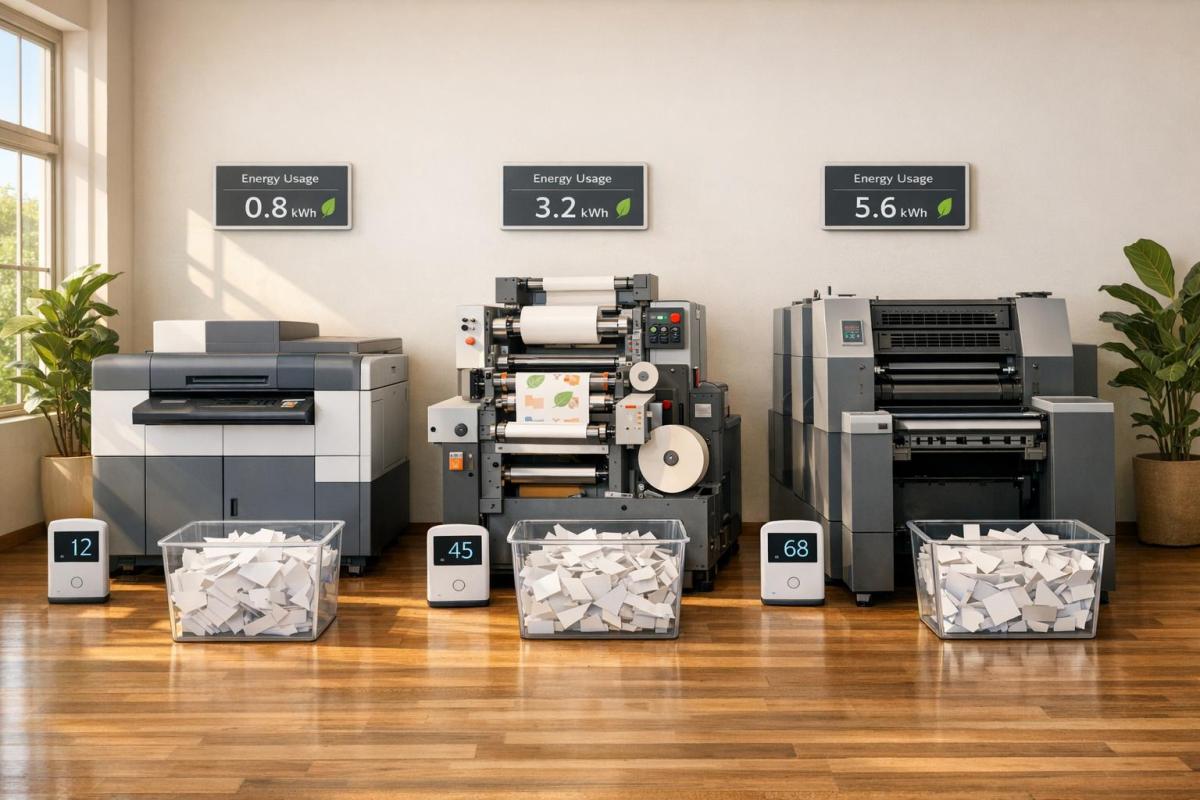
Printing methods like digital, flexographic (flexo), and offset each have unique strengths when it comes to energy use and waste reduction. Here’s a quick breakdown:
- Digital Printing: Best for short runs (100–5,000 units). Minimal setup energy, low startup waste (1–3%), and efficient curing with LED UV systems. Ideal for personalized or small-batch projects.
- Flexographic Printing: Suited for high-volume packaging (50,000+ units). Uses water-based inks to reduce VOC emissions by 20–40%. Inline processing and LED UV curing improve energy efficiency by up to 30%.
- Offset Printing: Great for large-scale projects like books and magazines. Though setup energy is high, it becomes efficient for long runs, with lower VOC emissions (80% less than digital for mass production).
Key takeaway: Digital excels in small runs, flexo is optimal for packaging, and offset works best for large-scale production. Energy-efficient technologies like LED UV curing can reduce energy use across all methods.
Quick Comparison
| Feature | Digital Printing | Flexographic Printing | Offset Printing |
|---|---|---|---|
| Setup Energy | Low | High | Very High |
| Startup Waste | 1–3% | 3–6% | Moderate to High |
| Best Use Case | Short runs, variable data | High-volume packaging | Large-scale books, magazines |
| Energy Efficiency | 0.04–0.10 kWh/pack | 0.07–0.12 kWh/pack | High for long runs |
| VOC Emissions | Low for short runs | Reduced with water-based inks | Lowest for mass production |
Choosing the right method depends on your project size, material type, and energy goals.
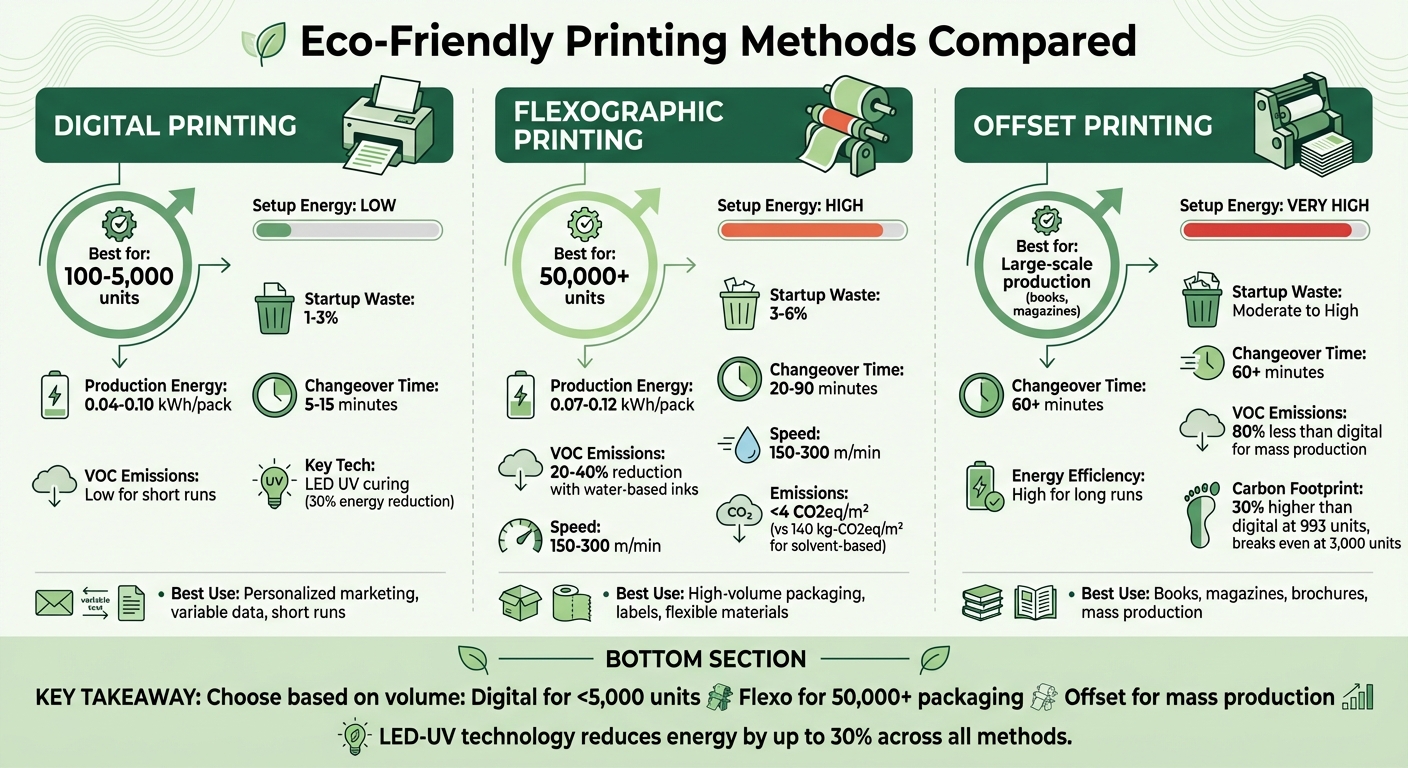
Digital vs Flexo vs Offset Printing: Energy Efficiency and Environmental Impact Comparison
Digital Printing: Energy Use and Environmental Impact
Low Setup Energy and Reduced Waste
Digital printing simplifies the process by sending files directly to the substrate, skipping the need for plate creation. This streamlined approach drastically cuts down on both setup energy and waste. For example, flexographic printing can require hundreds of meters of substrate to achieve proper color and registration, while digital printing systems often stabilize with just 5–20 sheets or a few tens of meters.
Flexo printing typically generates 3–6% waste during startup, but digital printing only needs those 5–20 sheets to stabilize. This efficiency is especially noticeable in small production runs, ranging from 100 to 5,000 units, where energy consumption per pack is significantly lower – usually between 0.04–0.10 kWh. Taylor Morgan, Print Production Lead at Printrunner, highlights this advantage:
"Digital engines minimize makeready and plate waste, but the sustainability math works best when short‑run or versioned work dominates."
By removing the need for plates – and the chemicals and solvents associated with them – digital printing reduces waste and energy use even further. This waste reduction not only lowers energy consumption but also aligns with advancements in curing technology.
LED UV Curing Systems
Curing technology is another area where digital printing shines in energy efficiency. Modern digital presses often use LED UV technology, which transforms the way inks cure. Unlike traditional mercury lamps that need warm-up time and produce excessive heat, LED systems operate with instant on/off functionality and focus light in narrow bands (365–395 nm). This precise targeting reduces wasted infrared heat and cuts energy use by 50–70% compared to mercury-vapor UV lamps.
The lower heat output of LED systems opens up the possibility of printing on thin, heat-sensitive materials without requiring energy-draining cooling systems. Additionally, LED lamps are incredibly durable, lasting around 20,000 hours compared to the 1,000–2,000 hours typical of older UV lamps. They also maintain consistent performance without the gradual power loss seen in traditional systems. These advancements not only reduce operational energy costs but also align with broader efforts toward sustainability outlined earlier in the discussion.
sbb-itb-ce53437
Flexographic Printing: Energy Use and Environmental Impact
Water-Based Inks and Lower VOC Emissions
Flexographic printing stands out for its use of water-based inks, which reduce VOC emissions by 20–40% compared to solvent-based systems. This not only improves air quality but also creates a safer working environment. However, the process does require careful management of drying energy and humidity.
The environmental advantages of flexo printing go further. A study conducted between October 1 and December 4, 2023, by the Beijing Institute of Graphic Communication, led by Professor Lixin Mo, revealed impressive results. Flexographic printing using water-wash plates and water-based inks produced emissions of less than 4 CO2eq/m², a stark contrast to the 140 kg-CO2eq/m² emissions from gravure solvent-based systems. Professor Mo highlighted:
"Flexographic printing provides numerous advantages, including a more environmentally friendly approach compared to other printing technologies… and the ability to facilitate high-speed mass production."
Advancements in ink technology, paired with modern curing methods, further improve flexo’s environmental footprint. For instance, integrating LED-UV curing technology into flexo systems reduces energy consumption by up to 30% while also cutting emissions. David Lee from Focus Label Machinery Ltd shared:
"LED UV is now creating a lot of interest because it uses up to 30% less energy and has reduced impact with regards to volatile emissions."
Inline Processing Reduces Energy Consumption
Flexographic printing also benefits from streamlined workflows that save energy. Inline processing combines multiple steps – such as printing, coating, laminating, and die-cutting – into a single pass. This eliminates the need for multiple setups, significantly reducing energy waste.
The efficiency gains are notable. Flexo presses typically operate at speeds of 150–300 m/min. When paired with inline processing, these systems minimize idle time and optimize energy use per meter. In February 2023, a Pakistani packaging company reduced machine idle time by 30%, resulting in energy savings of approximately 34–39% per meter. Rodney Pennings, Sales Director at Paper Converting Machine Co, explained:
"Finding ways to produce a finished product in one pass has helped to drive down production costs and waste while helping to broaden product offerings and access to new markets."
Additionally, heat recycling systems in modern flexo presses contribute to substantial energy savings, cutting energy costs by 23% to 35%. This makes flexo particularly efficient for high-volume production runs exceeding 50,000 units.
Offset Printing: Energy Use and Environmental Impact
Higher Setup Energy for Plate Preparation
Offset printing involves a significant energy investment upfront, particularly for creating the four CMYK aluminum plates and calibrating the press system. While aluminum plates are recyclable, the energy required for their production is considerable. This high setup energy makes offset printing less efficient for smaller print runs. However, as the volume of production increases, energy consumption and emissions per unit drop dramatically. For runs exceeding 500–1,000 units, offset printing becomes more energy-efficient, reducing the overall carbon footprint per item. Interestingly, lithographic offset printing produces nearly 80% fewer Volatile Organic Compounds (VOCs) compared to digital printing when used for extended production runs.
Recent innovations, such as LED-UV curing technology, are helping offset some of these energy demands by cutting down on curing energy and reducing process-related waste.
LED-UV Technology and Water Consumption
Modern offset presses now utilize LED-UV curing systems, which have revolutionized energy efficiency. Unlike traditional mercury-vapor lamps, LED-UV systems require no warm-up time and emit far less heat. These systems can lower energy consumption by as much as 70%, with overall press energy usage dropping by up to 30%. Additionally, LED lamps boast a lifespan of approximately 20,000 hours, compared to the 1,000–2,000 hours typical of older UV lamps. Their instant on/off functionality also allows presses to handle thicker ink layers – like metallic finishes – without smudging, thanks to faster curing speeds.
Beyond energy savings, water management is a key factor in offset printing efficiency. Water is used on the plate roller to ensure it adheres only to non-image areas, repelling oil-based inks and directing them precisely to the image areas. Many operations now use digital plate processing with water or digital imaging, eliminating the need for harmful developer chemicals. This shift not only reduces environmental impact but also cuts down on water and energy waste. Furthermore, standardizing press settings during startup helps minimize both water and substrate waste.
Energy Efficiency Comparison: Digital vs Flexo vs Offset
Side-by-Side Comparison Table
When deciding on the most sustainable printing method, energy efficiency plays a crucial role. Each method has its own advantages depending on the project size and specific requirements.
Digital printing is ideal for short runs, using 0.04–0.10 kWh per pack when workflows are optimized. Flexographic printing, while slightly more energy-intensive at 0.07–0.12 kWh per pack with traditional UV curing, benefits from high-speed production (150–300 meters per minute) once the press is fully operational. Offset printing, on the other hand, consumes the most energy during setup due to plate preparation and refrigeration systems. However, its cost per unit becomes much lower for high-volume projects. The table below highlights these differences.
"Sustainability isn’t a single metric. kWh per pack, VOCs from inks/cleaning, scrap rates during changeovers, and compliance… all factor in." – Madison Cole, Senior Packaging & Labeling Strategist, OnlineLabels
| Feature | Digital Printing | Flexographic Printing | Offset Printing |
|---|---|---|---|
| Setup Energy | Low (No plate creation) | High (Plate mounting & calibration) | Very High (Complex plate preparation) |
| Production Energy | 0.04–0.10 kWh/pack | 0.07–0.12 kWh/pack | High (Plate preparation & refrigeration) |
| Startup Waste | 1–3% | 3–6% | Moderate to High |
| Changeover Time | 5–15 minutes | 20–90 minutes | 60+ minutes |
| VOC Emissions | Low for short runs; higher for long runs | Reduced 20–40% with water-based inks | Lowest for mass production |
| Best Application | 100–5,000 units, variable data | 50,000+ units, labels, packaging | Mass production books, magazines |
These figures highlight how production volume is a key factor in determining the most sustainable choice. For example, a life cycle assessment comparing the HP Indigo 7000 Digital Press to offset printing for 8-page brochures revealed a 30% lower carbon footprint for digital printing at the economic breakeven point of 993 brochures. However, the environmental breakeven point, where the overall impact of both methods aligns, wasn’t reached until producing approximately 3,000 brochures – 2.4 to 4.1 times higher than the economic breakeven. This emphasizes the need to weigh both economic and environmental factors when selecting a printing method.
How to Choose the Right Printing Method
Key Factors to Consider
When selecting a printing method, aligning your production needs with energy and cost efficiencies is crucial. Based on the energy comparison table, project volume is the most important consideration. For short runs (100–5,000 units), digital printing stands out due to its minimal startup waste (1–3%) and the absence of plate requirements, which enhances efficiency. On the other hand, once production exceeds 50,000 units, flexographic printing becomes more economical. Its lower energy consumption per unit (0.001–0.004 kWh per label) and reduced running costs outweigh its higher initial waste. For extremely large-scale projects, offset printing shines, as its per-unit costs drop significantly, making it a go-to for high-volume commercial needs despite the higher setup energy and waste.
The material type also plays a significant role. Flexographic printing works well for flexible packaging, labels, corrugated boxes, and foil substrates, especially with water-based inks that can cut VOC emissions by 20–40%. Digital printing performs best on standard materials like paper, certain films, and labels, though it may struggle with specialty substrates. Offset printing remains the benchmark for high-quality paper products, including books, brochures, and magazines.
Budget considerations require balancing setup and per-unit costs. Digital printing eliminates plate expenses, making it ideal for smaller runs, though its per-unit costs rise for larger volumes. Flexographic and offset methods involve higher upfront costs for plates and setup but deliver significant savings once production scales up. For example, the economic break-even point for offset printing occurs at around 993 8-page brochures, while the environmental break-even is closer to 3,000 units. This makes digital printing a greener option for mid-range volumes.
By evaluating these factors, you can determine which method best fits your specific project needs.
Method Recommendations by Project Type
Based on volume, material, and budget, here’s how to match the printing method to your project:
- Digital printing is perfect for short-run projects like personalized marketing campaigns, variable data printing, or multi-SKU jobs. With a quick changeover time of 5–15 minutes and almost no makeready waste, it’s ideal for runs under 3,000 units. Opting for LED-UV curing can also lower energy use by about 30% compared to traditional systems.
- Flexographic printing is best suited for packaging projects over 50,000 units, especially for flexible materials or labels. Its use of reusable polymer plates and water-based inks supports sustainability goals in medium- to long-run production. While changeover takes 20–60 minutes and startup waste ranges from 3–6%, its high-speed output (150–300 meters per minute) ensures cost and energy efficiency at scale.
- Offset printing excels in large-scale commercial projects like books, magazines, and brochures. Its higher setup energy and plate preparation waste become justifiable when spread across tens of thousands of copies, making it the most economical choice for massive volumes.
Conclusion
Making Energy-Efficient Printing Choices
Selecting the best printing method comes down to your project’s scale and environmental goals. For smaller runs, digital printing shines by reducing setup waste and energy use. If you’re producing over 50,000 units of packaging or labels, flexographic printing – especially with water-based inks that lower VOC emissions by 20–40% – is a solid choice for efficiency. On the other hand, offset printing, while energy-heavy during setup, becomes more cost-effective and energy-efficient for large commercial runs, as the setup energy is spread across higher volumes. Studies show that digital printing’s carbon footprint is about 30% lower than offset printing for runs up to 3,000 units, but offset takes the lead for larger projects.
Modern LED-UV systems can cut energy use by up to 30% across all three printing methods. Additionally, water-based ink systems offer another layer of sustainability. For instance, flexographic printing with water-wash plates can achieve emissions as low as 4 CO₂eq/m², a stark contrast to the 140 kg-CO₂eq/m² associated with solvent-based options.
"Sustainability isn’t a single metric. kWh per pack, VOCs from inks/cleaning, scrap rates during changeovers, and compliance… all factor in."
– Madison Cole, Senior Packaging & Labeling Strategist, OnlineLabels
For flexible packaging, combining UV-LED systems with flexographic processes delivers an effective mix of speed and eco-friendliness.
Ultimately, the right printing method depends on your project’s volume and sustainability priorities. For short-term marketing campaigns, digital printing’s low waste makes it ideal. For high-volume packaging, flexography’s efficiency can outweigh its upfront setup costs. Carefully consider your typical run lengths, materials, and budget to strike the best balance between environmental impact and cost.
For tailored advice on eco-conscious printing solutions, reach out to Miro Printing & Graphics Inc.
FAQs
How do I estimate my print run’s carbon footprint?
To figure out the carbon footprint of your print run, you can use tools that assess the impact based on factors like paper type, weight, and volume. Standards such as ISO 16759:2013 offer a framework for calculating carbon footprints using Life Cycle Assessment (LCA). Additionally, practical calculators provided by industry organizations can help you evaluate the emissions tied to your printing processes and make choices that are more environmentally conscious.
What does LED-UV curing change for sustainability?
LED-UV curing offers a greener alternative by cutting out mercury and ozone emissions completely. Plus, it slashes energy use by as much as 85% compared to traditional mercury-based UV curing methods. This makes it a much more eco-friendly option, reducing its overall impact on the environment.
Are water-based inks always the greenest option?
Water-based inks might seem like a greener option at first glance, but that’s not always the case. Drying them can use up a lot of energy, and their environmental impact can vary based on how they’re formulated and applied. Whether they’re a better choice depends heavily on the specific printing method and situation.
Related Blog Posts
- Cost Analysis: Traditional vs. Alternative Materials
- Top 5 Factors for Choosing Printing Methods
- Offset vs. Digital: Fogra Color Accuracy
- Offset vs Digital: Bulk and On-Demand Printing
https://app.seobotai.com/banner/banner.js?id=69982f42efc60cc2af088eeb
 BergenCountyPrintersBlogs