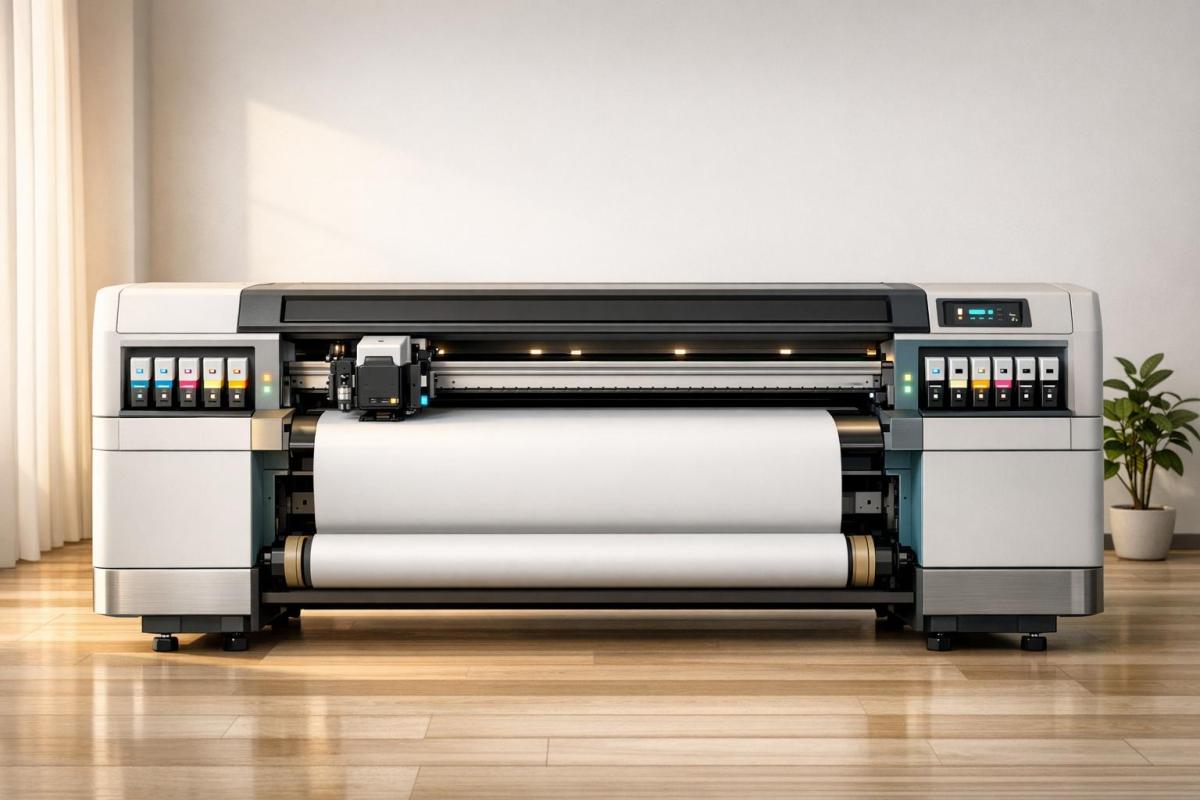
Large Format Paper Types Explained

Choosing the right paper for large format printing is vital for quality and durability. Explore different types and their ideal applications.

Large format printing is used for creating large, attention-grabbing visuals like posters, banners, and architectural plans. Choosing the right paper is crucial as it impacts image quality, durability, and overall presentation. Here’s what you need to know:

  • Glossy Paper: Shiny surface for vibrant colors; best for photos and marketing materials but prone to glare.
  • Matte Paper: Non-reflective, ideal for text-heavy designs or art prints; offers a polished look but less color intensity.
  • Satin Paper: A middle ground between glossy and matte; vibrant colors with reduced glare.
  • Bond Paper: Affordable and durable; perfect for blueprints, CAD drawings, and technical documents.
  • Canvas & Specialty Papers: Textured options for art reproductions or durable materials like polypropylene for outdoor use.

Key factors to consider include paper weight (measured in pounds or gsm), thickness (in mils), and finish type (glossy, matte, or satin). Heavier papers are more durable and suitable for long-term projects, while lightweight options work well for temporary displays.

For professional guidance, companies like Miro Printing & Graphics Inc. can help you select the best paper type, ensuring high-quality results tailored to your project’s needs.

Paper Guide: Paper Types for Printing – Choosing the Right One

Common Large Format Paper Types

Choosing the right paper type for large format printing can significantly impact the look and durability of your project. Each type of paper brings unique qualities to the table, making it suitable for specific uses. Below is an overview of the most common options and their ideal applications.

Glossy Paper

Glossy paper stands out for its shiny, reflective surface that enhances color vibrancy and sharpness. This finish makes it a go-to choice for photo prints, posters, and marketing materials like flyers. The rich, deep colors it produces are visually striking, but its reflective surface can create glare under bright lighting, which is something to consider depending on your display setting.

Matte Paper

Matte paper, with its non-reflective finish, offers a sleek and professional look. It’s perfect for applications like fine art prints, artwork, and presentations where a glare-free experience is essential. While matte paper may not deliver the same color intensity as glossy options, it excels in detail reproduction and provides a high-end feel.

Satin Paper

Satin paper strikes a middle ground between glossy and matte finishes. Its semi-gloss surface offers vibrant color reproduction without the harsh glare of glossy paper. This makes it an excellent choice for photo prints and display graphics, especially in environments with varied lighting conditions.

Bond Paper

Bond paper is a practical and budget-friendly option, known for its bright white surface and clarity, especially for line work and text. It’s widely used for blueprints, CAD drawings, and engineering or architectural documents. Available in weights ranging from 75–90 GSM (20#–24#) for everyday use to 90–110 GSM (24#–28#) for premium presentations, bond paper comes in widths like 24", 36", and 42", with roll lengths between 150 and 650 feet.

Canvas and Specialty Papers

Canvas and specialty papers cater to more creative and niche needs. Textured canvas paper is ideal for art reproductions, giving prints the look of traditional paintings. Specialty options like backlit film are perfect for illuminated displays, such as light boxes, retail signage, or architectural lighting, offering a glowing effect. Other materials, such as Tyvek, provide added water and tear resistance, while clear film works well for overlays in engineering and architectural projects.

Paper Type Best Applications Key Benefits Typical Cost Range
Glossy Posters, marketing materials, photo displays Vibrant colors, sharp details Medium
Matte Art prints, presentations, gallery displays Glare-free, polished appearance Medium
Satin Photo prints, retail displays, trade shows Balanced color with minimal reflection Medium
Bond Blueprints, CAD drawings, technical documents Affordable, durable, clear text Low
Canvas/Specialty Art reproductions, backlit displays, overlays Unique textures and specialized features High

Key Paper Attributes

Choosing the right paper type is just the first step. Understanding its technical attributes ensures your final print looks and performs exactly as you need.

Weight and Thickness

In the U.S., paper weight is measured in pounds per ream (500 sheets) or in grams per square meter (gsm). These factors directly impact both the print’s appearance and its durability. For large-format printing, weights can range from 20–24 lb (75–90 gsm) for everyday bond papers to 44 lb or more (300+ gsm) for heavyweight fine art papers.

Thickness, measured in mils, plays a crucial role in stiffness and rigidity. It affects printer feeding, curling, and whether the print shows through on the other side, which is especially important for double-sided printing. For canvas prints or similar applications, thicker, heavyweight papers are essential to handle stretching without tearing.

  • Papers over 32 lb (120 gsm) feel sturdier, resist curling, and are excellent for client presentations, photography, and art reproductions.
  • Medium-weight papers, typically 24–28 lb (90–105 gsm), are great for posters and general signage.
  • Lightweight papers are ideal for high-volume projects where cost efficiency is a priority.

Finish Options

The finish of a paper determines how it reflects light and interacts with ink:

  • Glossy finishes reflect the most light, producing vibrant colors and sharp details. However, they can cause glare in bright lighting.
  • Matte finishes have a non-reflective surface, reducing glare and making them ideal for text-heavy documents or displays in well-lit areas.
  • Satin finishes strike a balance, offering moderate color vibrancy while minimizing glare. This makes them versatile for professional photography and presentations.

Glossy papers typically use less ink since they absorb less, while matte papers may require specially formulated inks to prevent smudging.

Paper Comparison Table

Attribute Lightweight (20–24 lb) Medium Weight (24–32 lb) Heavyweight (32+ lb)
Thickness Under 4 mils 4–6 mils 6+ mils
Best Finishes Matte, Bond Glossy, Satin, Matte All finishes available
Durability Basic handling Good resistance to wear Excellent durability
Ideal Applications CAD drawings, drafts, blueprints Posters, presentations, retail signage Fine art, photography, premium displays
Curl Resistance Low Moderate High

Environmental factors also play a role in paper performance. Heavier papers are more stable in changing humidity, while lightweight papers may absorb moisture and ripple. For outdoor use or displays near windows, UV-resistant coatings can protect against sunlight and water damage, making them a smart choice for long-lasting projects.

Specialty Papers and Advanced Uses

When standard paper just doesn’t cut it for your project, specialty materials can offer exciting new possibilities. These premium substrates require a bit more care but deliver outstanding results, especially for high-end or creative applications.

Canvas and Art Papers

Canvas and art papers go beyond the basics, offering textured finishes and long-lasting durability that make them perfect for premium prints. Canvas paper, for example, stands out with its thick, textured surface – ranging from 10 to 24 mils – that mimics the look and feel of traditional paintings. This makes it ideal for gallery wraps and fine art reproductions, where the image extends around the edges of a frame, capturing the essence of the original artwork.

Not only does canvas paper provide a stunning visual impact, but its archival quality and stretchability also ensure that colors remain vibrant for decades. This durability makes it a favorite for gallery applications and professional art prints. Similarly, art papers offer a variety of textures and finishes. Some are smooth, making them great for detailed photographic work, while others have subtle textures that enhance artistic prints. Both options are excellent for high-end photography and fine art.

For projects requiring different features, films and synthetic materials provide unique advantages.

Backlit Film and Polypropylene

If your project needs to stand out with illuminated visuals or withstand outdoor conditions, films and synthetic materials are worth exploring. Backlit film is specifically designed for lightboxes, retail displays, and trade shows. Its translucent material ensures even light diffusion, making graphics vibrant and eye-catching.

Polypropylene, on the other hand, is a tough synthetic material that’s waterproof, tear-resistant, and UV-resistant. These properties make it an excellent choice for outdoor signage and banners, offering durability and cost-effectiveness for long-term use.

Finishing Options for Specialty Papers

After choosing the right specialty material, applying the proper finishes can take your project to the next level. Finishes like lamination add a clear protective layer, shielding prints from scratches, moisture, and UV light. UV coating, on the other hand, enhances color saturation and sharpness while preventing fading and discoloration.

Handling and storage are also crucial for specialty papers, especially textured options like canvas. Prints should be handled carefully to avoid scratches or creases that could compromise their appearance.

Material Best Applications Key Properties Durability Level
Canvas Gallery wraps, fine art prints Textured, archival quality, stretchable High
Art Paper Fine art, premium photography Smooth or textured, archival properties Medium-High
Backlit Film Lightboxes, displays Translucent, even light diffusion Medium-High
Polypropylene Outdoor signage, banners Waterproof, tear-resistant, UV-resistant Very High

Choosing the right specialty paper and finishing options doesn’t just make your project look better – it ensures it lasts longer and leaves a professional impression.

How to Choose the Right Paper

Picking the right large format paper doesn’t have to be complicated. With a clear understanding of your project’s needs and a step-by-step approach, you can make smart choices that deliver high-quality results without breaking your budget.

Project Requirements Assessment

Start by evaluating the needs of your project. Think about where the final product will be displayed – indoors or outdoors – and how long it needs to last. Is it a temporary piece or something more permanent? Also, consider the desired image quality and your budget. Paper weight and thickness play a big role here, as they affect both durability and cost.

Paper Selection Process

Once you’ve outlined your project requirements, use the following guidelines to choose the right type of paper:

  • Event posters and retail displays: Opt for heavier, coated papers to achieve vibrant colors and long-lasting durability.
  • Technical drawings and blueprints: Lightweight coated or bond paper is ideal for clear details while keeping costs reasonable.
  • Fine art prints: Go for canvas or premium art papers with archival properties to ensure longevity and precise color reproduction.
  • Outdoor signage: Materials like polypropylene or vinyl are excellent for resisting tears, moisture, and UV exposure.

Before finalizing your choice, make sure the paper is compatible with your printer. Many wide-format inkjet printers designed for bond paper can only handle materials that are less than 9 mils thick. For critical projects, it’s a good idea to request test prints to confirm the final output meets your expectations.

How Miro Printing & Graphics Inc. Can Help

Even with a solid understanding of your needs, professional advice can make the process much easier. That’s where Miro Printing & Graphics Inc. comes in. With decades of experience, they specialize in helping clients navigate the balance between quality, durability, and budget.

"Let us know what type of project you are working on, and allow us to offer our expertise."

The team at Miro Printing & Graphics Inc. takes the time to understand your project, whether it’s a trade show display, architectural drawing, or fine art reproduction. They use real-world performance data to recommend the best paper options for your specific needs.

But their services go beyond just paper selection. Their Computer Layout & Design team ensures your artwork is perfectly tailored to the chosen paper type, while their in-house bindery offers finishing touches that enhance both durability and presentation. From scratch-resistant lamination to specialized mounting for gallery displays, they handle all the details to ensure a polished final product.

Miro Printing & Graphics Inc. also offers large format printing capabilities to accommodate various paper types and sizes. Whether you need standard U.S. architectural sizes like ARCH D (24 x 36 inches) or engineering sizes like ANSI E (34 x 44 inches), their flexibility ensures your project specifications are met.

For businesses managing large-scale distributions, their Mailing & Fulfillment Services provide a convenient, end-to-end solution. This approach saves time and guarantees consistent quality from printing to delivery.

"During the process, Miro Printing & Graphics Inc. will work with a professional, personal approach to better understand your company’s needs. The end result is a finished piece that exceeds your highest expectations but never your budget!"

Their attention to detail and customer-focused approach help avoid costly mistakes, ensuring your investment delivers exactly what you need. Clients often highlight their ability to handle complex projects while maintaining exceptional service and timely delivery.

Conclusion

Choosing the right large format paper can take your prints from ordinary to outstanding. The key is aligning paper characteristics – like weight, thickness, and finish – with the specific needs of your project. Whether it’s glossy paper for vibrant photo displays, bond paper for precise technical drawings, or polypropylene for weather-resistant outdoor banners, each material has a role to play.

Start by defining the requirements of your project: where the print will be displayed, how long it needs to last, and the visual impact you want to achieve. Glossy and satin papers enhance colors for photos, while bond and vellum are ideal for technical drawings. Outdoor projects demand tougher materials like vinyl or polypropylene to stand up to the elements.

Paper weight and thickness also influence print quality and cost. Most standard weights fall between 75 and 110 GSM (20# to 28#), with heavier papers offering more durability for tasks like mounting or stretching. However, keep in mind that many wide format inkjet printers can only handle materials under 9 mils thick. Always check your printer’s specifications before making a purchase.

For expert advice, you can rely on the decades of experience at Miro Printing & Graphics Inc. Their team can help you navigate the balance between quality, durability, and cost while ensuring your printer, paper, and ink work seamlessly together.

Additionally, their comprehensive services – spanning layout design, in-house bindery, and large format printing – provide a streamlined process from start to finish. This integrated approach ensures every detail is handled with care, delivering consistent results from the initial concept to the final product.

FAQs

How do I choose the right paper type – glossy, matte, or satin – for large format printing?

Choosing the right paper type for large format printing plays a big role in achieving the desired look and feel for your project. Glossy paper is known for its shiny, reflective surface that makes colors pop, making it an excellent choice for photographs or designs that need to grab attention. However, keep in mind that it can produce glare under bright lighting. Matte paper, on the other hand, has a smooth, non-reflective finish, ideal for text-heavy prints or artwork where clarity and a more understated appearance are key. If you’re looking for something in between, satin paper offers a soft sheen that enhances colors without the overly reflective quality of glossy paper, making it a versatile option for a variety of needs.

If you’re unsure which paper type is best for your project, the team at Miro Printing & Graphics Inc. in Hackensack, NJ, can provide expert guidance and deliver high-quality large format printing tailored to your needs.

How do paper weight and thickness influence the quality and durability of large format prints?

The weight and thickness of paper are crucial factors in determining the quality and durability of large format prints. Heavier, thicker paper offers greater resistance to tearing, creasing, and general wear, making it a smart choice for prints that will face frequent handling or need to last for extended periods.

For instance, if your print will be showcased in a busy area or exposed to outdoor conditions, opting for a sturdier paper stock can help preserve its look and extend its lifespan. Conversely, lighter paper might be better suited for short-term or budget-friendly projects where durability isn’t a top priority.

What are the benefits of using specialty papers like canvas or polypropylene for large format printing projects?

Specialty papers like canvas and polypropylene bring distinct benefits to large format printing, making them the go-to options for certain projects.

Canvas stands out for its textured, premium finish, making it an excellent choice for reproducing artwork, photography, or creating decorative prints. It’s not just visually appealing – it’s also durable and capable of showcasing vibrant colors, which is why it’s a favorite for both professional and personal uses.

On the other hand, polypropylene is a tough, tear-resistant material perfect for banners, signage, or outdoor displays. Its lightweight and water-resistant properties, combined with a smooth surface, allow for sharp, detailed prints that can hold up even in tough conditions.

The key to selecting the right paper lies in understanding your project’s specific needs – whether you’re prioritizing aesthetics, durability, or the ability to withstand environmental challenges.

Related Blog Posts

https://app.seobotai.com/banner/banner.js?id=68fd68819cea6427b3fdb0f2

Surface Treatments for Better Ink Adhesion

Explore effective surface treatments to enhance ink adhesion on low-energy materials, improving print quality and durability.

Getting ink to stick to materials like polyethylene or polypropylene can be challenging because of their low surface energy. Without proper preparation, prints may fade, peel, or smudge. The solution? Surface treatments that modify material properties to ensure ink bonds effectively. Here’s a quick breakdown:

  • Why Ink Doesn’t Stick: Low-energy surfaces repel ink, requiring at least 38 dynes/cm for proper adhesion.
  • Fixing the Problem: Techniques like corona, plasma, or primers increase surface energy or create bonding layers.
  • Choosing the Right Method: Each treatment method – corona for cost-efficiency, plasma for precision, primers for tough cases – has specific strengths and use cases.
  • Testing Is Key: Adhesion tests (e.g., tape test, dyne pens) confirm the success of treatments.

Surface treatments not only improve print durability but also reduce waste by preventing adhesion failures. Whether you’re printing on plastic films or metals, the right method ensures consistent, high-quality results.

Plasma and Flame Surface Treaters Improve Ink Adhesion for printing

Common Surface Treatment Methods

In the printing industry, three main surface treatment methods stand out, each tailored to specific materials and applications. Knowing how these methods work can help printers select the best option for their needs.

Corona Treatment

Corona treatment uses high-voltage electrical discharge to make challenging surfaces more ink-friendly. By exposing the material to electrical energy, oxygen in the air is ionized, creating ozone that oxidizes the surface. This oxidation increases the surface energy, allowing inks to adhere effectively.

This method is especially popular in flexography due to its ability to reliably control surface energy. It works by altering the polarity of non-absorbent materials like polyethylene and polypropylene, which naturally have low surface tension. Corona treatment can raise surface tension to the ideal range of 45-48 dynes/cm, ensuring high-quality printing.

One of the advantages of corona treatment is its simplicity. The equipment is relatively easy to use and integrates seamlessly into most production lines. It’s also considered a cost-efficient option, as the treatment is typically applied during manufacturing. For applications requiring more precision, plasma treatment may be a better choice.

Plasma Treatment

Plasma treatment offers a more precise approach by using ionized gas to modify surfaces. This method provides better control and uniformity compared to corona treatment, making it ideal for applications with strict specifications.

In plasma treatment, a highly energized gas interacts with the surface molecules, increasing surface energy while allowing for fine-tuned adjustments based on material needs. Unlike corona treatment, plasma can be customized for different substrates and requirements.

This method works well on a variety of materials, including both plastics and metals, making it a versatile option for complex projects that involve multiple substrate types. However, the added precision comes with higher equipment costs and greater operational complexity. Despite these challenges, plasma treatment is often worth the investment for projects requiring consistent, high-quality results across diverse materials.

When surface energy modification isn’t enough, primers can serve as an alternative solution, creating a bond between the ink and the substrate.

Primers and Adhesion Promoters

For situations where electrical treatments aren’t feasible, primers provide a practical alternative. Instead of altering surface energy, primers create a bonding layer that enables ink to stick to the substrate. This chemically compatible interface ensures strong adhesion.

Primers are applied through methods like spraying or dipping, and their formulations vary to suit different materials. This flexibility allows printers to select primers that work with both the substrate and the ink system being used.

UV-curable primers are particularly popular for synthetic materials. These primers cure quickly under UV light, forming a durable bond that enhances adhesion and print longevity. They’re especially useful for high-speed production or applications requiring immediate handling.

Primers are a go-to solution for materials that resist electrical treatments. They can be applied selectively to specific areas, offering targeted adhesion. However, using primers adds an extra processing step and requires careful selection to ensure compatibility with both the substrate and the ink.

Ultimately, the choice between corona treatment, plasma treatment, and primers depends on the specific materials, production needs, and quality goals. Corona treatment is a cost-effective option for many common materials, plasma offers precision for demanding applications, and primers provide a reliable solution when other methods fall short.

How Surface Treatments Improve Ink Adhesion

Improving ink adhesion starts with modifying surface energy, a crucial factor in transforming materials that are difficult to print on into ones that are more ink-friendly. By employing specific surface treatment techniques, manufacturers can significantly enhance the interaction between ink and substrate.

Raising Surface Energy

The secret to better ink adhesion lies in increasing surface energy – a measure of how readily liquids can spread across a material’s surface. Many printing challenges arise from materials with naturally low surface energy, which causes ink to bead up and fail to bond properly.

To address this, low-surface-energy materials need to reach at least 38 dynes/cm for effective ink wetting and bonding. Techniques like corona and plasma treatments are designed to tackle this issue. These methods introduce polar functional groups, such as hydroxyl, carbonyl, and carboxyl, onto the material’s surface through oxidation. This chemical modification boosts surface energy, making the material more receptive to ink.

When ink encounters a surface with high energy, it spreads evenly instead of forming droplets. This maximized contact ensures stronger adhesion and delivers better print quality.

Surface Changes and Cleaning

Beyond raising surface energy, these treatments also clean and physically alter the surface. For instance, corona and plasma treatments create a high-energy environment that volatilizes contaminants and slightly etches the surface. This etching introduces micro-roughness, which increases the surface area and provides more anchor points for mechanical bonding.

For materials that respond poorly to electrical treatments, mechanical cleaning methods like sanding or abrasion can achieve similar results. These methods remove debris and enhance surface roughness, further supporting ink adhesion.

Using Multiple Treatments Together

Combining surface treatment methods can produce results that exceed what a single approach can achieve. A popular strategy involves plasma treatment followed by the application of a primer. Plasma treatment raises the surface energy and cleans the substrate, while the primer acts as a chemical bridge between the ink and the treated surface. This dual process enhances both adhesion and durability, especially for challenging materials.

Using multiple treatments is particularly effective in preventing adhesion failures in demanding environments, reducing risks like delamination, fading, or abrasion. However, timing is critical – surface treatments can lose effectiveness over time, so follow-up treatments must be applied while the initial effects are still active.

For example, Miro Printing & Graphics Inc. employs this dual-method approach to achieve consistent, high-quality results. They also incorporate quality control measures such as surface energy testing and adhesion tests to customize the process for specific materials and printing needs.

Investing in combined treatments pays off by improving print quality, minimizing waste caused by adhesion failures, and enhancing the durability of the final product. This multi-step strategy lays the groundwork for rigorous adhesion testing and quality assurance, ensuring reliable outcomes for every project.

Comparing Surface Treatment Methods

Selecting the right surface treatment method is essential for achieving high-quality prints. Each method comes with its own strengths and weaknesses, impacting factors like cost, print quality, and compatibility with different materials. By understanding these differences, you can make better choices tailored to your specific needs.

Pros and Cons of Each Method

Corona treatment is a widely-used option for increasing surface energy, especially in high-volume production. It raises surface tension to the required 38 dynes/cm or higher, ensuring successful printing. Its cost-effectiveness and ability to integrate with existing production lines make it a popular choice.

However, corona treatment isn’t without challenges. Its effects diminish over time, particularly during long storage periods. It’s less effective on three-dimensional objects and requires controlled environments for consistent results. Additionally, it generates ozone, so proper ventilation is necessary.

Plasma treatment stands out for its ability to make molecular-level modifications. By using ionized gas, it creates stable and uniform surface changes that often last longer than those achieved with corona treatment. This method works on both plastics and metals, offering versatility. Its precise control over surface chemistry improves bonding with inks.

The downsides? Plasma treatment requires a higher initial investment and typically operates at slower speeds compared to corona treatment. While it produces minimal waste and emissions, it demands strict safety protocols for handling electricity and gases.

Flame treatment provides an economical way to prepare surfaces. It involves exposing materials to a controlled flame made from low-pressure air and gas. This method is effective for plastic substrates, especially those with mold release coatings that can challenge other treatment methods. It also comes with relatively low equipment costs.

On the flip side, flame treatment struggles with treating complex shapes uniformly and risks damaging surfaces with excessive heat. Combustion byproducts may require ventilation and adherence to environmental regulations.

Primers and adhesion promoters offer a different approach by creating a bondable layer between the ink and substrate rather than altering the surface itself. They ensure consistent adhesion, even on substrates with problematic surface properties, like those containing slip agents that migrate to the surface.

The drawbacks include additional processing steps, which increase production time and labor costs. Primers also add to material expenses and may affect the substrate’s appearance or thickness. Proper curing time is essential, adding another layer of quality control.

Treatment Method Surface Energy Increase Initial Cost Production Speed Durability Environmental Impact
Corona High Moderate Very High Good Moderate (ozone)
Plasma Very High High Moderate Excellent Low
Flame Moderate Low High Good Moderate-High (emissions)
Primers High Variable Low-Moderate Excellent Variable (VOCs)

Picking the Right Method for Your Material

The best surface treatment method depends on your material and production needs. To ensure proper adhesion, aim for a surface tension about 10 dynes/cm higher than your ink’s surface energy.

Polyolefin films like polyethylene and polypropylene are well-suited to corona treatment, which balances cost and effectiveness for these low-energy materials. However, if the films contain slip agents above 500 ppm, you’ll need to address the weak boundary layer they create before treatment.

Metal substrates and advanced plastics benefit most from plasma treatment. Its molecular-level modifications and versatility make it ideal for these materials. While the upfront costs are higher, the improved durability and quality often justify the investment for specialized applications.

Small-scale operations or production environments with varied needs might find flame treatment more practical. It’s particularly effective for plastic surfaces with mold release coatings, and its lower equipment costs make it accessible for businesses with tighter budgets.

Challenging substrates that don’t respond well to energy-based treatments may require primers or adhesion promoters. This approach ensures strong adhesion and works on materials that resist other methods.

Production volume also plays a key role. Corona treatment is ideal for high-volume, continuous production thanks to its speed and integration capabilities. Plasma treatment is better suited for specialized, low-volume tasks where quality is more important than speed. Primers, while versatile, add extra processing steps that can slow down production.

Finally, consider your facility’s capabilities. Corona and plasma systems require specialized maintenance and electrical safety protocols. Flame treatment involves fire safety measures and exhaust management. Using primers means handling hazardous materials and managing waste disposal.

For flexographic inks with surface tensions of 35-38 dynes/cm, aim to treat surfaces to 45-48 dynes/cm. This ensures the substrate meets the necessary energy levels for optimal adhesion.

Testing and Checking Ink Adhesion

Regular adhesion testing is a key step in ensuring effective surface treatments and maintaining high print quality. These tests are a cornerstone of strict quality control throughout the production process.

Standard Adhesion Tests

One of the most commonly used methods for checking ink adhesion is the tape test, which follows ASTM D3359 standards. This involves making cross-hatch cuts in the printed ink layer, applying a standardized adhesive tape over the area, and then quickly removing it. The amount of ink that remains on the substrate is then evaluated. If minimal ink is removed, it signals strong adhesion, whereas significant ink removal indicates weak bonding.

Another method, shear strength testing, measures the force required to separate the ink from the substrate. This test provides precise data, which is especially important when specific adhesion values are required for certain applications.

Dyne pen tests are also widely used to confirm that surface treatments have raised the substrate’s surface energy to the necessary levels. For example, substrates designed for flexographic inks typically need surface energies of 45–48 dynes/cm, while the inks themselves usually have surface tensions of 35–38 dynes/cm. Additionally, cross-hatch testing and rub resistance tests offer both qualitative and quantitative insights into how the ink will perform under real-world conditions.

Why Quality Control Matters

These testing methods form the backbone of robust quality control, which helps prevent small issues from turning into costly production problems. Even minor inconsistencies in surface preparation, ink chemistry, or environmental conditions can weaken adhesion. This can lead to product returns, damaged customer trust, or higher costs due to rework.

Environmental factors, in particular, can significantly affect adhesion. For instance, high humidity may slow ink drying, while elevated temperatures can speed up additive migration, weakening the bond. Additionally, when slip agents in film substrates exceed 500 ppm, they can create weak boundary layers that reduce adhesion. Regular testing helps catch these issues early, preventing larger problems down the line.

Keeping detailed records of test results is another critical aspect of quality control. These records help track equipment performance, ensure process consistency, and support ongoing improvement efforts. Proper training on testing techniques and routine calibration of equipment are also essential for ensuring accurate and reliable results.

Miro Printing & Graphics’ Methods

At Miro Printing & Graphics Inc., rigorous adhesion testing is an integral part of the production process to guarantee high-quality prints. The company employs multiple testing methods to confirm that surface treatments meet the specific demands of various printing applications. These tests are carefully aligned with their surface treatment strategies to ensure every substrate meets the required standards.

Before printing, dyne pen measurements are used to verify that substrates have been properly treated. During production, tape tests provide quick quality checks, allowing for real-time adjustments to surface treatments or ink formulations as needed.

After production, more detailed testing – such as shear strength testing and rub resistance tests – is conducted to ensure the final products can withstand their intended use. Whether it’s outdoor signage or packaging, these protocols confirm that the products are built to last. Additionally, all test results are recorded to optimize future projects and provide quality assurance documentation for customers.

Environmental monitoring also plays a key role. By tracking factors like temperature and humidity during printing and curing, Miro Printing & Graphics ensures that adhesion develops as expected. For specialized applications that demand maximum durability, the company employs a combination of advanced surface treatments and rigorous testing to consistently deliver products that meet or exceed performance requirements.

Getting Better Ink Adhesion with Surface Treatments

Surface treatments play a key role in tackling the common issue of poor ink adhesion on low-energy substrates. By increasing surface tension, these treatments create the conditions needed for strong bonding. For durable prints, substrates should ideally have a surface tension about 10 dynes/cm higher than the ink’s surface energy.

The success of these treatments depends on achieving the right energy balance. Methods like corona, plasma, flame treatments, and chemical primers are tailored to address specific substrate challenges and production needs. When used together strategically, they bridge the gap between low-energy surfaces and dependable ink adhesion.

A multi-step approach often delivers the best results. Start by cleaning the surface to remove contaminants. Then, apply surface modification treatments to boost surface energy. Finally, use primers to achieve the highest level of adhesion when needed. This layered process tackles different adhesion challenges, making it particularly effective for applications that demand long-lasting durability.

To ensure the treatments work as intended, standard tests are used to verify that the required surface energy has been achieved. These quality control steps, combined with environmental monitoring, help maintain consistent adhesion under varying production conditions.

Miro Printing & Graphics Inc. brings decades of expertise to the table, offering tailored guidance to match treatment methods with specific substrate and ink challenges. Their technical support simplifies the process of selecting the best treatment combinations for unique printing needs.

Whether you’re working with tricky polyolefin films, metal substrates, or specialized applications that demand extra durability, the right surface treatment can turn adhesion problems into smooth, reliable results. Proper preparation not only enhances print quality but also reduces waste and ensures consistent performance across a range of printing projects.

FAQs

How can I choose the right surface treatment to improve ink adhesion for my material?

When it comes to choosing the right surface treatment, a few crucial factors come into play: the material you’re using, the type of ink, and the desired appearance and durability of your print. Techniques such as corona treatment, plasma treatment, and primers each offer distinct advantages, making them suitable for various materials and printing needs.

If you’re unsure which option is best for your project, reaching out to an experienced print shop like Miro Printing & Graphics Inc. in Hackensack, NJ, can make all the difference. Their knowledge of printing methods and materials can guide you in selecting the ideal approach to achieve top-notch results tailored to your requirements.

What are the main differences between corona and plasma treatments, and how do they affect ink adhesion on various materials?

Corona and plasma treatments are both techniques used to enhance surface properties for better ink adhesion, but they operate differently and are suited to distinct materials. Corona treatment relies on a high-voltage electrical discharge to boost the surface energy of non-porous materials like plastics, making them more ink-friendly. In contrast, plasma treatment uses ionized gas to clean, activate, or coat surfaces, offering greater precision and the flexibility to treat a broader range of materials, including metals and glass.

Choosing between these methods often comes down to the material and the specific application. Corona treatment is generally more budget-friendly and ideal for flat, simple surfaces. Plasma treatment, however, excels with intricate shapes and materials that need a more thorough treatment. Both approaches are effective, but selecting the right one depends on the unique requirements of your project to achieve the best ink adhesion results.

What’s the best way to ensure ink adheres well and lasts on different surfaces, even in challenging conditions?

When it comes to ensuring durable and lasting ink adhesion, choosing the right surface treatment for your material and ink type is key. Techniques like corona treatment, plasma treatment, or applying primers are widely used to prepare surfaces, enhancing their ability to bond with the ink effectively.

Partnering with experienced professionals can elevate your results. A reliable print shop with expertise in surface treatments can help you select the most suitable method for your project. This ensures not only strong adhesion but also resistance to environmental wear, keeping your product intact throughout its lifecycle.

Related Blog Posts

https://app.seobotai.com/banner/banner.js?id=68fc16499cea6427b3fd9216

Offset vs Digital: Bulk and On-Demand Printing

Explore the differences between offset and digital printing to determine the best choice for your project based on volume, cost, and customization needs.

When choosing between offset and digital printing, the right option depends on your project’s size, budget, timeline, and customization needs. Here’s a quick breakdown:

  • Offset printing is ideal for large print runs (1,000+ pieces). It offers lower per-unit costs, precise color matching (Pantone), and supports specialty finishes like metallic inks and embossing. However, it has high setup costs ($500–$2,000+) and longer turnaround times (3–7 days).
  • Digital printing works best for short runs (1–500 pieces) or projects needing quick turnarounds (same day to 24 hours). It supports personalization (e.g., unique names or promo codes) and has low setup costs, but the per-unit cost remains higher and specialty options are limited.

Key Considerations:

  • Quantity: Offset is cost-effective for bulk orders; digital suits smaller runs.
  • Budget: Offset saves money on large projects; digital avoids upfront costs.
  • Timeline: Digital is faster; offset takes longer due to setup.
  • Customization: Digital handles variable data; offset produces identical copies.

For example, if you’re printing 10,000 brochures, offset printing may cost $0.10–$0.20 per piece, compared to $0.25–$0.40 with digital. But for fewer than 500 pieces, digital printing is more practical and flexible.

Quick Comparison:

Factor Offset Printing Digital Printing
Best For Large runs (1,000+ pieces) Short runs (1–500 pieces)
Setup Cost High ($500–$2,000+) Low ($0–$50)
Per-Unit Cost Low at volume ($0.05–$0.10) Flat rate ($0.50–$1.00)
Turnaround Time 3–7 days Same day to 24 hrs
Customization Not supported Fully supported
Specialty Finishes Extensive options Limited options

For businesses, combining both methods can be effective. Use offset for bulk orders like catalogs or brochures, and digital for personalized mailers or quick updates. Services like Miro Printing & Graphics Inc. in Hackensack, NJ, can guide you based on your project’s specifics.

Offset Printing Vs Digital Printing [ Difference & Best ]

Offset Printing: How It Works and When to Use It

Offset printing has long been a cornerstone of commercial printing, and for good reason. Knowing how it works and when it’s the right choice can help businesses make smarter decisions for their printing needs.

How Offset Printing Works

Offset printing starts with the creation of aluminum plates – one for each color. Most jobs require four plates for cyan, magenta, yellow, and black (CMYK), though additional plates might be needed for specialty colors or finishes. These plates are mounted onto the press, where they’re inked. The ink is then transferred to a rubber blanket cylinder, which applies the image onto paper or other materials. This indirect transfer is what defines offset printing.

Before production begins, operators run test sheets to ensure proper alignment and color balance. While calibration takes time, it’s critical for maintaining consistent quality. The process also involves using specialized inks, cleaning agents, and equipment for custom finishes. This meticulous setup is why offset printing is known for its superior results.

Offset Printing Advantages

Offset printing stands out for its outstanding print quality. It produces sharp details and accurate colors, making it ideal for brands that require precise color matching, such as those relying on the Pantone Matching System (PMS). When it comes to large print runs, the cost savings are hard to ignore. For example, printing 10,000 brochures via offset might cost $0.10–$0.20 per piece, compared to $0.25–$0.40 per piece with digital printing .

This method also supports a wide variety of specialty inks and finishes, including metallics, fluorescent colors, embossing, varnishing, and foil stamping. Additionally, it can handle many types of paper, from lightweight newsprint to heavy cardstock, offering creative freedom for designers and marketers.

Offset Printing Drawbacks

The biggest downside to offset printing is its high setup cost, which can range from $200 to $500 or more, depending on the complexity of the job and the number of colors involved. This upfront expense makes it less practical for smaller print runs, where the cost can’t be distributed across a large quantity.

Another limitation is its lack of flexibility for variable data. Since every copy is identical, offset printing isn’t suitable for projects that require personalization, like customized mailings or business cards. The calibration process also generates waste in the form of scrap sheets, which adds to material costs .

Given these factors, offset printing is best suited for high-volume projects that demand consistent, high-quality output. Think magazines, catalogs, corporate brochures, and marketing materials. Companies like Miro Printing & Graphics Inc. use offset printing to deliver precise color accuracy and custom finishes for large-scale projects, ensuring they meet even the most rigorous quality standards.

Digital Printing: How It Works and When to Use It

Digital printing offers speed, flexibility, and the ability to personalize content in ways traditional methods can’t match. Knowing how it operates – and when it’s the right choice – can help businesses make smarter decisions for their printing needs.

How Digital Printing Works

Unlike offset printing, which requires physical plates, digital printing works by transferring images directly from digital files to the printing surface. All you need is a PDF file sent straight to the digital press. Using either toner-based or inkjet systems, the image is applied and fused directly onto the material. This eliminates the need for lengthy setups, test sheets, or waiting for ink to dry. The result? A faster, more streamlined process that’s ready to go almost immediately.

Why Choose Digital Printing?

Digital printing shines when speed, flexibility, and customization are priorities. Here’s why:

  • Quick Turnaround: Materials can be printed in just hours, making it a go-to solution for tight deadlines or last-minute projects.
  • Cost-Effective for Short Runs: Without the hefty setup fees of offset printing, digital printing is ideal for smaller quantities. Whether you need one piece or a few hundred, the cost per unit stays consistent.
  • Personalization: Variable data printing lets you customize each piece with unique details like names, addresses, or promotional codes. In fact, personalized campaigns using this method can boost response rates by up to 36% compared to generic ones.
  • Eco-Friendly: Digital printing uses fewer chemicals and generates less waste. Plus, it’s easy to make last-minute updates to digital files without redoing any plates.

However, while digital printing has plenty of perks, it’s not without its limits.

The Drawbacks of Digital Printing

For all its advantages, digital printing does have some constraints:

  • Higher Costs for Large Runs: If you’re looking to print thousands of copies (like 5,000 brochures), the per-unit cost of digital printing can add up, making offset printing a more economical choice.
  • Limited Specialty Options: Digital presses don’t handle specialty finishes as well as offset presses. Metallic inks, embossing, spot varnishes, and textured papers may not be available or as effective.
  • Color Accuracy: While digital printing has come a long way, achieving precise Pantone color matching can still be tricky. For projects requiring flawless color fidelity, offset printing might be a better fit.

Digital printing works best for short-run projects (under 500 pieces), on-demand jobs with tight timelines, or materials that benefit from frequent updates or personalization. Local print services, like Miro Printing & Graphics Inc. in Hackensack, NJ, use digital printing to help businesses produce high-quality, customized marketing materials quickly and efficiently.

Offset vs Digital: Side-by-Side Comparison

When choosing between offset and digital printing, it’s important to weigh how each method performs across key factors, especially when managing bulk orders versus on-demand projects.

Quality and consistency:
Offset printing is unmatched in color accuracy and detail, making it the go-to option for projects that demand precise Pantone color matching. Its plate-based setup ensures consistent quality, even across thousands of copies, which is ideal for high-end marketing materials and packaging. Digital printing, while greatly improved, delivers quality that meets most standard business needs. However, slight inconsistencies in color may appear during long runs or when working with specialty materials.

Cost structure:
Offset printing comes with steep upfront costs due to the need for plate creation and press setup, which can range from hundreds to thousands of dollars. That said, its per-unit cost drops significantly as volume increases, often reaching as low as $0.05 to $0.10 per piece for runs of 10,000 or more. Digital printing, on the other hand, has minimal setup costs, but its per-unit cost remains fixed, typically between $0.50 and $1.00 per piece, making it more cost-effective for shorter runs. This cost difference also impacts production speed and scheduling.

Turnaround time:
Speed is where digital printing shines. Without the need for plate creation or extensive calibration, projects can often be completed within hours. Offset printing, however, requires additional time for setup, including plate preparation and press adjustments, which can extend project timelines by several days. Once setup is done, though, the actual printing process for offset is very fast.

Flexibility and customization:
Digital printing is the clear winner for personalization. It supports variable data printing, allowing unique details – like names, addresses, or promo codes – to be incorporated into each piece without slowing down production. Offset printing, by contrast, is less adaptable; making changes typically requires new plates, adding to the cost and time.

Offset vs Digital Printing Comparison Chart

Factor Offset Printing Digital Printing
Best For Large runs (1,000+ pieces) Short runs (under 500 pieces)
Setup Cost High ($500–$2,000+) Low ($0–$50)
Per-Unit Cost Low at volume ($0.05–$0.10) Flat rate ($0.50–$1.00)
Turnaround Time 3–7 days Same day to 24 hrs
Print Quality Highest, with precise color matching Very good; meets most needs
Color Accuracy Excellent for Pantone matching Good, with limits on specialty colors
Personalization Not supported Fully supported
Minimum Quantity Typically 500–1,000 pieces As low as 1 piece
Paper Options Wide range, including specialty stocks Standard to good variety
Specialty Finishes Extensive (metallic, embossing, etc.) Limited options
Environmental Impact Higher waste and chemical use Lower waste and fewer chemicals
Content Changes Expensive (requires new plates) Easy and cost-effective

Substrate compatibility:
For projects requiring a variety of paper types, thicknesses, or specialty finishes like metallic inks and custom coatings, offset printing has the upper hand. Digital printing works well with most standard papers but can struggle with very thick, textured, or specialty materials.

Miro Printing & Graphics Inc., located in Hackensack, NJ, offers both offset and digital printing. Their expertise allows them to recommend the best approach tailored to your project’s volume, timeline, and customization needs.

How to Choose Between Offset and Digital Printing

Choosing the right printing method depends on a few key factors: project size, budget, timeline, and customization needs. By carefully weighing these elements, you can determine which option best suits your specific requirements.

Quantity is a good starting point. Offset printing becomes cost-effective when you’re producing 1,000 to 5,000 pieces or more. On the other hand, digital printing is ideal for smaller runs and even allows for single-copy orders without additional costs.

Next, think about total costs. Offset printing involves upfront expenses for plate creation and press setup, which can range from several hundred to thousands of dollars. However, the per-unit cost decreases significantly as your order volume increases. Digital printing, meanwhile, has consistent per-unit pricing regardless of quantity, making it a better choice for smaller budgets or short runs.

Deadlines and customization needs are also critical. Digital printing offers quick turnaround times and supports variable data, such as personalized names, addresses, or promo codes. In contrast, offset printing requires extra time for plate creation and press adjustments, making it better suited for projects with static content where every copy is identical.

Quality and material preferences should not be overlooked. If your project demands precise Pantone color matching, specialty inks, or premium finishes, offset printing generally delivers superior results. Digital printing, while sufficient for most standard business needs, may struggle with specialty materials or very thick paper stocks.

Your regular printing habits matter, too. For frequent small batches with updated content – like monthly newsletters or seasonal promotions – digital printing’s flexibility is a major advantage. However, for large-scale projects with static designs, such as annual reports or extensive marketing campaigns, offset printing offers better value due to its economies of scale.

Another consideration is environmental impact. Digital printing tends to produce less waste and uses fewer chemicals, making it a more sustainable option.

For expert guidance, companies like Miro Printing & Graphics Inc. in Hackensack, NJ, can help simplify the decision. With expertise in both offset and digital printing, they can evaluate your project and recommend the best approach.

"Let us know what type of project you are working on, and allow us to offer our expertise."

Beyond printing, Miro provides a range of services, including in-house design, bindery, large-format printing, and mailing fulfillment, ensuring your project is managed seamlessly from start to finish.

If minimizing costs per piece is your priority and your timeline is flexible, offset printing might be the way to go. But if speed, personalization, and flexibility are key, digital printing is likely your best bet.

Making the Right Printing Choice for Your Business

Understanding the benefits of offset and digital printing can help businesses manage costs, improve efficiency, and support growth. The trick is to align your printing method with the specific needs of each project instead of sticking to a one-size-fits-all approach.

Factors like print volume, budget, quality expectations, and deadlines play a big role in determining the best option. For a deeper dive into these considerations, check out the earlier sections.

Often, combining both methods delivers the best results. For example, offset printing works well for producing large quantities of marketing materials, while digital printing is ideal for personalized follow-ups or smaller updates. This blend of techniques offers both cost savings and greater flexibility.

Partnering with a comprehensive print provider, such as Miro Printing & Graphics Inc. in Hackensack, NJ, can simplify the process. Their expertise in both offset and digital printing ensures you’ll make informed choices tailored to your goals.

"Let us know what type of project you are working on, and allow us to offer our expertise."

As market needs evolve, choosing the right printing method remains essential. Offset printing shines for large-scale, budget-conscious projects, while digital printing is perfect for customized materials and fast turnarounds. By understanding both options, businesses can stay responsive to change while keeping costs and quality in check.

FAQs

How do I choose between offset and digital printing for my project?

When choosing between offset and digital printing, it’s important to weigh three key factors: quality, cost, and scalability. Offset printing shines when it comes to large-volume projects, delivering high-quality results and better cost efficiency for bulk orders. In contrast, digital printing is perfect for smaller, on-demand jobs, thanks to its fast turnaround and ability to accommodate customization.

Miro Printing & Graphics Inc., located in Hackensack, NJ, offers both offset and digital printing services, ensuring you get the best option to meet your specific needs. They also provide in-house bindery and design services, making them a one-stop shop for both personal and business printing projects.

What are the environmental differences between offset and digital printing, and which is more eco-friendly?

Offset and digital printing each have their own effects on the environment. Offset printing, which relies on plates and large presses, tends to generate more waste due to setup materials and uses more energy for large print runs. That said, it becomes more efficient for bulk orders, as the waste and energy consumption per unit decrease with higher quantities. In contrast, digital printing is generally a more eco-conscious option for smaller jobs. It eliminates the need for plates, produces less waste, and uses less energy overall.

The choice between these methods depends largely on the scope of your project. For smaller, on-demand printing, digital printing often proves to be the more environmentally friendly option. For large-scale projects, offset printing can be the better choice in terms of efficiency per unit. Consulting with a professional print provider like Miro Printing & Graphics Inc. can help you determine the best method to meet both your project needs and environmental priorities.

Can I use both offset and digital printing for the same project, and what are the advantages?

Yes, it’s possible to use both offset and digital printing for the same project, and this combination can deliver distinct advantages. Offset printing works best for large-volume jobs, offering consistent quality and precision. On the other hand, digital printing is perfect for smaller runs, providing quick turnaround times and flexibility at a lower cost. By blending these two approaches, you can balance affordability with customization, tailoring your project to meet specific requirements without sacrificing quality or efficiency.

Related Blog Posts

https://app.seobotai.com/banner/banner.js?id=68faf1409cea6427b3fd751e

Ultimate Guide to Fogra Prepress Software Integration

Integrate Fogra-compliant software into your prepress workflow for consistent color management and enhanced print quality across various printing methods.

Fogra compliance ensures precise color management and print quality, making it essential for modern printing workflows. This guide breaks down how to integrate Fogra-compliant software into your prepress setup to achieve consistent and accurate results across digital, offset, and large-format printing. Here’s what you need to know:

Understanding Fogra Standards and Their Role in Printing

Fogra

Overview of Fogra Standards

Fogra standards are globally recognized specifications that set precise color targets, ensuring consistency across various printing equipment and materials.

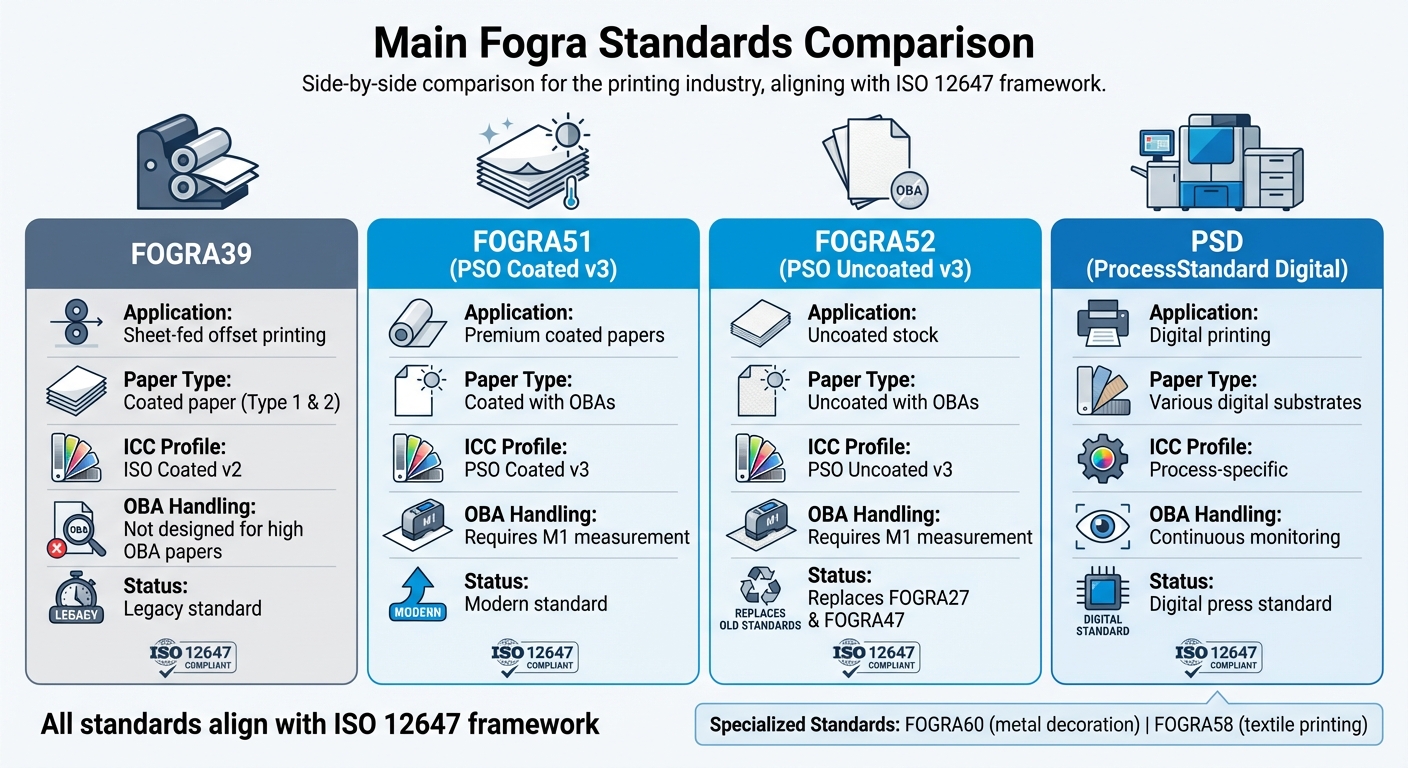
In the U.S., the three most widely used Fogra standards are Fogra39, Fogra51, and Fogra52. Each is tailored to specific paper types and printing conditions. Fogra39 is designed for traditional coated papers without optical brighteners, making it ideal for legacy printing setups. Fogra51, on the other hand, is optimized for modern coated papers that include optical brightening agents (OBAs) – chemicals that enhance the paper’s whiteness and brightness. For uncoated papers with OBAs, Fogra52 provides the necessary guidelines, covering applications like business cards and brochures with matte finishes.

What makes these standards so effective is their ability to deliver measurable color targets, regardless of the ink, paper, or equipment in use. For example, Fogra39 allows yellow solid color densities to range from 1.07 to 1.92 D, providing flexibility while maintaining compliance.

Fogra standards are closely tied to ISO 12647 specifications, which define process controls for offset, gravure, and flexographic printing. This alignment ensures that printers adhering to Fogra standards meet international quality benchmarks.

These standards have become a cornerstone of the U.S. printing industry. For instance, Miro Printing & Graphics Inc., based in Hackensack, NJ, uses a Fogra-compliant workflow to deliver consistent, high-quality color results.

Standard Paper Type Primary Use Key Feature
Fogra39 Coated paper (no OBAs) Traditional offset printing Widely adopted legacy standard
Fogra51 Modern coated paper (with OBAs) Contemporary offset printing Updated for optical brighteners
Fogra52 Uncoated paper (with OBAs) Matte and textured printing Tailored for modern uncoated papers

Next, let’s dive into the essential terms that help maintain strict Fogra compliance throughout the production process.

Key Terms in Fogra Compliance

Understanding Fogra compliance requires familiarity with several technical terms that are critical to a color-managed workflow. These concepts ensure that the transition from standards to practical application is seamless.

  • ICC Profiles: These are digital files that describe how specific devices – such as monitors, printers, or presses – handle color. Think of them as a translator, ensuring that the blue you see on your screen matches the blue printed on the final product.
  • Media Wedge: This is a printed strip containing standardized color patches that serve as a quality control tool. Measured with a spectrophotometer, it verifies color accuracy. The Fogra MediaWedge comes in several versions, like CMYK V3.0 for traditional four-color printing, RGB Photo V1 for photographic work, and Multicolor 5C for specialty applications.
  • Output Intent: Embedded in PDFs, this metadata specifies the Fogra standard and ICC profile to be used for printing. It ensures that everyone, from designers to press operators, is aligned on the intended printing conditions, minimizing errors.
  • Soft Proofing: This process simulates the final printed output on a calibrated monitor, allowing potential color issues to be addressed before production begins. Using Fogra-certified profiles and controlled viewing conditions, soft proofing can save time and costs.
  • Delta E (ΔE): This metric measures color differences. The lower the ΔE value, the closer the color match. In workflows using Fogra39, aim for a ΔE2000 tolerance of 3 or less to maintain precise color accuracy.
  • ProcessStandard Digital (PSD): Developed by Fogra, this guideline provides a framework for creating, preflighting, and processing PDF-based documents. It supports both small and large format digital printing, ensuring a smooth transition from digital files to physical prints.
  • Monitor Calibration: Modern workflows rely on a gamma of 2.2 for monitor calibration, aligning with current color management practices. Proper calibration is essential for reliable soft proofing and accurate color decisions throughout the process.

Color Match in Hybrid Print Production with ColorLogic GmbH

ColorLogic GmbH

Setting Up a Fogra-Compliant Prepress Workflow

Establishing a Fogra-compliant workflow requires careful attention to file preparation, monitor calibration, and proofing system integration. This process involves both technical configurations and creating standardized procedures for your team to follow consistently. The goal is to ensure seamless color accuracy from design to print. Below, we’ll explore the steps for file preparation and technical checks essential for maintaining Fogra compliance.

File Preparation and Preflight

The cornerstone of Fogra-compliant file preparation lies in adhering to PDF/X standards. Files should be created in either PDF/X-4 or PDF/X-6 formats, ensuring all necessary elements are embedded. Automated preflight checks then verify critical details like font embedding, CMYK conversion, and image resolution.

Preflighting acts as a quality control step, systematically scanning files for compliance with both Fogra and PDF/X standards. Key checks include confirming that fonts are embedded, images are in the correct CMYK color space, and spot colors are accurately defined. Preflight software flags issues like missing fonts, incorrect color spaces, or low-resolution images before files reach production, saving time and avoiding costly errors.

When choosing preflight software, look for features like customizable profiles tailored to your Fogra standards, seamless integration with PDF/X requirements, and automated correction tools for common problems. High-quality software will also generate detailed reports, guiding you through any necessary file adjustments with ease.

For optimal print quality, ensure all images are at least 300 DPI, and convert all color elements to the appropriate CMYK color space based on your chosen Fogra standard.

Calibrating Monitors and Viewing Conditions

Once files are prepared, the next step is ensuring your monitors accurately display Fogra standards. Monitor calibration is best achieved using hardware tools like a colorimeter or spectrophotometer. Set your monitors to Fogra specifications, including a D50 white point, ~120 cd/m² brightness, and a gamma of 2.2. This gamma setting is now the standard for modern workflows, replacing the older 1.8 gamma.

Calibration should take place in a controlled lighting environment. A D50-certified light box (5000K) near your workstation ensures reliable visual comparisons between on-screen colors and printed outputs. This standardized lighting eliminates inconsistencies caused by ambient conditions, offering a stable reference for color evaluation.

The environment around your workstation also plays a role in color accuracy. Surrounding walls and surfaces should be painted neutral gray to avoid color contamination from reflections. Additionally, consistent overhead lighting and monitor hoods can help minimize glare and stabilize viewing conditions.

Monthly calibration is generally sufficient, though high-production environments may require more frequent adjustments. Keeping logs of calibration sessions helps track monitor performance over time, allowing you to address any drift and schedule equipment replacements as needed.

Setting Up Fogra-Certified Proofing Systems

After file preparation and monitor calibration, the final step is setting up a certified proofing system. Start by selecting a Fogra-certified proofing device that aligns with your production needs. The device should support the Fogra simulation profiles you’re using, such as Fogra39 or Fogra51. Pair it with proofing software capable of interpreting ICC profiles to ensure your digital files match the expected print output.

To verify color accuracy, integrate a spectrophotometer into your proofing system. This tool measures the actual color values on your proofs and compares them to Fogra reference values. Regular use of a spectrophotometer helps maintain accuracy and alerts you when recalibration is needed.

Validation using the Fogra Media Wedge CMYK V3.0 is another critical step. This process provides independent verification of your proofing accuracy. Print the media wedge on your proofing system, measure the color patches using your spectrophotometer, and compare the results to Fogra reference data. To remain compliant, the color differences should fall within a 3 ΔE2000 tolerance.

For color-critical projects, repeat this verification process with every proof. Regular checks ensure your proofing system consistently meets Fogra standards, catching any deviations in color accuracy before they impact the final product.

Printing companies like Miro Printing & Graphics Inc. in Hackensack, NJ, demonstrate how implementing these Fogra-compliant practices across digital, offset, and large-format printing can deliver consistent, high-quality results that meet both industry standards and customer demands.

Software and Tools for Fogra Integration

Once the prepress setup is in place, the next step is choosing the right software and tools to manage and verify color accuracy. To meet Fogra standards and align with US printing requirements, it’s essential to select tools that streamline workflows and ensure consistent results. Modern Fogra-compliant software simplifies color management, so understanding which tools to use and how they fit together is key.

Overview of Fogra-Compliant Software

Tools like Esko Pack Proof and SureProof make color management more efficient by automating RIP processes and supporting Fogra and other international color standards. Esko Pack Proof integrates seamlessly with major proofing devices, offering automated workflows that reduce manual effort. SureProof focuses on high-volume production, featuring batch processing and automated quality checks to maintain accuracy.

For monitor calibration, Eizo calibration tools are a solid choice. These tools ensure that what you see on-screen matches the printed output, adhering to Fogra specifications. Paired with Eizo ColorEdge monitors, they maintain consistent gamma settings of 2.2, a standard for Windows-based environments commonly used in US print shops.

X-Rite solutions add another layer of precision with tools for color measurement and ICC profile management. Their software automates profile creation and compliance verification, ensuring consistency throughout the workflow. These solutions also generate compliance reports, making it easier to track and maintain standards.

Specialized tools like MagicPress and MagicPrepress focus on optimizing ink density. For instance, a US print shop used these tools in 2021 to match Fogra39 and G7 standards, achieving color accuracy within a 3 ΔE2000 tolerance. This kind of precision helps ensure reliable and repeatable results.

Using ICC Profiles and Measurement Tools

ICC profiles act as the backbone of Fogra compliance, translating color data between devices in your workflow. Managing these profiles effectively involves creating, updating, and applying them based on regular device calibration and verification.

To handle ICC profiles, use spectrophotometers and colorimeters. Best practices include:

  • Using Fogra-certified ICC profiles for proofing and printing.
  • Regularly updating profiles after calibrating devices.
  • Keeping a centralized repository for easy access across teams.

In US-based workflows, managing dual profiles is often necessary – one for Fogra compliance to serve international clients and another for local standards like GRACoL or SWOP for domestic jobs.

Accurate measurements depend on controlled conditions. Operators use spectrophotometers to calibrate monitors, verify proofing systems, and ensure printed output meets reference standards under D50 lighting. While many tools automate this process, understanding the fundamentals is crucial for troubleshooting. Regular checks of control patches can catch device drift early, prompting maintenance or profile updates as needed.

Matching Software with Hardware

Your software must integrate smoothly with certified hardware to avoid compatibility issues. This means ensuring your tools support the RIPs, measurement devices, and calibration equipment in your setup. All components should handle Fogra-certified ICC profiles without data loss or conversion errors. This is especially important when combining equipment from different manufacturers, as communication protocols can vary.

Software Type Primary Function Key Hardware Requirements US Localization Needs
Proofing RIP Color-accurate proofing Fogra-certified proofer, calibrated monitor Imperial units, USD pricing
Monitor Calibration Display accuracy Compatible colorimeter/spectrophotometer Gamma 2.2, US date formats
Color Measurement Profile creation/verification High-accuracy measurement device Fahrenheit temps, inch measurements

Hardware should align with the capabilities of your software. FograCert-certified proofing solutions specify compatible monitors, measurement devices, and software, offering a pre-tested combination that simplifies integration and ensures reliable results. Starting with certified hardware-software pairs minimizes setup challenges and supports consistent quality.

The configuration process involves setting up reference viewing conditions, calibrating monitors to match Fogra reference values, and maintaining consistent gamma settings across your workflow. Regularly verifying and documenting calibration results not only ensures compliance but also provides an audit trail for quality control.

For example, Miro Printing & Graphics Inc. in Hackensack, NJ, successfully integrated Fogra-compliant software across their digital, offset, and large-format printing services. By focusing on workflow compatibility, they maintained consistent color accuracy across diverse printing methods and substrates, meeting both client expectations and industry standards.

Installation and Configuration Best Practices

After selecting your software and integrating tools, the next step for a smooth prepress workflow is proper installation and configuration. For Fogra-compliant software, this means meeting system requirements, setting up licenses, and adjusting initial settings.

Software Installation and Licensing

Before installing any Fogra-compliant software, make sure your system meets the necessary requirements. This typically includes a compatible operating system – either Windows or macOS – along with sufficient RAM, processing power, and storage. You’ll also need administrative access during installation since the software modifies system files and installs drivers for devices like spectrophotometers.

Licensing options depend on the software you choose. Perpetual licenses grant permanent access but may require separate update fees, while subscription-based licenses include continuous updates and support, though they come with recurring costs. For larger teams, network licenses allow multiple users to access the software from different workstations.

To avoid disruptions, securely store license keys in an encrypted password manager. Additionally, configure user permissions carefully – only authorized personnel should have access to critical workflow settings or licensing details. This not only protects your system but also ensures compliance with Fogra standards.

Proofer Calibration and Substrate Selection

Once your software is installed, calibrating your proofing devices is a critical next step. This process requires tools like a spectrophotometer or colorimeter – devices such as the X-Rite i1Pro are popular for their precision and reliability.

Calibration involves using a D50 light box to simulate standardized lighting conditions. You’ll print test patches, measure their color values, and adjust device settings until the output matches Fogra reference values, such as Fogra39 for offset printing.

The substrate you choose plays a big role in maintaining compliance. Proofing papers should meet Fogra standards for whiteness, gloss, and optical brightening agents (OBA). Using certified proofing substrates ensures consistent and predictable color reproduction.

Regularly verify calibration because devices can drift over time. Environmental factors like temperature and humidity can also affect both your equipment and substrates. For example, Miro Printing & Graphics Inc. in Hackensack, NJ, achieved consistent color accuracy by using X-Rite tools and sticking to a strict calibration schedule. This approach not only improved their workflow but also enhanced client satisfaction.

With calibrated devices and compliant substrates ready, the next step is to organize your workflow settings for long-term efficiency.

Organizing Workflow Settings

Proper installation and calibration set the stage for organizing your workflow. Start by structuring your files into clear categories – such as folders for inputs, proofs, calibration data, and archives. Use logical naming conventions like "job_date_client" to make files easy to locate.

Maintain consistent gamma settings, ideally at 2.2. While older Mac systems used gamma 1.8, the 2.2 standard ensures better compatibility across different platforms.

Enhance security by implementing role-based access controls and storing credentials in encrypted systems. Regularly audit access logs to monitor usage and identify potential issues.

Set up automatic backups for critical data, including calibration files, ICC profiles, and job files. Version control is a lifesaver – it allows you to track changes and revert to previous configurations if needed. Even small changes to settings can ripple through the workflow, so having a way to restore a stable setup is invaluable.

Finally, maintain thorough documentation. Keep records of calibration events, including the device used, the operator’s name, and the results. Use checklists to ensure consistency across shifts, and rely on digital records and automated reminders to stay on track. This level of organization not only boosts accountability but also helps maintain compliance over time.

Maintaining Compliance and Workflow Optimization

Keeping a Fogra-compliant workflow running smoothly isn’t a one-and-done task. It requires consistent calibration and adjustments as equipment naturally drifts and environmental conditions shift.

Regular Calibration and Verification

To stay compliant with Fogra standards, you need a clear and consistent calibration routine. Proofers and presses typically need recalibration every week, while monitors can go a bit longer, usually about a month. In environments where color precision is non-negotiable, daily verification might even be necessary.

Changes in ambient conditions can also push the need for more frequent checks. A helpful tool in this process is the control strip – specifically the Fogra MediaWedge, which should accompany every proof and production run. This strip acts as a benchmark for color accuracy. By measuring it with a spectrophotometer and comparing the results to Fogra reference values, you can catch and address deviations early, well before they lead to expensive reprints.

For critical colors, aim to maintain a tolerance within 3 ΔE2000. If measurements start creeping close to this threshold, recalibration should happen immediately.

To keep everything consistent and accountable, document every calibration session. Include details like the operator’s name, the equipment used, environmental conditions, and results. This practice not only promotes accountability but also creates a reliable reference for troubleshooting when issues arise.

These habits ensure you’re prepared to tackle any deviations before they snowball into bigger problems.

Troubleshooting Common Issues

Routine calibration lays the groundwork for effective troubleshooting. When something goes wrong, follow a structured approach to pinpoint and fix the issue. Start by ensuring the correct ICC profile is being used.

Consistent lighting conditions are also critical. D50 lighting is the standard for accurate color evaluation, and any variations in ambient lighting can throw off your results. Stick to standardized lighting to maintain accuracy across the board.

Substrate differences can also lead to color mismatches. Always use the same proofing paper or substrate as the one used in your last successful calibration. Even slight differences in brightness or optical brighteners can cause noticeable shifts in color.

Gradual device drift is another common culprit. If recalibration doesn’t solve the problem, it might be time for professional servicing or even replacing the hardware.

Environmental factors like temperature and humidity can also interfere with performance. Keeping these conditions stable ensures your measurement devices and overall workflow stay consistent.

Improving Workflow Efficiency

Once calibration and troubleshooting are under control, the next step is to fine-tune your workflow for efficiency. Automated preflight tools can check that files meet Fogra PDF/X standards, cutting down on human error and preventing unnecessary rework .

Workflow software can further streamline processes. These systems can automatically apply the correct ICC profiles based on job specifications and flag files that don’t meet workflow requirements. This automation lightens the load on operators and ensures consistency.

Tracking key performance indicators (KPIs) like the percentage of jobs passing color verification on the first try or the average ΔE values for key colors can reveal trends and highlight areas that need attention . Regular staff training in color theory and measurement techniques also helps maintain a high standard of compliance and troubleshooting .

Standardizing processes with detailed standard operating procedures (SOPs) is another way to eliminate variables that could disrupt compliance. These SOPs should cover everything from handling substrates to performing measurements and systematic troubleshooting.

Version control is a must for preventing accidental changes to workflow settings. The ability to quickly revert to a known-good configuration can save time and frustration, especially in environments with multiple operators.

Finally, regular workflow reviews – monthly assessments of things like turnaround times, error rates, and client feedback – can uncover bottlenecks and opportunities for improvement. These reviews not only enhance compliance but also help streamline operations, making your workflow as efficient as possible.

Conclusion

Integrating Fogra-compliant software into your prepress workflow requires a thoughtful approach to ensure consistent print quality and efficient operations. The primary benefits include enhanced color accuracy and a smoother process that consistently delivers top-notch prints across various jobs and devices.

Achieving successful Fogra integration hinges on three key factors working in harmony to uphold professional standards. Investing in certified hardware, calibrated monitors, and precise measurement tools is essential. When combined with regular calibration schedules and well-documented procedures, these investments yield significant long-term benefits.

For businesses in the United States, Fogra compliance provides additional perks. The standards align well with regional requirements such as GRACoL and SWOP, helping your workflows stay competitive both domestically and internationally.

The learning curve for Fogra integration can be challenging, particularly for smaller operations without dedicated color management expertise. However, partnering with experienced providers can ease this transition. For example, in Hackensack, NJ, Miro Printing & Graphics Inc. offers Fogra-compliant prepress and printing services, helping businesses achieve compliance without requiring heavy upfront investments.

As you refine your workflow, focus on sustainable practices rather than quick fixes. Regular training, updated documentation, and dependable calibration tools will keep your processes running smoothly for years to come. With the printing industry moving toward digital standardization and automation, adopting Fogra compliance early can provide a strategic edge.

This guide has outlined the essential steps for integration. Whether you handle the process internally or work with professional partners, long-term success depends on treating compliance as an ongoing effort rather than a one-time task. By committing to Fogra-compliant practices, you can consistently deliver high-quality results that meet today’s rigorous printing standards.

FAQs

What are the benefits of using Fogra-compliant software in my prepress workflow?

Integrating Fogra-compliant software into your prepress workflow guarantees consistent, high-quality print results by following internationally recognized standards. This approach ensures precise color accuracy, simplifies production, and minimizes errors – saving both time and money in the long run.

At Miro Printing & Graphics Inc. in Hackensack, NJ, precision and attention to detail are at the heart of delivering outstanding print products. Using Fogra-compliant tools aligns with these values, helping businesses produce reliable and professional results for all their printing projects.

How can I calibrate my monitor to meet Fogra standards, and what tools should I use?

To align your monitor with Fogra standards, begin by using a trusted hardware calibration device like a colorimeter or spectrophotometer. These tools fine-tune your monitor’s settings, ensuring precise color reproduction that aligns with industry benchmarks.

Follow the specific instructions provided by your calibration device manufacturer, and use software that supports Fogra-compliant profiles – such as the Fogra Media Wedge – for the best results. To keep your prepress workflow consistent and reliable, it’s a good idea to recalibrate your monitor every few weeks.

What are the differences between Fogra39, Fogra51, and Fogra52 standards, and how can I choose the right one for my printing needs?

Fogra39, Fogra51, and Fogra52 are widely recognized color standards in the printing industry, ensuring consistent and precise color reproduction. Here’s a quick breakdown:

  • Fogra39: Based on ISO 12647-2, this standard is ideal for offset printing on coated papers.
  • Fogra51: An update to Fogra39, tailored for modern printing environments, particularly when optical brighteners are present in the paper.
  • Fogra52: Specifically developed for uncoated papers, ensuring accurate color reproduction on materials with different surface qualities.

Choosing the right standard depends on your printing method and the type of paper you’re using. For instance, Fogra39 works well with coated paper in offset printing. On the other hand, Fogra51 or Fogra52 might be better suited for uncoated or optically brightened papers. If you’re uncertain, reaching out to a professional print service like Miro Printing & Graphics Inc. can help you achieve top-tier results for your project.

Related Blog Posts

https://app.seobotai.com/banner/banner.js?id=68fac4dd9cea6427b3fd5f4a

Complete Guide to Print Workflow Automation Tools

Explore how print workflow automation enhances efficiency, reduces costs, and boosts quality in printing operations.

Print workflow automation transforms printing processes by replacing manual tasks with software-driven solutions. This approach improves efficiency, reduces errors, and helps businesses meet tight deadlines while controlling costs. Here’s what you’ll learn:

  • What it is: Software automates steps like job submission, file checks, and production scheduling.
  • Why it matters: It addresses labor shortages, minimizes mistakes, and ensures consistent quality.
  • Key features: Automated job routing, centralized management, and quality control tools.
  • Benefits: Faster production, lower costs, and scalability for growing demands.
  • How to implement: Map current workflows, choose compatible tools, and track performance.

Automation helps printers handle complex jobs, like variable data printing, and manage operations across multiple locations. Adopting tools like AI-powered quality checks or cloud-based management can boost productivity and customer satisfaction. Dive in to see how this technology reshapes printing businesses.

Podcast: The 6 Levels of Workflow Automation

Key Features of Print Workflow Automation Tools

Modern print automation tools simplify the entire production process, from job intake to final quality checks, creating a smooth workflow that minimizes errors and speeds up delivery. These tools are designed to address common challenges in manual workflows, such as scheduling conflicts and costly reprints, while boosting efficiency.

Three standout features make these tools indispensable: automated job submission and routing, centralized print management and monitoring, and quality control with preflight checks. Let’s dive into how each of these features transforms daily operations.

Automated Job Submission and Routing

Manually processing print orders can create bottlenecks, but automated job submission systems eliminate these delays. These tools collect print jobs from various sources – like web portals, email attachments, or direct file uploads – and assign them to the right equipment based on the job’s specific requirements, such as materials, size, and deadlines.

The routing process relies on rule-based logic to evaluate factors like job size, color, finishing needs, and equipment availability. This ensures smooth, uninterrupted production. For example, variable data printing benefits significantly from this feature. Imagine a marketing campaign requiring 50,000 personalized postcards – automated routing ensures the workload is evenly distributed across available digital presses, seamlessly merging data while maintaining high-quality output.

Centralized Print Management and Monitoring

With real-time dashboards, print shop managers gain a complete overview of their operations through a single interface. These centralized systems monitor job progress, equipment performance, and resource allocation, making it easier to identify and resolve issues before they impact deadlines.

Modern dashboards provide live metrics on equipment usage, material consumption, and labor allocation. If a press unexpectedly goes offline, the system alerts managers and suggests alternative routing options to prevent delays. Role-based access further enhances efficiency, giving team members visibility into tasks relevant to their roles – prepress operators handle file approvals, press operators oversee their production queues, and finishing staff track jobs ready for binding.

For businesses with multiple locations, centralized monitoring is even more critical. Managers can allocate jobs based on equipment availability, proximity to customers, or facility capacity. For example, companies like Miro Printing & Graphics Inc. in Hackensack, NJ, have effectively used centralized tools to streamline operations and maintain high standards across their production lines.

Quality Control and Preflight Checks

Automated quality control tools scan files for potential issues – like incorrect color profiles, low-resolution images, or missing fonts – before production begins. This proactive approach reduces waste and minimizes the need for reprints.

The preflight process runs automatically as files enter the system, flagging errors and generating detailed reports for corrections. Some systems even make automatic adjustments, such as optimizing color profiles or resolution, to ensure the best possible output.

Color management plays a vital role in maintaining consistency across print runs and equipment. For brand-sensitive materials, where precise color accuracy is essential, these systems ensure files meet required standards. Advanced tools like HP Scan AI Enhanced take this a step further by using OCR technology to extract and validate data from documents, cutting down on manual verification time while maintaining quality.

By catching errors early, print shops save on materials, reduce labor costs tied to reprints, and maintain strong customer relationships through consistent, high-quality results. Many businesses report noticeable reductions in material waste and quicker turnaround times after implementing these automated preflight systems.

Together, these three features – automated routing, centralized monitoring, and quality control – create an efficient production environment where jobs move seamlessly from start to finish. This integration allows print shops to handle growing workloads while consistently delivering exceptional results to their customers.

Benefits of Print Workflow Automation

The advantages of print workflow automation become clear when you consider how it improves production speed, cuts costs, and enables businesses to scale their operations. In today’s fast-paced market, this can give print shops a significant edge.

Faster Production and Improved Efficiency

Automation simplifies the entire print process, from prepress to finishing, cutting processing times by as much as 50%. For example, when a customer places an order, automated systems can check the file quality, assign the job to the correct equipment, and schedule production based on deadlines and available capacity. Staff are only notified when their input is absolutely necessary, allowing them to focus on tasks like customer service and quality control.

One major perk is the elimination of bottlenecks. Businesses that adopt workflow automation often experience quicker delivery times and the ability to handle more orders. This is especially helpful in addressing labor shortages, as smaller teams can manage larger workloads without compromising on quality.

Lower Costs and Smarter Resource Management

The financial benefits of automation extend across a variety of areas. For mid-size companies, annual savings typically range from $5,000 to $50,000. These savings primarily come from reduced labor costs, less material waste, and fewer expensive reprints.

By automating repetitive tasks, businesses can allocate their workforce to more critical roles, such as customer engagement or solving complex problems. Automated preflight systems also help by catching errors – like font or color issues – before production begins, minimizing the waste of paper, ink, and finishing materials.

Automation also enhances resource management. Real-time tracking tools monitor equipment usage, inventory levels, and maintenance schedules. For instance, maintenance can be planned during slower periods to avoid costly downtime. Additionally, automated systems ensure presses stay active by reducing the manual preparation time between jobs, keeping production running smoothly.

Scalability and New Opportunities

Automation doesn’t just save money – it also sets the stage for growth. By allowing existing teams to handle more jobs at once, businesses can scale up during busy seasons or when taking on larger contracts.

A great example of this is variable data printing, which allows for personalized campaigns with thousands of unique pieces. Automation makes it easy to merge and route data, turning what used to be a time-intensive process into a profitable service.

Automation also enables print shops to expand their offerings. For instance, a shop that once focused on basic products like business cards can now confidently bid on more complex projects, such as multi-component marketing campaigns. Many shops report productivity boosts of 20–40% after implementing automation, which supports revenue growth without a proportional increase in overhead. This efficiency often allows businesses to offer competitive pricing while maintaining strong profit margins.

Take Miro Printing & Graphics Inc. in Hackensack, NJ, as an example. By using automation, they efficiently manage a wide range of services – from digital and offset printing to large-format and custom projects – while maintaining high quality. Their automated systems also provide detailed performance data, helping managers make smart decisions about staffing, equipment investments, and market opportunities. This kind of insight enables businesses to adapt quickly to changing demands and plan strategically for growth.

sbb-itb-ce53437

How to Implement Print Workflow Automation

Streamlining print workflows begins with a structured approach that builds on your current operations. The most effective implementations typically follow three key phases to maximize efficiency and return on investment.

Review and Map Current Workflows

Start by documenting every step of your process, from when a customer places an order to the delivery of the final product. Bring together staff from all relevant areas – job intake, prepress, production, and finishing – to examine each workflow step in detail.

Use visual process mapping to uncover hidden bottlenecks. Look for common delays like manual data entry or approval hold-ups, as these are often the points where automation can make the most difference.

Pay close attention to areas where tasks frequently stall. For example, manual preflight checks or delayed customer approvals due to the lack of automated notifications can slow things down. Record how long each step takes and identify redundancies, such as entering the same data multiple times across different systems.

Include input from everyone involved in the workflow. Front-office staff can highlight communication challenges with customers, while production teams can point to issues like equipment scheduling conflicts or quality control slowdowns. Taking this comprehensive approach ensures no stage is overlooked, helping you pinpoint areas where automation will have the greatest impact.

Select the Right Automation Tools

Once you’ve mapped your workflows, the next step is choosing tools that integrate smoothly with your existing systems. Compatibility should be a top priority – your new tools must work seamlessly with your CRM, ERP, and inventory management systems. Avoid solutions that require manual data transfers, as they can undermine the efficiency gains you’re aiming for.

Opt for tools that can grow with your business and support the file formats your industry relies on, such as PDF/X standards. If your work involves regulated industries like healthcare, ensure the software complies with data privacy laws like HIPAA. This not only keeps you compliant but also strengthens customer trust.

Staff training is critical for successful adoption. Choose tools with user-friendly interfaces and strong vendor support, including training materials and responsive help desks. Many vendors offer tailored training sessions and guides for different roles within your organization.

Begin with pilot projects to test the tools in real-world scenarios. This lets you demonstrate the value of automation to your team while identifying any integration or training issues before a full-scale rollout.

Track Performance and Results

Once automation tools are in place, tracking their performance is key to ongoing improvement. Monitor metrics like job completion times, error rates, cost per job, waste, and equipment utilization to measure the impact.

Set up regular review schedules – weekly for operational metrics and monthly for broader trends. Modern automation tools often include dashboards and reporting features, making it easy to access and analyze this data. Use these insights to identify new bottlenecks or areas for further optimization.

Customer satisfaction is another critical metric. Faster turnaround times and fewer errors should lead to happier customers, and tracking this feedback helps you see which automation features have the greatest effect.

Take Miro Printing & Graphics Inc., for example. After automating workflows across their digital, offset, and large-format printing operations, they used detailed performance metrics to make smarter staffing and equipment decisions. Automated job submission and real-time monitoring systems provided actionable data, allowing them to improve turnaround times, optimize resource allocation, and ultimately achieve higher customer satisfaction while reducing costs.

Perform annual audits or reassess after major changes in volume to ensure your system remains effective. Technology evolves quickly, and what worked well last year might need fine-tuning to handle new demands or opportunities.

The Future of Print Workflow Automation

Automation tools are revolutionizing printing operations, making them faster, more efficient, and capable of handling increasingly complex tasks. As technology continues to advance, print shops are discovering new ways to streamline workflows and maintain a competitive edge.

Why Automation Matters

Print workflow automation brings several key advantages: faster production, cost savings, and improved quality control. Features like automatic job submission, real-time tracking, and error prevention allow print shops to handle larger workloads with fewer mistakes, ultimately boosting customer satisfaction.

Businesses that adopt these tools often see major efficiency gains. For instance, real-time tracking helps optimize how jobs are assigned to equipment and staff, ensuring resources are used effectively. A great example is Miro Printing & Graphics Inc. in Hackensack, NJ. By embracing automation, they can manage a variety of projects quickly and deliver high-quality results. As automation evolves, emerging technologies are setting the stage for even more transformative changes.

AI and Machine Learning
Artificial intelligence (AI) and machine learning are reshaping print workflows. These technologies automate tasks like document processing, job routing, and error detection. Tools such as HP Scan AI Enhanced use Optical Character Recognition (OCR) to extract data from scanned documents, simplifying data entry and managing complex workflows with real-time insights.

In 2024, HP launched AI-powered tools like HP Scan AI Enhanced and TotalAgility, integrated into the HP Workforce Experience Platform. These tools help organizations automate document handling, reduce manual workloads, and improve efficiency. With features like AI-driven recommendations, businesses can identify high-volume scanning areas, optimize workflows, and cut paper use.

Cloud-Based Management
Cloud solutions are becoming a cornerstone of modern print operations, especially for businesses adapting to hybrid or remote work setups. These systems offer centralized control, remote access, and easy integration with tools like CRM and ERP platforms. With cloud-based print management, businesses can oversee operations from anywhere and scale up effortlessly.

Predictive Maintenance
Predictive maintenance is another game-changer. By using AI and sensors to monitor equipment, these systems can predict potential failures and schedule maintenance before issues arise. This proactive approach reduces downtime, extends the life of machines, and lowers repair costs with automated alerts for technicians.

Eco-Friendly Solutions
Sustainability is becoming a priority in the print industry. Automation tools now help minimize waste, reduce energy usage, and lessen environmental impact. Features like digital proofing cut down on paper use, while AI analytics track material consumption and recommend ways to reduce waste. Some platforms even support eco-friendly ink and substrate options, providing detailed reports on environmental performance.

Looking ahead, the next decade is likely to bring even more advancements in AI, cloud-based platforms, and sustainability-focused features. Experts predict deeper integration with digital channels, more personalized print services, and smarter analytics for business optimization. As these tools become more accessible, even smaller print shops will be able to adopt them, staying competitive and meeting market demands.

FAQs

How do print workflow automation tools improve efficiency in variable data printing?

Print workflow automation tools make variable data printing faster and more efficient, which is essential for producing personalized marketing materials or tailored documents. These tools handle tasks like merging individual data – such as names or addresses – into pre-designed templates automatically. This not only saves time but also minimizes the risk of errors.

For companies like Miro Printing & Graphics Inc., these tools enable the production of high-quality, customized prints while staying on schedule, even with tight deadlines. Automation brings consistency, precision, and the ability to scale, making it a must-have for today’s printing demands.

What are the key steps to successfully implement print workflow automation tools?

To make the most out of print workflow automation tools, start by pinpointing your specific printing requirements and identifying any bottlenecks in your current process. This step ensures you choose tools that match your business objectives and address your unique challenges.

Bring your team into the loop early on. By involving them from the start, you can help them understand how these tools will streamline operations and minimize mistakes. Offering proper training and ongoing support during the transition will also make the adoption process much smoother.

Lastly, consider teaming up with a reliable print service provider, like Miro Printing & Graphics Inc. based in Hackensack, NJ. With their expertise in digital, offset, and large-format printing, as well as in-house bindery and design services, they can help ensure your automation tools are seamlessly integrated into your workflow for the best possible results.

How do AI and machine learning improve print workflow automation systems?

AI and machine learning are transforming print workflow automation by making processes faster, more efficient, and less prone to errors. These technologies excel at analyzing large datasets to fine-tune workflows, anticipate potential problems, and suggest practical solutions. The result? Operations run more smoothly, and projects are completed in less time.

Take repetitive tasks, for instance – AI can handle file preparation, fine-tune color adjustments, and optimize layouts automatically. Meanwhile, machine learning algorithms learn and adapt to the specific needs of a business over time. This combination doesn’t just boost accuracy and save costs; it also elevates the customer experience by delivering consistent, high-quality results.

Related Blog Posts

https://app.seobotai.com/banner/banner.js?id=68f97f8f9cea6427b3f568be

Heat Recovery in Drying Processes

Explore how heat recovery systems in drying processes enhance energy efficiency, reduce costs, and lower emissions in various industries.

Heat recovery systems save energy and reduce costs in industrial drying operations by reusing heat from exhaust air or gases. These systems are particularly effective in industries like printing, textiles, and paper production, where drying consumes significant energy. Here’s why they matter:

  • Energy Efficiency: Recovering waste heat can cut energy use by 20–50%, lowering operating costs.
  • Cost Savings: Facilities can save hundreds of thousands to millions of dollars annually, with payback periods typically between 1–4 years.
  • Lower Emissions: Systems reduce fossil fuel use and carbon emissions, helping meet regulatory requirements.
  • Two Main Types: Sensible heat recovery (direct heat transfer) and latent heat recovery (energy from water vapor condensation).

Modern heat recovery systems, such as heat exchangers and vapor compression systems, are tailored to specific drying needs. They improve energy efficiency while supporting compliance with environmental standards. Facilities running high-demand drying processes, like those in substrate production, benefit the most from these systems.

Process Heat Recovery System with Dust & Odour Control

How Heat Recovery Works in Drying Systems

Heat recovery in drying systems operates on basic thermodynamic principles, capturing heat from exhaust streams and redirecting it into incoming process flows. This process not only cuts energy costs but also reduces environmental impact, as previously discussed. There are two main ways this is achieved: sensible heat transfer (direct heat exchange) and latent heat transfer (energy released during water vapor condensation).

Exhaust air or gases leaving the dryer carry significant thermal energy that would otherwise go to waste. Heat recovery systems harness this energy to preheat incoming air, water, or other fluids, minimizing the need for additional fuel or electricity to reach the required drying temperatures.

Sensible Heat Recovery

Sensible heat recovery focuses on capturing the heat from exhaust air or gases to warm incoming streams, without involving a phase change. This is typically done using heat exchangers – devices like air preheaters (for gas-to-gas transfer) or economizers (for gas-to-liquid transfer). These systems allow efficient energy transfer while keeping the streams separate.

In substrate drying, sensible heat recovery is often used to preheat combustion air or process water. For instance, if exhaust air exits the dryer at 300°F (149°C), a heat exchanger can recover much of that energy to raise the temperature of incoming air from 70°F (21°C) to around 200°F (93°C) or higher. This preheating significantly reduces the workload on primary heating sources. The effectiveness of this process depends on factors such as the temperature difference, flow rates, and the design of the heat exchanger.

Latent Heat Recovery

Latent heat recovery taps into the energy released when water vapor condenses from the exhaust air. This method often captures more energy than sensible heat recovery because the phase change releases a substantial amount of thermal energy – about 1,000 BTU per pound of water vapor under standard conditions. By cooling the exhaust below its dew point, water vapor condenses, releasing this energy, which can then be collected using specialized systems designed to handle moisture and resist corrosion.

This approach is particularly important in processes that remove water-based solvents or moisture from substrates. A notable example is the DryFiciency project (2017–2021), which demonstrated that using high-temperature vapor compression heat pumps for latent heat recovery could cut energy demand from 700–800 kWh per ton to about 200 kWh per ton of evaporated water. The project achieved up to 80% energy savings, alongside significant reductions in fossil fuel use and carbon emissions, showcasing the immense efficiency gains latent heat recovery can provide.

Heat Recovery Type Energy Source Typical Applications Energy Savings Potential
Sensible Heat Recovery Temperature difference in gases Preheating air or water Moderate to high
Latent Heat Recovery Water vapor condensation Process heating; hot water supply High to very high

While latent heat recovery systems are more complex – requiring careful management of condensate and corrosion risks – their energy benefits often outweigh these challenges, especially in high-moisture environments.

Interestingly, both sensible and latent heat recovery can work together in a single system to maximize energy capture. The best setup depends on the exhaust stream’s characteristics, the desired temperature levels, and the specific needs of the drying process. These considerations lay the groundwork for selecting the right heat recovery equipment, which will be explored in the next section.

Heat Recovery Equipment for Drying Applications

This section explores equipment designed to improve industrial drying efficiency by capturing and reusing waste heat. Choosing the right heat recovery system depends on your drying process, temperature requirements, and facility setup. Below, we detail options for both direct and latent heat recovery systems.

Direct Contact Heat Exchangers

Plate heat exchangers are a compact solution for facilities with limited space. These systems use thin metal plates to transfer heat between exhaust and fresh air streams while keeping them separate, ensuring efficient thermal exchange without contamination.

Rotary heat wheels are ideal for large-scale operations, providing continuous heat transfer. As the wheel rotates, it absorbs heat from the warm exhaust air and releases it into the cooler incoming air. While they require a higher initial investment, their efficiency makes them worthwhile for larger systems.

Shell-and-tube exchangers offer versatility, transferring heat from exhaust gases to liquids or air. This makes them especially useful in facilities needing both heated air and process liquids, adapting well to varied drying conditions.

For applications requiring more advanced recovery, systems designed to capture latent heat are discussed next.

Vapor Condensation Systems

Advanced systems like heat pipes and vapor compression systems recover both sensible and latent heat from exhaust streams. These are particularly effective in processes where moisture removal is critical, such as printing operations using water-based inks or coatings.

Vapor compression heat pumps have demonstrated impressive energy savings in industrial settings. For example, the DryFiciency project achieved energy reductions of 60–80%, lowering specific energy demand from 700–800 kWh per ton to approximately 200 kWh per ton of evaporated water.

Regenerative thermal oxidizers (RTOs) are another dual-purpose solution, especially valuable in facilities handling solvent-based inks or coatings. RTOs not only reduce emissions of volatile organic compounds (VOCs) but also recover heat for drying processes. Operating in autothermal mode, they utilize the heat generated from VOC combustion to supply energy for drying. This approach not only ensures environmental compliance but also cuts energy costs.

For instance, Miro Printing & Graphics Inc. in Hackensack, NJ, uses such systems to meet environmental standards while improving energy efficiency in their solvent-based operations.

Installation with Existing Drying Equipment

Retrofitting heat recovery systems into existing drying setups requires careful planning to maintain optimal drying conditions and ensure compatibility. Key steps include connecting exchangers to existing exhaust ducts and air intakes, managing pressure and condensate, and integrating the system with current controls and safety protocols. Modern systems often come with features like automatic cleaning and noise reduction to enhance reliability and workplace comfort.

Phased installations provide flexibility, allowing facilities to start with basic sensible heat recovery and later upgrade to latent heat systems as energy savings justify further investment. This approach helps manage upfront costs while delivering immediate benefits.

Equipment Type Typical Application Key Benefits
Plate Heat Exchanger Air-to-air drying processes Simple, efficient, and low maintenance
Rotary Heat Wheel Large-scale continuous operations High efficiency and compact design
Shell-and-Tube Heat Exchanger Processes requiring liquid heating Versatile performance with robust construction
Vapor Compression Heat Pump High-temperature drying and steam generation Significant energy savings and carbon reduction
Regenerative Thermal Oxidizer Solvent-based ink drying Combines emission control with energy recovery

Regular monitoring and maintenance are crucial to ensure long-term performance. Many modern systems feature automated controls that adjust operations based on production needs and environmental conditions, enhancing efficiency and reducing manual oversight.

sbb-itb-ce53437

Financial and Environmental Benefits of Heat Recovery

Heat recovery systems offer a smart way to cut energy use, lower emissions, and ease regulatory challenges. By reusing waste heat, facilities can save a lot of money and improve their environmental performance at the same time.

Energy Cost Savings

Heat recovery systems can slash energy consumption in drying operations by 20–50%, depending on how well the technology integrates with the process. For example, paper and board facilities have managed to recover over 50 MW of energy, translating into annual savings ranging from hundreds of thousands to several million U.S. dollars. One U.S. tissue paper manufacturer reduced natural gas usage for drying by 30%, saving about $250,000 annually. This also cut over 1,000 metric tons of CO₂ emissions each year, with the entire system paying for itself in less than three years. In a more specialized case, a dairy company used a heat-regenerating adsorption dryer to recover up to 400 kW of heat. This heat was then used to preheat boiler feed water and support hot water processing, improving the overall efficiency of the facility. These financial gains go hand in hand with meaningful environmental benefits.

Carbon Reduction and Environmental Impact

By cutting fossil fuel use, heat recovery systems significantly reduce carbon emissions, making them a key tool for eco-conscious manufacturing. Case studies show that CO₂ emissions in drying processes can drop by 20–50%, mirroring the energy savings achieved. Beyond reducing carbon output, these systems can work alongside purification technologies, like regenerative thermal oxidizers, to lower emissions of volatile organic compounds (VOCs). They also help curb the formation of secondary pollutants and, in closed-loop setups, can recycle evaporated water back into the process, reducing overall water consumption. Such improvements not only help facilities comply with strict U.S. environmental regulations, like those under the Clean Air Act, but can also make them eligible for energy efficiency incentives and rebates. One example from the converting industry involved a substrate production facility that installed a regenerative thermal oxidizer with integrated heat recovery. The system effectively purified emissions to levels well below legal limits and recovered enough heat to operate in an autothermal mode, eliminating the need for additional fuel.

Return on Investment (ROI)

Heat recovery systems typically offer strong financial returns, with payback periods ranging from 1 to 4 years depending on factors like system complexity, energy prices, and the scale of implementation. Once installed, these systems can continue to deliver operational cost savings for over a decade. In substrate production, key factors affecting ROI include the initial cost of installation, energy prices (for both natural gas and electricity), system efficiency, ease of integration with existing equipment, and the facility’s operating hours. Facilities with continuous, high-demand drying loads – especially those running multiple shifts – tend to see faster returns. For instance, the tissue paper facility mentioned earlier saved $250,000 annually and achieved a payback period of under three years, all while improving compliance with regulatory requirements.

Financial Metric Typical Range Key Factors
Energy Savings 20–50% reduction System type, integration quality
Payback Period 1–4 years Energy prices, facility size, operating hours
Annual Cost Savings $100,000–$2,000,000+ Facility scale, energy consumption
Long-term Benefits 10+ years System maintenance, energy price trends

For printing operations, companies like Miro Printing & Graphics Inc. in Hackensack, NJ, have successfully combined heat recovery with emission control to achieve both economic and environmental gains. These examples highlight the potential of heat recovery systems to deliver lasting value across industries.

Summary and Key Points

Heat recovery systems transform waste heat into usable energy, significantly improving the efficiency of drying processes in substrate production facilities. By capturing heat from exhaust streams and repurposing it to preheat process inputs, these systems achieve both operational savings and reduced environmental impact.

These systems use heat exchangers to harness energy from hot exhaust gases, with recovery capabilities exceeding 50 MW (equivalent to 86 tons of steam per hour). Modern units can generate up to 400 kW for preheating applications, demonstrating their impressive capacity.

There are two main approaches to heat recovery: sensible recovery, which captures direct thermal energy, and latent recovery, which utilizes energy from water vapor condensation. These systems are designed to integrate seamlessly with existing drying setups, often requiring only minor adjustments.

The advantages are clear: heat recovery reduces energy consumption, lowers operational costs, and typically pays for itself within 1–3 years. For companies like Miro Printing & Graphics Inc., this makes it a practical and cost-effective solution.

Beyond cost savings, heat recovery systems contribute to environmental goals by cutting fuel use, reducing VOC emissions, and even lowering water demand in closed-loop systems. These benefits help facilities meet U.S. environmental standards, particularly when combined with technologies like regenerative thermal oxidizers.

For printing operations and substrate production facilities, such as those managed by Miro Printing & Graphics Inc., heat recovery systems offer a competitive edge. They deliver immediate energy savings, boost process efficiency, and enhance compliance with environmental regulations, making them a critical element of sustainable business practices.

FAQs

How do heat recovery systems help lower carbon emissions in industrial drying processes?

Heat recovery systems are a game changer when it comes to cutting carbon emissions. They work by capturing waste heat generated during industrial drying processes – heat that would otherwise escape into the air – and putting it to good use. This recycling process helps facilities reduce energy consumption, which in turn lowers greenhouse gas emissions and boosts overall energy efficiency.

Beyond the environmental benefits, these systems can also lead to noticeable savings on energy costs. For substrate production facilities, this means a practical way to operate more sustainably while keeping expenses in check. Adopting heat recovery technology is a smart move for businesses aiming to balance greener practices with steady productivity.

What is the difference between sensible and latent heat recovery, and how do they contribute to energy efficiency in drying processes?

When it comes to heat recovery, there are two main approaches: sensible heat recovery and latent heat recovery. Sensible heat recovery deals with capturing and reusing heat from temperature changes in air or materials. On the other hand, latent heat recovery focuses on reclaiming energy from moisture or phase changes, like condensation. Both methods are excellent ways to cut down on energy waste by recycling heat that would otherwise escape.

In drying processes, sensible heat recovery works best in systems with large temperature swings, while latent heat recovery shines in settings with high moisture levels. Combining these methods allows facilities to significantly reduce energy use, cut operating costs, and take a step toward more efficient and eco-friendly operations.

What should you consider when upgrading existing drying equipment with heat recovery systems?

When upgrading drying equipment with heat recovery systems, there are a few crucial aspects to keep in mind. Start by evaluating how energy-efficient your current equipment is and pinpointing where heat loss occurs. This step helps you gauge the potential advantages of adding a heat recovery system. Another key consideration is compatibility – the new system needs to integrate smoothly with your existing setup without affecting performance.

You’ll also want to weigh the cost-effectiveness of the upgrade. Factor in the upfront costs, projected energy savings, and how long it will take to recoup your investment. Lastly, take a close look at the maintenance requirements of the heat recovery system to ensure it aligns with your facility’s operational capacity. Careful planning can lead to better energy efficiency and lower operating costs down the road.

Related Blog Posts

https://app.seobotai.com/banner/banner.js?id=68f8448d1019c13c0b387bc1

Offset vs. Digital: Fogra Color Accuracy

Explore the differences in color accuracy between offset and digital printing, focusing on Fogra standards and their impact on print quality.

Offset and digital printing both aim for precise color accuracy, guided by Fogra standards, which align with ISO certifications. Offset printing excels in large-scale projects, offering consistent results with profiles like Fogra39 for coated papers and Fogra52 for uncoated. However, it faces challenges with ink absorption on uncoated stock, leading to muted colors. Digital printing, certified under Fogra PSD, provides vibrant colors, especially on coated papers, and is ideal for short runs or personalized materials. While offset is cost-effective for high volumes, digital printing offers faster setup and flexibility for smaller jobs. Choosing the right method depends on your project’s size, timeline, and color needs.

Offset Printing and Fogra Color Accuracy

Fogra

How Offset Printing Works

Offset printing relies on an indirect transfer method that sets it apart from other printing techniques. The process starts with aluminum plates, where the images are etched directly onto the surface. These plates are then mounted onto the press, forming the basis for precise image reproduction.

Here’s how it works: ink is applied to the image areas of the plate, while the non-image areas attract water to stay ink-free. From there, the ink moves from the plate to a rubber blanket and finally to the paper. This indirect transfer process – where the ink doesn’t go straight from plate to paper – is what gives offset printing its name. It’s also the key to its ability to produce sharp, high-quality images.

Offset printing is ideal for large-volume projects because the fixed setup costs are spread out over the run. It also supports a broad range of colors, including the Pantone Matching System (PMS), which allows for the use of spot colors beyond the standard CMYK palette.

This reliable process is the foundation for meeting the stringent requirements of Fogra certification.

Fogra Certification for Offset Printing

Fogra certification for offset printing is built on the Process Standard Offset (PSO) framework, which aligns with the ISO 12647 standards. This system ensures consistent color quality across various print jobs and materials.

To achieve Fogra certification, print providers must undergo rigorous testing and documentation. This includes producing test prints, measuring color values against predefined benchmarks, and maintaining detailed process control records. Regular verification ensures ongoing consistency in color reproduction.

One widely used standard in commercial offset printing is Fogra39, which allows for ink coverage up to 330%. This higher ink limit produces richer, more saturated colors compared to many digital printing methods. For specific paper types, Fogra offers tailored profiles like FOGRA51 for coated papers and FOGRA52 for uncoated papers, which adjust color separations and ink limits to account for how different substrates absorb and reflect ink.

The cost of certification starts at $2,753 for members, a significant investment in quality assurance. However, this expense often pays off by reducing reprints, boosting client trust, and enabling printers to handle complex projects requiring precise color consistency.

Even with these standards in place, offset printing still faces challenges when working with certain materials.

Offset Printing Color Accuracy Challenges

Offset printing is not without its hurdles, especially when it comes to achieving consistent color accuracy across different paper types. One of the biggest challenges is ink absorption on uncoated paper stocks. Uncoated papers soak up more ink than coated ones, which can cause colors to appear lighter and less vibrant than intended.

For instance, black ink on uncoated paper often looks gray rather than deep black. While profiles like PSO uncoated v3 FOGRA52 are designed to optimize color separations for these substrates, they can only do so much to counteract the physical limitations of the paper.

Environmental factors like temperature and humidity also play a role. These variables can affect ink flow, paper stability, and overall color consistency. To address this, print shops must maintain strict environmental controls alongside their Fogra compliance measures.

Using specific ICC profiles for coated and uncoated papers helps ensure consistent results. Additionally, regular press calibration and frequent checks against Fogra reference values are essential for maintaining accuracy over time.

Digital Printing and Fogra Color Accuracy

How Digital Printing Works

Digital printing skips the need for traditional plates by working directly from digital files. Instead of relying on plates, it uses toner or ink applied through toner-based or inkjet methods. This direct approach has a major perk: there’s almost no ink spread or diffusion in toner-based digital printing. That precision means colors are reproduced instantly, without the lengthy plate-making process that offset printing demands.

Modern digital systems use CMYK with extended color gamuts to meet strict Fogra standards. For example, the ProStream 1000 can reproduce an impressive 2,182 out of 2,334 PANTONE colors using just four on-press colors. Plus, the direct-to-print nature of digital printing minimizes setup times, making it perfect for short-run projects or jobs with tight deadlines. To ensure consistent high-quality results, digital printers must meet their own Fogra certification standards.

Fogra Certification for Digital Printing

Fogra has developed a specific framework for digital printing called ProcessStandard Digital (PSD), designed to suit the unique workflows of this technology. PSD aligns with ISO 15311-3 for digital printing and integrates with ISO 12647-2, ensuring uniformity across various printing methods. Digital printing can achieve one of three Fogra quality levels, ranging from fine art to production draft, each with defined ΔE_00 and resolution benchmarks.

The ProStream 1000 series became the first digital production printer in the world to earn Fogra certification using the FOGRA59/eciCMYKv2 exchange color space under PSD standards. Similarly, Canon’s varioPRINT iX-series achieved FOGRA51 certification, proving that digital systems can rival offset printing in color accuracy. These certifications empower print shops to seamlessly switch between offset and digital printing on the same paper stock while maintaining consistent quality.

Digital Printing Color Accuracy Benefits

Fogra certification highlights the strengths of digital printing, especially in color accuracy and vibrancy. Digital printing often produces brighter colors and richer blacks compared to offset printing, particularly on coated papers. This is largely due to the precision of droplet placement and the minimal ink diffusion in digital systems. For instance, the ProStream digital printer achieves exceptional PANTONE coverage, reproducing up to 93% of PANTONE colors (2,182 out of 2,334) with just four CMYK colors, all while maintaining a CIEDE2000 value below 2.0. This level of spot color accuracy eliminates the need for additional press colors.

Another advantage is the consistency digital printing offers across various substrates, thanks to its controlled toner application process. While uncoated papers can still pose challenges – such as colors looking slightly washed out or blacks appearing gray when using profiles like "PSO uncoated v3 FOGRA52" – these issues are typically less noticeable than with offset printing. Additionally, the FOGRA59 certification introduces a larger color gamut that encompasses traditional output standards. This expanded color space allows for process colors to be used in spot color reproduction, offering more flexibility in digital workflows.

Regular updates to ICC profiles help maintain process stability, avoid costly reprints, and ensure continued Fogra compliance.

Offset vs Digital: Fogra Color Accuracy Comparison

Color Reproduction Differences

When it comes to color reproduction, offset printing, especially with profiles like PSO uncoated v3 FOGRA52, tends to produce muted colors on uncoated paper. This happens because the ink gets absorbed into the paper, leading to grayer blacks and less vibrancy overall. Digital printing, on the other hand, delivers brighter, more vibrant colors. Since toner doesn’t absorb into the paper as ink does, the colors remain sharp and consistent, even on different paper types.

That said, digital printing has its limitations. Its color range is narrower compared to offset printing, which can reproduce the full Pantone color spectrum. These differences in color reproduction don’t just affect the final look – they also impact production costs and the flexibility of the printing process.

Factor Offset Printing Digital Printing
Color Vibrancy Muted, especially on uncoated paper Vibrant, particularly on coated paper
Consistency Excellent for large runs, with detailed setup Consistently high, even for small runs
Fogra Standards PSO certification PSD certification

Cost and Production Scale Comparison

The differences in color quality also tie into production costs and workflow decisions. Offset printing is more economical for large-volume jobs. While it requires longer setup times due to plate preparation, the cost per unit decreases significantly with higher quantities. In contrast, digital printing shines in short-run and on-demand scenarios, offering quick turnaround times but at a higher cost per unit. However, digital printing’s reliability can reduce the risk of costly reprints, which is especially valuable for smaller runs.

Factor Offset Printing Digital Printing
Cost per Unit Lower for large quantities Higher for smaller quantities
Setup Time Longer due to plate preparation Minimal setup; faster turnaround

Customization and Print Run Flexibility

Customization and flexibility are areas where digital printing truly stands out. Unlike offset printing, where plates are fixed once created, digital printing allows for easy personalization without additional setup costs. This makes it perfect for variable data printing, such as personalized marketing materials, short-run publications, or even proofs before committing to a larger offset run. For instance, Canon’s varioPRINT iX-series, which has earned FOGRA51 certification, shows that digital systems can meet the high-quality standards traditionally associated with offset printing.

Digital printing also allows seamless integration with offset processes. You can switch between the two methods on the same stock while maintaining consistent quality, provided both systems adhere to Fogra standards. However, digital printing requires ongoing process management. Regularly updating ICC profiles is crucial to address changes in media properties, ink batches, or environmental conditions like humidity and temperature.

In contrast, offset printing remains the go-to for high-volume jobs where consistency is key, but it lacks the flexibility for customization that digital printing offers. This makes digital printing an excellent choice for projects demanding personalization or quick turnaround times.

sbb-itb-ce53437

Choosing the Right Printing Method

Key Points Summary

Deciding between offset and digital printing comes down to your project’s specific needs, budget, and timeline. Offset printing is often the go-to for large-scale jobs where precise color accuracy is a must. With Fogra39 certification and support for the Pantone Matching System, offset printing ensures top-tier color consistency, making it ideal for brand-critical materials like packaging and corporate collateral. Plus, the larger the production scale, the more cost-effective offset printing becomes.

On the other hand, digital printing has made significant strides in quality. Modern digital presses, such as the Canon ProStream 1000 series – the first digital production printer to achieve FOGRA59/eciCMYKv2 certification – show how far digital technology has come in matching offset standards for Pantone reproduction and color accuracy. Digital printing shines in short-run projects and those requiring variable data, delivering quick turnarounds without compromising quality.

The choice of substrate also plays a big role. Offset printing on uncoated paper can result in muted colors due to ink absorption, while digital printing typically produces more vibrant results, especially on coated stock. Digital printing also offers the advantage of flexibility, allowing for personalized materials without the extra setup costs required in offset printing.

When time and budget are tight, digital printing’s streamlined process is a clear advantage. However, for large-scale, color-critical projects, offset printing’s established workflows and lower per-unit costs often make it the better option.

These factors underline the thoughtful approach taken by Miro Printing & Graphics Inc. in achieving Fogra compliance across all their printing methods.

How Miro Printing & Graphics Inc. Ensures Fogra Compliance

Miro Printing & Graphics Inc. employs advanced Fogra-certified techniques to guarantee high-quality results across both offset and digital platforms. Their process involves precise calibration of equipment to meet Fogra standards – using Fogra39 for offset printing and ProcessStandard Digital (PSD) profiles for digital projects.

By investing in both offset and digital capabilities, Miro Printing & Graphics Inc. can guide clients toward the best printing method for their specific needs. Their team’s technical expertise ensures that color-critical projects meet exact specifications, no matter the method chosen.

"With meticulous attention to detail, our print shop has a customized approach."

This commitment to precision extends to proofing and color management. Miro Printing & Graphics Inc. provides proofs aligned with the intended Fogra profile, giving clients a clear preview of how their colors will appear in the final product. Their team works closely with designers and print buyers, ensuring that digital assets are prepared with the correct ICC profiles – whether Fogra39, FOGRA51/52, or PSD standards.

To maintain Fogra compliance, the company conducts regular calibration and maintenance, addressing environmental factors that could affect output quality.

For businesses needing seamless transitions between printing methods, Miro Printing & Graphics Inc. offers the ability to shift projects between offset and digital presses while maintaining consistent color reproduction. This flexibility is a game-changer for clients requiring both high-volume materials and personalized variations, all while safeguarding their brand’s integrity.

EXPERT TALK: Offset vs. Digital with Versafire Digital Print Engines

FAQs

How does Fogra color accuracy compare between offset and digital printing?

Fogra color standards play a key role in ensuring consistent and accurate color reproduction in the printing world. When it comes to offset printing, this method stands out for its ability to deliver exceptional color consistency and precision, especially for large-scale projects. By using custom-mixed inks and plates that align closely with Fogra guidelines, offset printing is a go-to option for projects that demand exact brand colors or specific hues in high-volume production.

On the other hand, digital printing also adheres to Fogra standards but operates differently. It uses toner or inkjet technology, which can sometimes introduce slight color variations, particularly in larger batches. That said, digital printing shines when it comes to flexibility and speed, making it a fantastic option for smaller projects or those with tight deadlines where minor color shifts aren’t a major concern. Ultimately, both methods can produce high-quality results, and the best choice depends on the project’s size, timeline, and the level of color precision required.

How does the type of paper impact color vibrancy in offset and digital printing?

The type of paper you choose has a big impact on how colors appear in both offset and digital printing. For instance, glossy papers are known for boosting color brightness and sharpness, making them perfect for bold, vibrant images and intricate designs. On the flip side, matte papers deliver softer, more muted tones, which work well for a more polished or sophisticated look.

In offset printing, the way ink interacts with the paper – based on its coating and texture – can significantly alter the final color outcome. For digital printing, the surface of the paper affects how well the toner or ink sticks, which influences both the richness of the colors and the print’s durability. Picking the right paper ensures your prints not only look the way you want but also meet your practical needs.

Why is digital printing often preferred over offset printing for small print runs?

Digital printing has become the preferred option for smaller print runs, thanks to its fast turnaround, affordable setup, and the ability to produce smaller quantities without compromising on quality. Unlike offset printing, which involves time-consuming setup processes and plate creation, digital printing lets you jump into production almost instantly – perfect for meeting tight deadlines.

Another standout feature of digital printing is its ability to personalize. Whether it’s marketing materials or event invitations, customization is straightforward and hassle-free. For short-run projects, this mix of speed, cost-effectiveness, and flexibility makes digital printing a smart and reliable choice.

Related Blog Posts

https://app.seobotai.com/banner/banner.js?id=68f826611019c13c0b386d1d

What Is Green Seal Certification?

Explore how Green Seal Certification enhances sustainability in printing while boosting market trust and operational efficiency.

Green Seal Certification ensures products and services meet strict environmental, health, and sustainability standards. Established in 1989, it’s a trusted third-party validation program that helps businesses reduce harmful impacts while gaining consumer trust. The certification applies to multiple industries, including printing, and focuses on:

  • Reducing harmful chemicals like VOCs and heavy metals.
  • Conserving resources such as energy, water, and raw materials.
  • Promoting transparency through audits and monitoring.

For printing businesses, Green Seal Certification covers both products (e.g., recycled paper) and operations (e.g., waste management). Benefits include stronger market positioning, eligibility for government contracts, and operational cost savings. However, challenges like upfront costs and ongoing compliance make it a commitment requiring careful planning.

Green Seal Certification signals leadership in eco-conscious practices and aligns businesses with growing customer demand for responsible solutions.

Purpose and Principles of Green Seal Certification

Green Seal

Core Goals of Green Seal Certification

Green Seal Certification has a straightforward mission: to reshape the economy for a healthier and more environmentally friendly world. This mission translates into actionable goals that aim to create meaningful environmental progress across various industries.

One of the program’s main objectives is to reduce the use of harmful chemicals that pose risks to both human health and ecosystems. This involves eliminating or strictly limiting substances like carcinogens, mutagens, and reproductive toxins in certified products and services. The result? Safer workplaces and healthier communities.

Another key focus is conserving resources. Green Seal standards push companies to use less water, energy, and raw materials, while also minimizing waste and improving recyclability. These efforts not only shrink carbon footprints but can also lead to long-term cost savings.

Transparency is also essential. Companies seeking certification must provide thorough documentation and undergo independent audits to prove their sustainability claims are legitimate and consistently upheld. These goals serve as the foundation for the science-driven standards discussed next.

Principles Behind Green Seal Standards

Green Seal’s standards are built on solid, science-based principles designed to ensure their effectiveness. Developed in alignment with stringent guidelines from the U.S. Environmental Protection Agency and the American National Standards Institute, these standards provide a trusted framework for evaluating environmental claims.

A major principle is the use of recycled and renewable materials, which reduces dependence on virgin resources and supports a circular economy. For example, in the printing industry, this often means using recycled paper and materials sourced from sustainable practices.

Another critical principle is the strict limitation of toxic substances. Green Seal goes beyond regulatory requirements to further protect health while maintaining product performance.

Lifecycle accountability is also a key component. Companies are required to assess and address environmental impacts at every stage – from raw material extraction to end-of-life disposal. Regular audits and monitoring ensure the certification adapts and remains relevant.

Transparency measures are woven into these standards, requiring detailed documentation and independent verification to prevent greenwashing and maintain trust. A 2010 study revealed that 95% of consumers recognized the Green Seal label, and 76% actively factored it into their purchasing decisions. In the printing industry, these principles promote the use of sustainable materials and environmentally conscious practices, reinforcing Green Seal’s importance in eco-friendly initiatives.

The Power of Sustainability Certifications with Green Seal

Green Seal Standards in the Printing Industry

The printing industry faces its own set of environmental hurdles, and Green Seal has developed rigorous standards to address these challenges. These standards guide how print shops select materials, produce goods, and manage their facilities.

Key Requirements for Printing Products

Green Seal certification for printing products focuses on three main aspects: recycled content, chemical safety, and energy-efficient production.

To meet the recycled content requirement, certified products must include a minimum percentage of post-consumer recycled material – typically at least 30% for specific paper types. This helps conserve natural resources and cut down on waste.

Chemical restrictions are another cornerstone of the standards. Green Seal sets strict limits on harmful substances in inks, coatings, and adhesives, such as heavy metals and volatile organic compounds (VOCs). These restrictions aim to reduce air and water pollution while ensuring worker safety and maintaining print quality.

Energy efficiency is also a priority. Certified facilities need to adopt energy-saving technology, streamline production processes, and closely monitor energy use. They are encouraged to rely on renewable energy sources and work toward lowering greenhouse gas emissions.

But Green Seal doesn’t stop at product standards – operations play a big role too.

Certifying Printing Operations

Green Seal certification extends beyond products to evaluate the entire operation of a printing facility. This includes everything from sourcing materials to managing waste, controlling emissions, and ensuring workplace safety.

Facilities seeking certification must provide thorough documentation of their compliance, which Green Seal verifies through audits and on-site inspections. Certification requires a company-wide commitment to sustainable practices. This includes regular employee training on environmental protocols and implementing systems for continuous improvement.

For example, full-service print shops like Miro Printing & Graphics Inc. in Hackensack, NJ, use Green Seal certification to highlight their dedication to environmentally responsible practices. Their certification spans services like digital printing, offset printing, large-format printing, and bindery work, meeting the growing demand for eco-friendly printing solutions.

sbb-itb-ce53437

Benefits of Green Seal Certification for Printing Businesses

Green Seal Certification offers clear benefits by highlighting a company’s commitment to sustainability. For printing businesses, this certification provides a competitive edge in a market where environmentally conscious decisions are increasingly shaping purchasing behavior. It also helps improve internal operations, making it a valuable tool for meeting both market demands and operational goals.

Advantages for Print Providers

Stronger Market Position
Green Seal Certification is widely recognized and respected, giving certified print shops a competitive boost. Buyers often factor this certification into their purchasing decisions, making it easier for certified providers to stand out.

Additionally, certification provides access to government contracts that require or prefer Green Seal compliance. Over 100 federal, state, and local purchasing policies in the U.S. reference Green Seal, meaning certified businesses are eligible for opportunities that others may be excluded from due to green procurement standards.

Enhanced Brand Trust
Third-party certification from Green Seal assures customers that a business meets rigorous, science-backed environmental standards. This not only eliminates the risk of greenwashing but also builds trust with eco-conscious clients, strengthening the provider’s reputation in the market.

Operational Savings
Achieving certification often leads to operational improvements. By adopting practices that conserve resources and reduce waste, businesses can save money – helping to offset the costs of certification. Over time, these efficiencies can contribute to long-term financial and environmental benefits.

While print providers see these advantages, certification also delivers meaningful benefits to customers.

Benefits for Customers

For customers, choosing a Green Seal-certified print provider simplifies the process of finding sustainable printing solutions. Certification guarantees that the provider adheres to strict environmental standards, offering peace of mind and reducing the need for extensive research.

Certified providers also reduce their ecological impact by limiting harmful substances like volatile organic compounds (VOCs) and heavy metals in their inks and coatings. For organizations with green procurement policies, this certification streamlines vendor selection, meeting institutional requirements without the need for additional evaluations or documentation.

Challenges to Consider

While the benefits are clear, there are challenges associated with obtaining and maintaining Green Seal Certification.

High Costs
The certification process can be expensive, especially for smaller print shops. Costs include application fees, assessments, and ongoing compliance monitoring. Some businesses may also need to invest in new materials or equipment to meet the required standards.

Ongoing Compliance
Maintaining certification requires ongoing effort. Businesses must adhere to periodic audits and submit regular documentation to prove compliance. This can demand significant time and resources, particularly as standards evolve.

Upfront Investments
Meeting Green Seal’s stringent criteria often requires operational changes or new equipment. While these investments can lead to efficiencies over time, the initial costs may strain smaller businesses’ budgets.

Despite these hurdles, many print shops find that the long-term benefits – like increased market opportunities and stronger customer loyalty – make the investment worthwhile. As sustainability continues to play a growing role in purchasing decisions, aligning with Green Seal Certification demonstrates a meaningful commitment to environmental responsibility.

How Print Shops Can Achieve Green Seal Certification

Steps to Certification

Earning Green Seal Certification involves a detailed process that starts with evaluating your current operations. This initial step helps identify areas needing improvement and lays the groundwork for meeting Green Seal’s standards. A critical part of this process involves documenting key aspects of your business, such as materials used, energy consumption, and waste management practices.

Once you’ve completed your internal assessment, the next step is to compile and submit an application. This application must include evidence showing how your business aligns with Green Seal’s criteria for resource conservation, minimizing toxic emissions, and ensuring health and safety standards.

After submission, Green Seal conducts an in-depth review. This includes audits and site inspections to verify your claims and ensure that both your operations and products meet their stringent requirements. If everything checks out, certification is granted. However, this is not a one-and-done process – ongoing audits and updates are required to maintain certification.

The journey to certification, while rewarding, does come with challenges. Upfront costs, time commitments, sourcing compliant materials, and adjusting existing workflows can be obstacles. However, these hurdles can be addressed through initiatives like staff training, adopting eco-friendly technologies, and partnering with suppliers who provide approved materials. These efforts not only make certification attainable but also underline a print shop’s dedication to sustainability.

Miro Printing & Graphics Inc. and Green Seal Certification

Take Miro Printing & Graphics Inc. in Hackensack, NJ, as an example. With integrated operations that span from initial design to final binding, this company is well-positioned to achieve Green Seal Certification. Such a certification could serve as a powerful signal of their commitment to environmental responsibility, making them an attractive option for clients prioritizing green procurement.

For businesses like Miro, the benefits of certification are substantial. Research shows that 95% of buyers recognize the Green Seal label, and 76% use it as a deciding factor when making purchases. Certification could open doors to a broader market, strengthen existing client relationships, and even make them more competitive for government contracts. This is particularly relevant given that over 100 federal, state, and local purchasing policies in the U.S. incorporate Green Seal standards.

Conclusion: The Value of Green Seal Certification

Green Seal Certification offers a clear and effective way for print shops to adopt more sustainable practices. By meeting its rigorous standards, businesses can significantly cut down on waste, lower energy use, and eliminate harmful chemicals, creating safer work environments and healthier communities.

The certification’s strong market recognition provides instant credibility, especially with eco-conscious clients. This trust can translate into real business benefits, such as an enhanced brand image and access to government contracts through more than 100 federal, state, and local purchasing policies that reference Green Seal standards.

For customers, the certification delivers clarity and assurance in their purchasing choices. Instead of vague claims about environmental responsibility, Green Seal guarantees that certified printing services meet science-backed criteria for health and environmental safety.

By adhering to strict standards and undergoing regular audits, certified print shops not only meet current expectations but also drive progress in the industry. They stand out as leaders, ready to meet the growing demand for environmentally friendly printing solutions.

For businesses already prioritizing sustainability, like Miro Printing & Graphics Inc., Green Seal Certification strengthens their commitment and boosts their competitive edge. The investment pays off through streamlined operations, stronger customer trust, and alignment with the larger shift toward sustainable business models. This positions companies like Miro Printing & Graphics Inc. as pioneers in an industry increasingly focused on environmental responsibility.

FAQs

What challenges do businesses face when pursuing Green Seal Certification, and how can they address them?

Obtaining Green Seal Certification can be a tough process for businesses, mainly because of the high standards it demands. Companies often face hurdles like meeting strict environmental criteria, adjusting current operations to align with sustainable methods, and handling the costs tied to certification and any operational shifts.

To tackle these issues, businesses should start by carefully reviewing Green Seal’s guidelines to fully understand what’s required. Conducting an internal sustainability audit is a smart way to pinpoint areas that need improvement. Partnering with experts or organizations familiar with eco-friendly practices can also simplify the process and help ensure compliance. Though it might take time and resources, earning this certification highlights a company’s dedication to environmental responsibility, boosting its reputation and attracting eco-conscious customers.

What is Green Seal Certification and how can it benefit printing businesses?

Green Seal Certification is an independent, well-respected standard that highlights products and services meeting strict environmental and health criteria. For printing companies, earning this certification showcases their efforts to operate responsibly by cutting waste, conserving resources, and reducing their overall environmental footprint.

Achieving Green Seal Certification can help printing businesses appeal to eco-conscious customers and differentiate themselves in a crowded marketplace. Beyond marketing advantages, it can also lead to cost savings through more efficient practices. Plus, it demonstrates a commitment to ethical business operations, which can boost client trust and long-term loyalty.

How can a printing company start the process of obtaining Green Seal Certification, and what documents are needed?

Green Seal Certification is a well-respected benchmark for businesses aiming to showcase their dedication to environmentally responsible practices. For a printing company looking to achieve this certification, the first step is to carefully review Green Seal’s specific requirements tailored to their industry. These standards often focus on areas like using sustainable materials, improving energy efficiency, reducing waste, and adopting eco-friendly production methods.

To apply, businesses typically need to provide detailed documentation that demonstrates compliance. This might include records of the materials used, production processes, and waste management strategies. In many cases, an on-site assessment is also part of the process to confirm that all criteria are being met. For a smoother experience, companies may consider reaching out to Green Seal directly or consulting with an expert who understands the certification process inside and out.

Related Blog Posts

https://app.seobotai.com/banner/banner.js?id=68f6d36e1019c13c0b37a648

5 Steps for Printing Budget Allocation

Learn how to create an effective printing budget that aligns with your business goals, enhances ROI, and reduces unexpected costs.

Printing costs can account for up to 3% of annual revenue, making smart budgeting essential for businesses. Without proper planning, you risk overspending, inconsistent quality, and missed opportunities. This guide outlines five actionable steps to create a printing budget that aligns with your business goals and maximizes ROI:

  1. Review Your Printing Needs: List all required materials, assess current inventory, and plan for future demands. Group items by purpose (e.g., marketing, operational, event-specific) to focus spending effectively.
  2. Set Budget Limits: Define your maximum spend based on past expenses, ROI potential, and project priorities. Account for direct (e.g., paper, ink) and indirect costs (e.g., design, shipping).
  3. Distribute Funds by Priority: Rank items by their business impact – allocate more for high-value materials like sales brochures and less for internal documents. Balance quality and quantity to meet goals without overspending.
  4. Get Quotes and Update Your Plan: Request detailed, itemized quotes from providers. Compare options, negotiate where possible, and adjust your budget based on real prices.
  5. Track and Adjust: Monitor spending in real time using tools like spreadsheets or print management software. Conduct regular reviews to identify and correct discrepancies.

How To Create A Project Costing Application with Budget vs. Actual Costs In Excel [Free Download]

Step 1: Review Your Printing Needs

Building a meaningful printing budget begins with understanding exactly what your business needs to print. A clear and detailed list helps you avoid unnecessary purchases and ensures no essential items are overlooked. Once you’ve outlined your requirements, quantify them to set the stage for smart budgeting.

List Your Core Printing Items

Start by creating a detailed inventory of all the printed materials your business requires. The specifics will vary depending on your industry and objectives. For instance, retail businesses often focus on creating promotional flyers and bold banners for storefront displays. On the other hand, professional service firms may prioritize business cards and branded stationery for client interactions. Don’t underestimate the impact of paper costs – it can make up 20%–40% of your total print expenses. Knowing exactly what you need helps you focus your spending where it matters most.

Feedback from long-term customers of professional printing services highlights the importance of these essential items. As Julieth R., a satisfied customer, shared:

"I have been a customer of theirs for several years for my business cards, envelopes and posters and could not be happier." – Julieth R., Customer

When compiling your list, include details like material type, purpose, quantity, and how often you’ll need to reorder. This will help you make informed decisions about balancing quality and quantity.

Review Current and Future Requirements

Take stock of your current inventory and plan for future projects to avoid last-minute orders and take advantage of bulk discounts. Conduct an audit of your existing materials and review your calendar for the next 12 months. This will help you identify any shortages, surpluses, or upcoming needs. Looking at past usage and seasonal trends can also offer valuable insights to predict demand and avoid unexpected expenses.

For example, if you’re planning to attend multiple trade shows in the coming year, it’s wise to prepare banners, brochures, and business cards well in advance. Consolidating these orders can lead to better pricing. Additionally, consider whether digital alternatives – like email newsletters or online invitations – could replace some printed materials, allowing you to allocate more of your budget to high-impact items.

Group Items by Purpose and Use

Organizing your printing needs into categories simplifies budgeting and helps prioritize what’s most important. Many businesses divide their requirements into three main groups: marketing materials (flyers, brochures, banners), operational items (forms, invoices, letterhead), and event-specific materials (trade show signage, invitations). Once you’ve assessed demand, grouping similar items can help you take advantage of bulk discounts and reduce setup costs.

Using a spreadsheet to track these categories, along with quantities and estimated costs, can make the process even smoother. Partnering with a trusted print provider during this step can also uncover cost-saving opportunities.

"Let us know what type of project you are working on, and allow us to offer our expertise. During the process, Miro Printing & Graphics Inc. will work with a professional, personal approach to better understand your company’s needs." – Miro Printing & Graphics Inc.

Step 2: Set Your Budget Limits

Once you’ve outlined your printing needs, it’s time to set clear financial boundaries. Establishing a firm budget not only prevents overspending but also ensures your resources are allocated effectively. This step goes beyond just picking a number – it requires a careful review of priorities and a thorough understanding of potential costs.

Set Your Maximum Spending Amount

Your maximum budget should align with both your financial capacity and the importance of your printing projects. Start by reviewing past expenditures. For instance, if your annual report cost $2,500 last year, use that as a baseline, adjusting for any changes in scope or costs.

Think about the return on investment (ROI) when allocating funds. Materials that directly impact revenue, like marketing brochures or sales catalogs, may justify a larger budget compared to internal documents. Seasonal factors also play a role. Retail businesses might need to allocate more during the holidays, while B2B companies could see higher spending around trade shows.

The U.S. Government Publishing Office highlights that rush charges can inflate printing costs by 15–25%. Planning ahead can help you avoid these fees. Additionally, setting aside a contingency buffer can cover unexpected costs or price changes, keeping your budget intact. Finally, make sure to account for all direct and indirect expenses to create a comprehensive budget.

Include All Direct and Indirect Costs

To avoid surprises, break down your printing expenses into direct and indirect costs. Direct costs include essentials like paper, ink, printing labor, and basic finishing services. Indirect costs, often overlooked, can include design fees (ranging from $50–$200 per hour depending on complexity), shipping, storage, rush fees, and administrative overhead. Post-press services such as binding, laminating, or other specialized finishes can also add to your total.

For example, a New Jersey company cut brochure expenses by 18% by working with Miro Printing & Graphics Inc., which provided a complete pricing package that included design, finishing, and mailing services.

When requesting quotes, make sure to ask for itemized estimates that cover all potential services. Companies like Miro Printing & Graphics Inc. offer comprehensive solutions, including in-house bindery and mailing services, and provide free, detailed estimates that account for indirect costs. As they explain:

"The end result is a finished piece that exceeds your highest expectations but never your budget!"

Record and Share Your Budget Plan

A well-organized and shared budget plan is crucial for accountability and smooth collaboration. Tools like Microsoft Excel or Google Sheets are excellent for tracking expenses, offering real-time updates, version control, and easy sharing.

Use a spreadsheet to log expenses by item, quantity, cost, and approval status. This makes it simple for stakeholders to see where funds are going and monitor spending as projects move forward. According to Mimeo, businesses can save up to 30% on printing costs by consolidating orders and optimizing print runs.

Sharing your budget with your team helps prevent misunderstandings and ensures everyone is aware of financial constraints. Regularly reviewing the budget allows you to catch potential overruns early, making adjustments before costs spiral out of control. Cloud-based tools can be particularly helpful, enabling multiple team members to access and update budget data in real time, keeping everyone aligned and on track.

Step 3: Distribute Funds by Priority

Once you’ve set your budget limits, the next step is figuring out how to allocate your funds effectively. Not all printing materials carry the same weight when it comes to business impact. The key is to spend wisely – focusing your dollars on items that deliver the greatest results while avoiding unnecessary splurges on premium finishes where they aren’t needed. By prioritizing strategically, you ensure every dollar works toward boosting your business.

Rank Items by Business Impact

When it comes to allocating your print budget, start with the materials that directly influence your bottom line. Identify which items generate revenue, support marketing efforts, or meet critical regulatory needs.

You can divide print materials into three tiers based on their impact:

  • High-impact items: Think sales brochures, client proposals, and trade show banners – materials that directly drive sales or enhance your brand presence.
  • Medium-impact items: Includes business cards and internal presentations that support your team but don’t directly generate revenue.
  • Low-impact items: Internal forms, draft documents, or other materials with minimal outward-facing value.

To determine where to allocate funds, compare the cost of each item with its potential return. For instance, if a direct mail campaign has historically brought in $10,000 in new business from a 5% response rate, it deserves a larger budget slice than generic flyers with no measurable outcomes. Use past performance data to guide your decisions – if a product catalog pulled in 200 leads last quarter, it’s worth prioritizing in your budget.

Once you’ve ranked your items, create an itemized budget plan. This plan should include each print item, its priority level, allocated funds, and a brief explanation of why it deserves its spot. This transparency not only keeps your team aligned but also helps avoid last-minute debates over resource allocation.

Balance Quality and Quantity Needs

The trick to smart budgeting is matching the quality of materials to their purpose. Once you’ve ranked your priorities, align your spending with the level of quality each item requires.

For example, high-profile materials like client proposals, sales presentations, or marketing brochures often justify premium paper stocks and professional finishes. On the other hand, internal forms, draft copies, or administrative documents can get the job done with standard materials.

Here’s a practical breakdown: If you’re launching a new product, you might spend $1,000 on 200 premium brochures at $5 each for key prospects. At the same time, you could allocate $500 for 5,000 standard flyers at $0.10 each for broader distribution.

Bulk printing is another way to stretch your budget. Ordering larger quantities can reduce per-unit costs by as much as 30%. For items like sales brochures that your team uses regularly, consider ordering quarterly to take advantage of these discounts. Meanwhile, for specialty items with limited use, smaller print runs may be more economical.

Material choices also play a big role in cost management. Switching to more affordable paper stocks can save 10–20% without sacrificing professionalism. Partnering with your print provider can help identify cost-effective alternatives that still look polished.

For instance, working with a full-service provider like Miro Printing & Graphics Inc. can simplify the process. They offer in-house design and bindery services, helping you make smart choices on materials, printing methods, and bulk order discounts. Their expertise can prevent budget overruns and ensure your funds are directed toward the items that matter most.

Finally, make it a habit to review your spending regularly. Business priorities change, and your budget distribution should adapt accordingly. By staying flexible, you can adjust your allocations without throwing off your overall financial plan.

sbb-itb-ce53437

Step 4: Get Quotes and Update Your Plan

Turn your prioritized needs into detailed quotes to avoid unexpected costs and ensure your budget covers everything.

Request Complete Price Quotes

When reaching out to print providers, share comprehensive project details to receive accurate pricing. Be specific about the type of item (e.g., brochures, business cards, banners), quantities, materials, color preferences, finishing options like lamination or binding, deadlines, and any special instructions.

For instance, instead of asking for a quote on “marketing brochures,” specify: “500 tri-fold brochures, 8.5″ x 11″ folded to 8.5″ x 3.67″, full color on both sides, 100lb gloss text paper with an aqueous coating finish, delivered by March 15th.” This level of detail minimizes follow-up questions and ensures the quote aligns with your actual needs, helping you avoid unplanned expenses.

Using a full-service provider can simplify the process. Companies such as Miro Printing & Graphics Inc. offer services like digital and offset printing, large format printing, design, bindery, and mailing – all under one roof. This allows you to consolidate your project into a single quote instead of coordinating with multiple vendors.

"Let us know what type of project you are working on, and allow us to offer our expertise."
– Miro Printing & Graphics Inc.

When requesting quotes, always ask for an itemized breakdown. This should include costs for design, printing, materials, finishing, and delivery, so you can see exactly where your money is going.

Check What Services Are Included

Once you’ve gathered quotes, take a close look at each one to spot any hidden costs. These can sneak up on you and throw off your budget. Print quotes often include additional services like design, pre-press setup, digital proofing, bindery (e.g., folding or stapling), finishing (such as lamination or die-cutting), and delivery or mailing services.

For example, design services might cost $50 to $200 per hour depending on complexity, while bindery or mailing services could add $0.05 to $0.50 per piece. If a quote doesn’t clearly outline what’s included, don’t hesitate to ask for clarification.

Watch out for common hidden fees, such as rush charges for tight deadlines, setup fees for new projects, proofing fees, extra revision costs, special finishing charges, and delivery fees. Request itemized quotes and confirm whether any additional charges could come up during production.

The quality of service is just as important as the price. Look for providers that offer thorough proofing processes. Some companies even provide video proofs of print samples for approval before full production, ensuring accuracy and reducing the risk of costly reprints.

"Mike and his team completed a complex job in record time for a very reasonable price. I’d approached numerous printers about this job with no success, but these guys just made it work and were super easy to deal with. I even received a video of my print sample (a mini booklet) for approval before they proceeded with the rest. Best service I’ve ever received from a printer; couldn’t recommend Miro more highly."
– Julia I.

Update Your Budget Based on Real Prices

Once you’ve gathered quotes, revisit your budget and make adjustments as needed. Compare the quotes to your initial estimates and shift funds around to stay within your overall budget.

For example, if you budgeted $2,000 for brochures and $1,000 for business cards but received quotes of $2,500 and $800 respectively, you might reduce the brochure quantity, opt for less expensive materials, or reallocate $500 from the business card budget to cover the difference – keeping your total spend at $3,000.

Competitive quotes can also be a bargaining tool. Many print providers are open to matching or beating competitor pricing, especially for large orders or repeat customers. You might even negotiate perks like free upgrades to better paper, faster turnaround times, or bundled services.

Keep track of final prices and details in your budget spreadsheet for easy comparison and future planning. Save all quotes, emails, and updated budget spreadsheets. These records will help with future negotiations, improve forecasting, and make your budgeting process more efficient over time.

Step 5: Track and Adjust Your Budget

Keeping an eye on your budget in real time and making timely adjustments can make all the difference in your printing project. Active tracking allows you to spot issues early and make smarter decisions along the way.

Monitor Spending as It Happens

Use tools like Excel, Google Sheets, or print management software to log every expense as it occurs. For instance, if you set aside $1,500 for business cards and the actual quote comes in at $1,650, a tracking system can flag this $150 difference so you can decide how to address it. Many businesses rely on spreadsheets with built-in formulas to compare actual spending against their budgets.

Some print management platforms take this a step further by automatically recording expenses when linked to your print provider or internal devices. These systems provide up-to-date data on usage and costs, eliminating the need for manual entry and giving you instant insight into your spending patterns.

To avoid surprises, set up automated alerts that notify you when spending nears your budget limit. Many management platforms offer these notifications, helping you take action before overspending becomes an issue. This proactive approach ensures you’re always in control.

Schedule Regular Budget Reviews

Real-time tracking is only part of the equation – regular budget reviews are just as important. A 2022 industry report found that businesses conducting monthly reviews reduced printing cost overruns by an average of 18% compared to those reviewing quarterly.

During these reviews, compare your actual spending to your original budget and analyze any discrepancies. Are you consistently overspending on certain items? Are there areas where you’re spending less than expected and could reallocate funds? Identifying patterns helps you fine-tune your approach.

Signs that your budget might need adjustment include frequent overspending in specific categories, unexpected costs like rush orders, or changes in project scope. Address these issues as soon as they arise.

For example, one marketing agency adopted cloud-based print management and managed to cut unplanned printing costs by 22% over six months. Flexibility in your review process is key. Sometimes, external factors like rising postage rates or material shortages can impact your budget. One marketing team, faced with a sudden increase in postage costs, adjusted their plan mid-project by switching to lighter paper and reducing print quantities. These changes allowed them to stay within budget while still hitting their campaign goals.

Keep Records for Future Projects

Thorough record-keeping is essential for improving future projects. Save all invoices, quotes, and correspondence – whether digital or physical – for easy reference.

Create a post-project summary that includes cost breakdowns, unexpected expenses, and key takeaways. Document what worked and what didn’t, such as vendor performance, material choices, and timeline accuracy. This information will be invaluable for making better budgeting decisions in the future.

Records also make forecasting and vendor negotiations easier. Some print providers, like Miro Printing & Graphics Inc., offer templates or online portals to track order history and spending, simplifying the process.

Don’t overlook the small details. Even minor email threads about design changes or delivery schedules can provide crucial context later. Businesses using dedicated print management software report saving up to 25% annually on printing costs thanks to improved tracking and adjustments.

Lastly, set aside a contingency fund – typically 5–10% of your total budget – for unexpected expenses. Keep track of how this fund is used to determine if adjustments are needed for future projects. Careful documentation and a flexible approach can help you stay prepared for whatever comes your way.

Conclusion: Key Points for Printing Budget Success

Achieving a successful printing budget comes down to thoughtful planning, smart prioritization, and diligent tracking. These elements work together to ensure high-quality results without exceeding your financial limits.

To recap, effective budgeting begins with clear planning – identify your needs and set practical spending limits. From there, focus on strategic prioritization by directing funds toward items that directly impact business outcomes. Finally, keep a close eye on your expenses through real-time tracking, allowing you to make quick adjustments before small issues grow into bigger problems.

It’s essential to account for all costs in your plan. This includes direct expenses like paper, ink, and printing, as well as indirect expenses such as design, shipping, and storage. By doing so, you can avoid those unpleasant surprises that derail budgets.

Another key to success is partnering with a reliable print provider. Choosing a full-service expert like Miro Printing & Graphics Inc. can make a significant difference. Their expertise can guide you in selecting the right materials, streamlining production, and sidestepping costly errors.

"The end result is a finished piece that exceeds your highest expectations but never your budget!" – Miro Printing & Graphics Inc.

For long-term success, keep detailed records of your projects. These records will be invaluable for refining future budgets and improving outcomes over time. Also, stay adaptable – adjust specifications or designs to save costs without compromising quality. Sharing your budget constraints with your provider can lead to creative, cost-effective solutions.

FAQs

How do I find the right balance between quality and quantity for my printing materials?

Striking the right balance between quality and quantity in printing comes down to understanding your project’s purpose and sticking to your budget. Start by defining what you want to achieve. Are you looking to impress with sleek, high-end finishes? Or is your priority reaching a wider audience with a larger number of prints? For example, premium brochures might call for thicker paper and glossy finishes, while cost-effective bulk flyers can focus more on quantity.

Partnering with a professional print shop, like Miro Printing & Graphics Inc., can make this process much easier. They can guide you through material and finish options that fit your goals and budget, ensuring your printed materials deliver the impact you’re aiming for.

How can I track and adjust my printing budget effectively?

To keep your printing budget under control, start by pinpointing your top priorities and directing funds toward the most important projects. This approach ensures your resources are focused where they’ll have the greatest impact.

Keep a close eye on your expenses to make sure they stay within the limits of your budget. If unexpected costs pop up, tweak your plan as needed to prevent overspending. Opting for budget-friendly solutions, such as digital printing services from a reliable provider, can also help you save money without sacrificing quality.

How can I make sure I include all costs in my printing budget?

To get a clear picture of your printing budget, it’s important to factor in direct costs – like materials, printing techniques, and finishes – alongside indirect expenses such as design work, shipping, and post-press services. Partnering with a comprehensive provider like Miro Printing & Graphics Inc. can make this process much smoother. They handle everything from digital and offset printing to in-house bindery and mailing, ensuring no detail slips through the cracks.

Relying on a single, dependable partner for all your printing needs can help you streamline costs, steer clear of surprise charges, and create a budgeting plan that fits your project’s unique demands.

Related Blog Posts

https://app.seobotai.com/banner/banner.js?id=68f5c2491019c13c0b2f9d50

Top 5 Substrates for Multi-Climate Printing

Explore the top five substrates for outdoor printing that withstand extreme weather, ensuring durability and quality in your projects.

When it comes to outdoor printing, choosing the right material is critical. Harsh weather conditions like heat, cold, humidity, and UV exposure can ruin prints quickly if the wrong substrate is used. Here’s a quick guide to the top five materials that perform well in extreme climates:

  1. Alveolar Polypropylene: Lightweight, recyclable, and resistant to moisture, temperature changes, and UV rays. Ideal for outdoor signage and displays.
  2. Acrylic: Durable and clear, with excellent resistance to moisture, UV rays, and temperature extremes. Great for signage, awards, and decorative displays.
  3. Aluminum: Strong and long-lasting, with high resistance to water, heat, and UV damage. Perfect for industrial and municipal outdoor signage.
  4. Foamed PVC: A budget-friendly option for short-term or indoor projects. Handles moderate weather but isn’t suited for extreme conditions.
  5. Vinyl: Flexible and moisture-resistant, making it a popular choice for banners, vehicle wraps, and temporary outdoor graphics.

Quick Comparison

Substrate Moisture Resistance Temperature Range UV Resistance Best Use Cases
Alveolar Polypropylene High Up to 200°C (392°F) Good Outdoor signage, event displays
Acrylic High -30°F to 190°F Excellent Permanent signage, awards
Aluminum Excellent -40°F to 250°F Excellent Long-term outdoor signage
Foamed PVC Moderate -4°F to 140°F Moderate Indoor displays, temporary signage
Vinyl High 0°F to 140°F Good Banners, vehicle wraps

For durable, long-lasting results, aluminum and acrylic are top choices. If you need eco-friendly or cost-effective options, consider alveolar polypropylene or foamed PVC. Vinyl is great for short-term, flexible applications. Always match the substrate to your specific project needs to ensure longevity and quality.

eufyMake E1 UV Printer – This Machine is Unbelievable

eufyMake E1 UV Printer

1. Alveolar Polypropylene

Alveolar polypropylene is a lightweight yet sturdy material with a honeycomb structure that offers strength without adding unnecessary weight. It’s also 100% recyclable, making it a responsible choice for outdoor visual communication projects. Its durability and eco-friendly nature make it a go-to option for signage and displays that need to withstand various outdoor conditions.

Moisture Resistance

Thanks to its non-porous honeycomb surface, alveolar polypropylene excels in humid environments. Unlike foam boards, which can absorb moisture and weaken over time, this material resists water absorption and swelling. This quality makes it ideal for real estate signs, construction panels, and event displays, where maintaining graphic integrity is essential.

Temperature Stability

Alveolar polypropylene holds its shape and properties across a wide range of temperatures. Its ability to resist thermal expansion and contraction helps prevent issues like warping or brittleness, whether during scorching summer heat or freezing winter cold. This makes it a reliable choice for long-term outdoor installations.

UV Resistance

When paired with UV-curable inks, this material offers excellent protection against damage from sunlight. Its compatibility with direct UV printing helps reduce fading, discoloration, and material degradation caused by prolonged exposure to UV rays. This ensures that outdoor graphics maintain their quality and appearance over time.

The flat, uniform surface of alveolar polypropylene provides strong ink adhesion, making it an excellent choice for UV-curable printing. While adhesion promoters can be used for more demanding applications, the material generally delivers reliable ink adherence without requiring additional surface treatments.

2. Acrylic

Acrylic is a standout material for multi-climate printing, offering exceptional clarity and durability. Its rigid, non-porous surface ensures sharp, detailed prints while maintaining its strength and structure in a variety of environmental conditions. Lightweight yet impact-resistant, acrylic is a practical alternative to glass, especially for outdoor and high-traffic applications.

Beyond basic signage, acrylic’s versatility shines in awards, displays, and decorative elements. It’s built to perform reliably, even in challenging climates. With options in various thicknesses and finishes – like clear, frosted, and colored – acrylic offers design flexibility while delivering consistent results in extreme heat or freezing temperatures. Let’s explore the key features that make acrylic a go-to choice for multi-climate projects.

Moisture Resistance

Acrylic stands up to moisture, maintaining its shape and stability even in rain or high humidity. Unlike foam or paper-based materials, its non-porous surface prevents water from seeping in, safeguarding print adhesion and avoiding substrate damage. This makes it ideal for outdoor signage, wayfinding panels, and storefront displays that face seasonal weather changes.

Temperature Stability

Acrylic performs reliably across a wide temperature range, from –30°F to 190°F (–34°C to 88°C). This ensures prints remain vibrant without warping or cracking, no matter how extreme the climate.

UV Resistance

Acrylic naturally resists yellowing and fading, even with prolonged sun exposure. When combined with UV-stable inks, acrylic signage can maintain its vibrant appearance for 5–10 years outdoors. This durability makes it a budget-friendly choice for permanent installations, reducing the need for frequent replacements.

The smooth, non-porous surface of acrylic provides excellent bonding with UV-curable inks, ensuring designs stay crisp and intact even in tough conditions. For the best results, make sure the surface is clean before printing. Adhesion promoters and pre-run tests can further enhance performance.

For durable, high-quality acrylic printing that stands up to extreme weather, reach out to Miro Printing & Graphics Inc. in Hackensack, NJ (https://bergencountyprinters.com).

3. Metal (Aluminum)

Aluminum stands out for its reliable performance across various conditions, making it a top choice for outdoor signage, architectural panels, and industrial projects exposed to harsh weather. Its strength and durability make it ideal for high-end commercial installations and municipal signage where longevity is a priority. While the initial cost is higher than plastic alternatives, aluminum’s recyclability and long lifespan provide excellent long-term value.

Moisture Resistance

Thanks to its non-porous surface, aluminum effectively resists water damage. This feature protects against moisture-related problems like bubbling, delamination, and ink degradation, which are common with other materials. This makes it especially useful for environments prone to heavy rain, such as coastal areas or regions with frequent precipitation. Outdoor transit signage benefits greatly from this moisture resistance.

Temperature Stability

Aluminum maintains its structural integrity across a wide temperature range, from -40°F to 250°F (-40°C to 121°C), without warping. Its low thermal expansion ensures it holds its shape even during extreme temperature swings, such as daily fluctuations of 50°F or more. Additionally, aluminum’s excellent heat conductivity helps dissipate thermal stress, reducing the risk of localized warping that can occur with plastic materials. This stability is further complemented by its resistance to UV damage.

UV Resistance

The reflective surface of aluminum helps deflect UV rays, preserving color vibrancy for 5–10 years. When paired with UV-curing inks, aluminum becomes a durable option for signage exposed to direct sunlight. This UV resistance makes it particularly suitable for desert regions or high-altitude locations where sunlight is intense.

Printing on aluminum requires specific preparation to ensure strong ink adhesion. The non-porous surface typically needs cleaning and treatment with adhesion promoters or metal primers to create a surface that bonds well with UV inks. Professional applications often use specialized primers to prevent ink from peeling or flaking under environmental stress. Once prepared, aluminum’s smooth surface allows for sharp, high-resolution prints. Proper treatment ensures the ink withstands temperature changes and moisture, resulting in long-lasting, detailed designs.

These qualities make aluminum a reliable choice for projects in challenging environments. For professional aluminum printing that delivers durable results, reach out to Miro Printing & Graphics Inc. in Hackensack, NJ, for expert large format and custom printing services.

sbb-itb-ce53437

4. Foamed PVC

Foamed PVC, also known as expanded PVC or PVC foam board, strikes a great balance between durability, print quality, and cost, making it a go-to material for printing in various climates. This lightweight yet sturdy plastic sheet features a closed-cell structure, which makes it easy to cut, shape, and print on. It’s a popular choice for applications like retail point-of-purchase displays and event signage, especially in settings that require resilience to both indoor and limited outdoor conditions. Let’s dive into how its structure handles moisture and other environmental factors.

Moisture Resistance

One of the standout features of foamed PVC is its ability to resist moisture. Thanks to its closed-cell structure, it doesn’t absorb water or swell in humid environments. With water absorption rates at less than 0.5% by weight, this material keeps its shape and maintains print quality even in damp or humid conditions, making it ideal for indoor use or sheltered outdoor settings.

Temperature Stability

Foamed PVC performs well across a wide temperature range, staying stable between –4°F and 140°F (–20°C to 60°C). This means it can handle most weather conditions found across the United States without warping or cracking. However, it’s worth noting that extreme cold might make it brittle, while prolonged exposure to high heat could cause it to soften.

UV Resistance

When it comes to UV exposure, standard foamed PVC offers moderate resistance. It can handle some sunlight without immediate damage, but extended exposure to direct sunlight may lead to yellowing or brittleness over time. For outdoor signage in sunny or high-altitude locations, opting for UV-stabilized foamed PVC is a smart move. These enhanced grades significantly improve color retention and durability under intense sunlight, making them a better choice for demanding outdoor use.

The smooth, non-porous surface of foamed PVC is perfect for achieving excellent print adhesion. It works particularly well with UV-curable inks, screen printing, and digital printing methods. For the best results, it’s a good idea to clean and lightly abrade the surface to improve ink bonding. Testing ink adhesion before full production is also recommended. In harsher environments, edge-sealing or lamination can provide extra protection for your printed designs.

For professional foamed PVC printing and finishing tailored to your specific climate needs, reach out to Miro Printing & Graphics Inc. in Hackensack, NJ.

5. Vinyl

Vinyl is a flexible and dependable material that stands up to diverse climate conditions, making it a favorite for outdoor graphics, banners, vehicle wraps, and signage. Whether it’s a blazing summer day or a freezing winter night, vinyl delivers durability and performance. Its combination of resilience, adaptability, and affordability makes it a popular choice for outdoor advertising.

Vinyl comes in two main types: calendered vinyl, which is more budget-friendly and suited for short-term use, and cast vinyl, which offers superior durability and is better for long-term applications. Cast vinyl is particularly effective for curved surfaces and harsh weather, making it ideal for demanding outdoor conditions.

Moisture Resistance

One of vinyl’s standout features is its resistance to moisture, which makes it a reliable choice for wet or humid environments. Its non-porous surface naturally repels water, ensuring it holds up well in rain, snow, or high humidity. This makes vinyl perfect for marine applications, outdoor event signage, or any graphics exposed to moisture.

From the humid summers of the Southeast to the damp winters of the Pacific Northwest, vinyl keeps its shape and print quality intact, no matter the conditions.

Temperature Stability

Vinyl performs reliably across a wide temperature range, from 0°F to over 140°F, making it suitable for use in various climates across the country. This stability ensures that graphics maintain their appearance and adhesion, even with seasonal temperature swings.

The material’s minimal expansion and contraction prevent issues like cracking, peeling, or distortion. This is especially important for applications like vehicle wraps and building signage, which face daily temperature fluctuations.

UV Resistance

Vinyl is highly resistant to UV rays, especially when paired with the right inks and protective treatments. This UV resistance helps prevent fading, discoloration, and material breakdown caused by prolonged sun exposure. When combined with UV-curable inks and protective laminates, vinyl signage can maintain vibrant colors for 3–7 years, depending on the type of vinyl and environmental conditions. Cast vinyl typically offers the longest lifespan.

Vinyl’s smooth, non-porous surface provides an excellent base for strong print adhesion across various printing methods. UV-curable inks bond especially well, resulting in durable prints that resist scratching, peeling, and environmental wear. Vinyl works seamlessly with digital printing, screen printing, and other common techniques.

Before printing, it’s essential to clean the vinyl thoroughly. Many professionals recommend testing print adhesion on a sample before full production, particularly for projects exposed to extreme climates. For added durability, edge-sealing or lamination can protect prints further, ensuring they last even in tough conditions. This combination of features makes vinyl a standout choice for multi-climate printing.

For high-quality vinyl printing tailored to extreme conditions, Miro Printing & Graphics Inc. in Hackensack, NJ offers complete services, including substrate selection, precise printing, and finishing touches to ensure your graphics thrive in any environment.

Substrate Performance Comparison

Here’s a quick look at how different substrates perform across key factors for multi-climate printing:

Substrate Moisture Resistance Temperature Stability UV Resistance Print Adhesion Typical Applications
Alveolar Polypropylene High High Good Excellent Outdoor/indoor signage, displays
Acrylic High Excellent Excellent Excellent Outdoor signage, awards, displays
Metal (Aluminum) Excellent Excellent Excellent Excellent Industrial tags, outdoor panels
Foamed PVC Moderate Moderate Moderate Good Indoor/outdoor displays, signage
Vinyl High Good Good Good Banners, vehicle wraps, graphics

Key Takeaways

  • Aluminum and Acrylic: These two are the go-to options for durability in extreme conditions. Aluminum stands out with its excellent moisture resistance, making it ideal for long-term outdoor use. Acrylic, on the other hand, is perfect for backlit displays thanks to its superior clarity and UV resistance.
  • Alveolar Polypropylene: This material balances durability and eco-friendliness. Its high resistance to moisture and temperature changes, combined with being fully recyclable, makes it an excellent choice for businesses that care about performance and sustainability.
  • Vinyl: Known for its flexibility, vinyl is a versatile option. Its ability to adhere well and conform to curves makes it a favorite for vehicle wraps and temporary outdoor graphics. It’s a solid pick for projects that require adaptability.
  • Foamed PVC: If you’re working with a tight budget or need a solution for short-term or indoor projects, foamed PVC fits the bill. While it doesn’t match the durability of aluminum or acrylic, it’s a cost-effective choice for temporary signage or controlled environments.

For extreme weather and long-term use, aluminum and acrylic are worth the investment. If you’re prioritizing affordability or sustainability, foamed PVC or alveolar polypropylene are smart alternatives. Meanwhile, vinyl shines for short-term, flexible applications like banners or vehicle graphics. Choosing the right substrate depends on your project’s specific demands, whether it’s battling harsh weather or staying within budget.

Conclusion

Selecting the right substrate is crucial to ensuring your project can handle extreme climates without issues like warped signage, faded colors, or adhesion problems.

While premium materials like aluminum and acrylic involve higher initial costs, they deliver outstanding durability and require less maintenance over time. On the other hand, budget-friendly options such as foamed PVC work well for short-term indoor projects where resistance to harsh weather isn’t a priority. Striking the right balance between upfront costs and long-term performance is key.

Environmental factors like temperature, moisture, and UV exposure should also play a significant role in your decision-making process. For those prioritizing sustainability, recyclable materials like alveolar polypropylene provide a practical mix of durability and eco-consciousness, appealing to businesses with green initiatives.

When expert advice is needed, Miro Printing & Graphics Inc. brings over 30 years of experience to the table. Their extensive material knowledge and range of services – including large format printing and custom projects – ensure precise results tailored to your needs, even in challenging environments. With their guidance, you can confidently select the best substrate for your project.

Whether it’s outdoor signage built to endure harsh conditions or indoor displays designed to maintain their visual appeal, your choice of substrate will directly influence your project’s longevity and success.

FAQs

How can I choose the right substrate for my printing project in different climate conditions?

When selecting a substrate, it’s important to think about the conditions your project will encounter – things like temperature fluctuations, humidity levels, or sunlight exposure. The material’s durability and how well it suits your specific needs are key factors to weigh. If you’re unsure, the team at Miro Printing & Graphics Inc. in Hackensack, NJ, offers personalized advice to help you choose the right option. They specialize in finding the perfect balance between performance and cost, ensuring your project stands out and lasts over time.

What makes alveolar polypropylene an eco-friendly choice for outdoor printing projects?

Alveolar polypropylene stands out as a more environmentally conscious choice for outdoor printing. Its durability and ability to withstand moisture and extreme temperatures make it perfect for various weather conditions, no matter the climate. Plus, being lightweight and recyclable means it not only reduces the frequency of replacements but also helps cut down on waste, aligning with efforts to promote greener printing practices.

Is foamed PVC a durable and cost-effective option for projects exposed to different weather conditions?

Foamed PVC stands out as a go-to material for printing projects thanks to its combination of durability and affordability. It’s lightweight, moisture-resistant, and can handle different weather conditions, making it a versatile option for both indoor and outdoor applications. Plus, its cost-effectiveness makes it a smart choice for businesses aiming to maintain quality while staying within budget. If you’re unsure about the best material for your project, reaching out to a professional print shop like Miro Printing & Graphics Inc. can provide the guidance you need for optimal results.

Related Blog Posts

https://app.seobotai.com/banner/banner.js?id=68f585b31019c13c0b2f7f8f