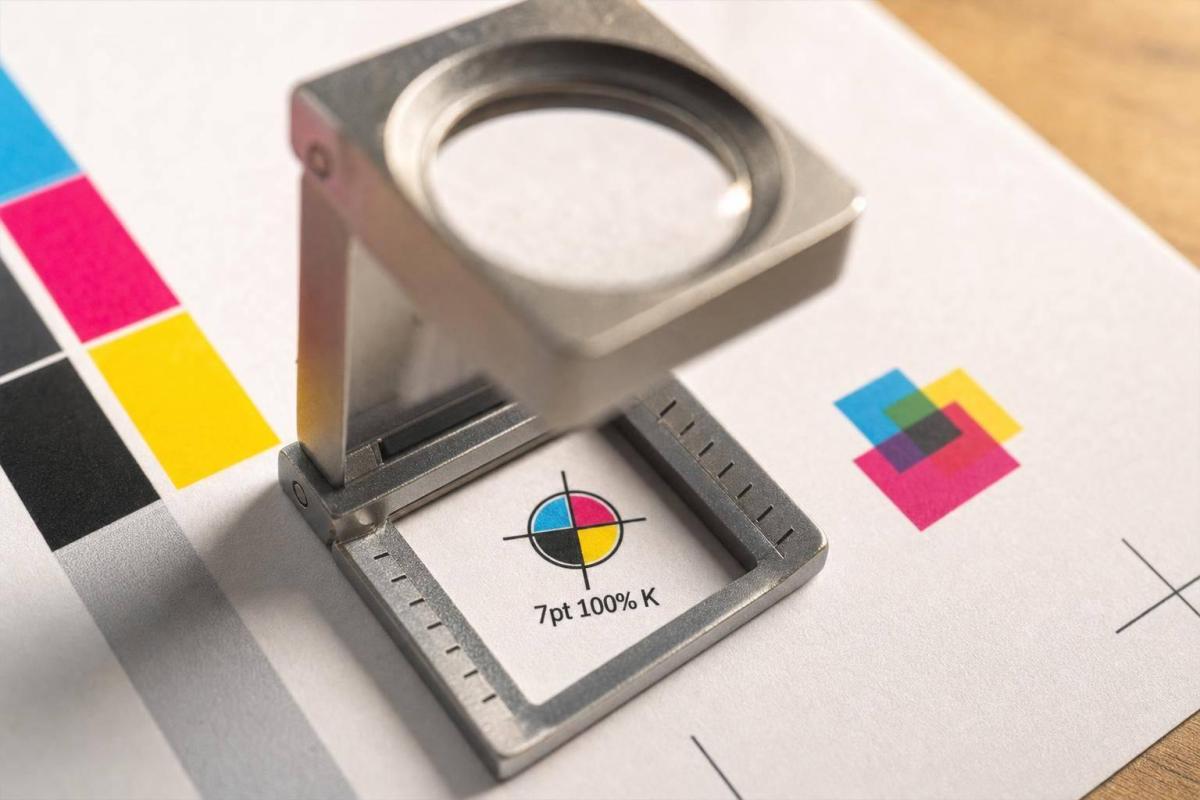
A plate shift as small as 0.004–0.008 inch can make print look off. If I want clean CMYK output, I need to control file setup, press alignment, and paper conditions from the start.
Here’s the short version:
- What goes wrong: halos, white gaps, fuzzy small type, and front/back misalignment
- What causes it: press drift, weak trapping, rich black on small text, and paper movement from heat or humidity
- How shops check it: registration marks, color bars, loupes, and press checks under 5,000K lighting
- Common targets: many sheetfed offset jobs aim for about ±0.002–0.004 inch
- How I cut risk: keep small text at 100% K only, use trapping around 0.10–0.15 mm (about 0.004–0.006 inch), and keep the pressroom near 70–75°F with 45–55% RH
This article is about one simple point: most CMYK registration trouble starts small, then stacks up fast. If I catch the early signs and set the job up right, I can avoid blurry edges, weak brand color, and costly reprints.
What I’d check first:
- Small text: black only, not built from CMYK
- Black on color: overprint where needed
- Rich black: save it for large areas
- Paper: let it sit in pressroom conditions before printing
- Duplex jobs: flag tight front/back alignment before the run starts
- Proofs and press checks: ask for them on jobs where every detail matters
That’s the core of it: clean files + steady sheet handling + stable paper = better register.
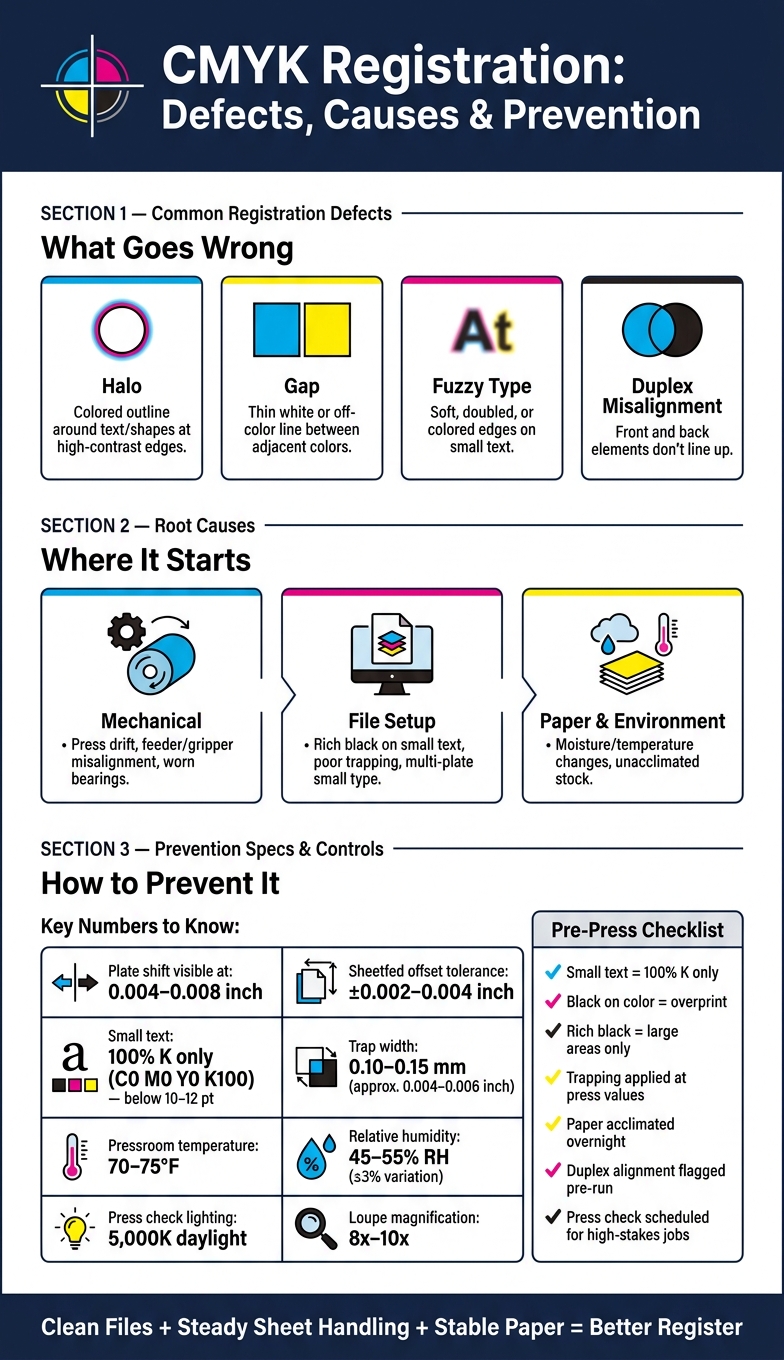
CMYK Registration Defects: Causes, Checks & Prevention at a Glance
Common CMYK Registration Problems and What Causes Them
Not every registration issue looks the same on press. And that matters, because the defect you see on the sheet usually gives you a solid clue about what’s going wrong.
Visual Defects: Halos, Gaps, Fuzzy Type, and Duplex Misalignment
When CMYK plates shift in different ways, they leave different signs on the page. So instead of treating all registration errors as one problem, it helps to read the pattern first.
| Defect | How it looks on the page | Most likely causes |
|---|---|---|
| Halo | Colored outline or shadow around text or shapes at high-contrast edges | Lateral or feed-direction misregistration; poor trapping; small text built from multiple CMYK plates |
| Gap | Thin white or off-color line between adjacent colors or at object edges | Under-trapping in prepress; sheet movement; gripper or feed misalignment |
| Fuzzy type | Soft, doubled, or colored edges on small text; loss of sharpness | Process color builds on small text; registration drift; vibration or periodic movement |
| Duplex misalignment | Front and back elements don’t line up when held to light; folds off-center | Incorrect front/back registration setup; paper shrink or expansion between sides |
Small type, thin rules, and high-contrast logos usually show trouble first. They don’t hide much. Even shifts as small as 0.004–0.008 inch can show up on those elements.
Once you can see the defect pattern clearly, the next move is simple: figure out whether the source is mechanical, file-related, or tied to the paper itself.
Mechanical, File, and Paper-Related Causes
A lot of press-side movement starts with hardware setup. Feeder, guide, gripper, plate, cylinder, or roller alignment problems are common sources of registration shift.
Paper can also be the troublemaker. It reacts to moisture and temperature changes, so stock that hasn’t been acclimated can move during the run and drift out of register.
File setup plays a part too. Rich black on small type and poor trapping can make a minor alignment miss look much worse than it is.
After the likely cause is narrowed down, printers usually confirm alignment with marks, bars, and press checks.
sbb-itb-ce53437
How Printers Check Registration Accuracy
When a press operator needs to check CMYK alignment, the shop leans on a few standard tools.
Registration Marks, Color Bars, and Press Checks
Registration marks are small targets printed just outside the trim area on each color separation. Since those marks are made from all four process colors, they should line up as one sharp mark when registration is on point. Under a loupe, a well-registered crosshair looks like a single clean mark. If cyan is off, you’ll see a thin colored shadow that shows which plate moved and which way it shifted.
Color bars run along the gripper or tail edge of the sheet. They include solid patches, overprints, tints, and fine-line patterns for each process color. Operators check them with a densitometer or spectrophotometer to measure ink density and color consistency. The fine-line parts can also show registration drift when viewed under a loupe.
During a press check, operators pull sample sheets and place them on a viewing table under standardized lighting, usually 5,000K daylight. Then they inspect registration marks and fine details with an 8x–10x loupe. Many modern commercial presses also use inline camera systems that watch registration targets the whole time and make real-time adjustments on their own. That same monitoring helps keep CMYK jobs on target throughout the run. The approved sheet is then set aside as the reference for the rest of the job.
Those results tell the pressroom whether the job is steady or whether it needs a fix before the run keeps going.
Typical Tolerances for Commercial CMYK Work
Tolerance depends on the job, stock, and press. Standard sheetfed offset work often aims for about ±0.002–0.004 inch. Packaging usually needs tighter control, while large-format work can get by with a bit more.
Fine type, hairline rules, and reversed-out copy can make even a small shift easy to spot.
Once the reading is off, the next step is to trace whether the cause is setup, stock movement, or press drift.
How to Prevent Registration Errors in Prepress, Press Setup, and Production
The best way to deal with registration errors is to stop them before plates are made, then keep the press locked in during production. Once you spot the defect, the fix usually comes down to three areas: file prep, press setup, and paper control.
Prepress Choices That Lower Misregistration Risk
Start with the small stuff, because that’s where registration problems show up fast.
Set small text below 10–12 pt in 100% K only: C0 M0 Y0 K100. That applies in particular to legal copy, contact details, barcodes, and QR codes. Check separations to make sure those elements are pure black only.
Black text on color should overprint. Rich black has its place, but it’s better reserved for large solid areas and display headlines. If you use rich black on tiny text, even a small shift can make the type look fuzzy or broken.
When two colors touch edge to edge, trapping helps cover the small gap that misregistration can create. For standard sheetfed offset on coated paper, a trap width of about 0.10–0.15 mm (around 0.3–0.4 pt) is a common target for normal press movement. On brand-heavy or packaging jobs, use the printer’s trap standard.
It also helps to avoid tiny multicolor type and thin colored keylines around small objects, especially near sheet edges. That’s often where mechanical movement shows up the most.
Pressroom Controls That Keep Sheets and Colors Aligned
Good file prep cuts risk. Press setup keeps the job inside tolerance.
The press has to feed each sheet the same way every time. That means feeder height, vacuum, side guides, and sheet separation all need close attention. If grippers are worn, or if gripper pressure is uneven, misregister can build over time and get worse as the run moves along.
Paper matters too. It takes in and gives off moisture from the air, and that changes sheet size. Because of that, paper should be stored in pressroom conditions and allowed to acclimate overnight before printing. Pressrooms handling precision CMYK work often aim for 70–75 °F and 45–55% relative humidity, with variation held to about ±3% RH during a run.
Routine maintenance also plays a big part. Drives, bearings, and transport parts can drift, and that mechanical drift shows up on the sheet. Operators watch registration marks and color bars through the run and stop the job if the shift goes past the job’s control limit.
A Pre-Order Checklist for Print Buyers
If you’re the buyer, these same press and prepress controls turn into a simple pre-order review.
| Check | What to Look For |
|---|---|
| Small text color build | All small text should be 100% K only – no CMY values |
| Rich black usage | Reserve rich black for large headlines and solid panels only |
| Overprint settings | Small black text and hairlines over color should overprint; large rich-black areas should knock out |
| Trapping | Confirm trapping is applied at press-appropriate values |
| Proof request | Ask for a contract proof or pre-production sample on critical brand or packaging jobs |
| Front-to-back alignment | Flag any duplex job where alignment matters – business cards, postcards, packaging inserts – so the printer can set appropriate controls |
| Press check timing | Schedule a press check during make-ready for high-stakes runs |
Conclusion: Key Ways to Avoid CMYK Registration Problems
CMYK registration problems usually come from three places: file prep, press setup, and paper movement. When something slips, you can see it right away: halos, gaps, fuzzy type, and duplex misalignment. In plain terms, the colors didn’t land where they were supposed to.
The fix isn’t one magic adjustment. It comes down to steady control from start to finish.
Most of these issues can be prevented with solid process control. Small body text should use 100% black. Proper trapping needs to be built in during prepress. Humidity and temperature should stay stable in the pressroom. And sheet handling needs to stay consistent through the entire run. That’s the big idea: registration problems usually don’t come from one dramatic failure. They come from small shifts that stack up.
The safest path is simple: build clean files, keep press settings steady, and maintain stable paper conditions.
FAQs
How can I tell if a file will cause registration problems before printing?
Use your design software’s Overprint Preview to see how colors interact and catch alignment issues where layers overlap. It’s also smart to keep the document in CMYK mode from the start, which helps avoid color shifts later.
Run preflight tools before sending anything out. They can flag problems like incorrect color modes, missing fonts, or low-resolution images. Miro Printing & Graphics Inc. can also review your files and provide custom PDF export presets before production.
When should I use rich black instead of 100% K black?
Use rich black for large, solid black areas or thick strokes when you want a deeper, more saturated look and better coverage. It gives those big dark areas more depth than plain black ink alone.
Use 100% K for small text and fine lines. That helps avoid registration issues and keeps type looking clean and sharp.
When choosing a rich black formula, keep total ink saturation in the 150% to 250% range. Push past that, and the black can start to look muddy instead of clean and deep.
Why does paper humidity affect CMYK registration so much?
Paper is hygroscopic. In plain English, that means it takes in moisture from the air and lets it go again. And when that happens, the sheet’s size can shift.
That’s where trouble starts. If humidity moves outside the 35%–55% sweet spot, paper can expand, shrink, warp, or turn brittle. Even small changes like that can make it harder for the press to keep CMYK colors lined up with precision.
Related Blog Posts
- Common Post-Press Quality Issues and Fixes
- 5 Causes of Registration Errors in Printing
- CMYK Print Defects: Misregistration vs. Banding
- Misregistration in Printing: Role of Calibration
https://app.seobotai.com/banner/banner.js?id=6a7bba42dc1e9c396e6c3308

